


Do you want to understand WordPress user roles and permissions better?
WordPress has a user role management system defining what a user can and can’t do on your website. Knowing these user roles and permissions is essential as your WordPress site grows.
In this guide, we will go in-depth into WordPress user roles and permissions so you can better manage your site.
What Are WordPress User Roles and Permissions?
Using WordPress user roles and permissions correctly gives you complete control over your WordPress website and can help improve your website security.
WordPress allows you to add multiple users to your website. You can also open user registration on your website so that other users can sign up.
When adding a new user to your website, you can choose a user role for them. You can also set a default user role for your site, which will be automatically assigned to new users who sign up for an account.
A user role comprises specific capabilities, or permissions, that spell out the actions a user can take on your website.
There are five default user roles available in WordPress by default:
- Administrator
- Editor
- Author
- Contributor
- Subscriber
You can see a complete visual comparison between each user role by viewing the infographic below:
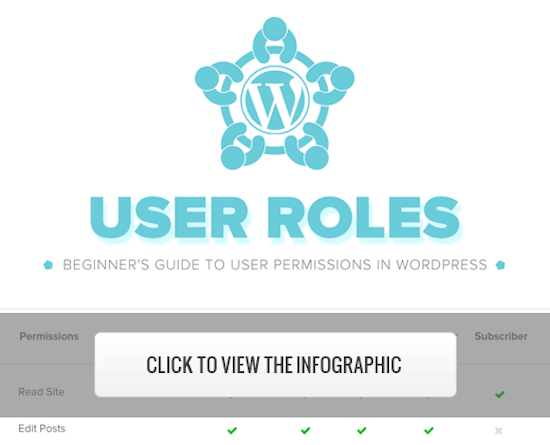
Alternatively, you can read the summary of each user role and their capabilities and permissions below.
1. Administrator Role
On a regular WordPress website, the administrator role is the most powerful user role. Users with the administrator role can add new posts, edit posts by any users, and delete those posts.
Plus, they can install, edit, and delete plugins and themes.
Most importantly, admin users can add and delete users and change information about existing users, including their passwords.
This role is basically reserved for site owners and gives you full control of your WordPress blog. If you are running a multi-user WordPress site, then you need to be very careful who you assign an administrator user role.
2. Editor Role
Users with the editor role in WordPress have complete control over the content sections of your website.
They can add, edit, publish, and delete any posts on the site, including the ones written by others. An editor can moderate, edit, and delete comments as well.
Editors cannot change your site settings, install plugins and themes, or add new users.
3. Author Role
Users with the author role can write, edit, and publish their own posts. They can also delete their own posts, even if they are already published.
When writing posts, authors cannot create new categories, but they can choose from existing ones. They can also add tags to their posts.
Authors can view comments, even those that are pending review, but they cannot moderate, approve, or delete any comments.
They do not have access to site settings, plugins, or themes, so it is a relatively low-risk user role. The only exception is the ability to delete their own published posts.
4. Contributor Role
Users with the contributor role can add new posts and edit their own posts, but they cannot publish any posts.
When writing posts, they can choose from existing categories and create their own tags.
The biggest disadvantage of the contributor role is they cannot upload files, so they can’t add images to their posts.
Contributors can also view all website comments, but they cannot approve or delete comments.
Finally, they don’t have access to website settings, plugins, or themes, so they cannot change any settings on your site.
5. Subscriber Role
Users with the subscriber role can log in to your WordPress site, update their user profiles, and change their passwords.
They can’t write posts, view comments, or do anything else inside your WordPress admin area.
This user role is particularly useful if you have a membership site, online store, or another site where users can register and log in.
If you want to create a custom login experience for your visitors, then see our guide on how to add a front-end login page and widgets in WordPress.
Bonus: Super Admin Role
This user role is only available on a WordPress multisite network.
Users with the super admin user role can add and delete sites on a multisite network. They can also install plugins and themes, add users, and perform network-wide actions on a WordPress multi-site setup.
Think of it like having admin access to every site in the network.
How to Customize Existing User Roles and Permissions in WordPress
The default WordPress user roles have capabilities that will work for most WordPress websites and blogs.
For example, if you run a magazine website, then the ‘Editor’ role can be assigned to senior staff, the ‘Author’ user role can be for junior writers, and the ‘Contributor’ role can be for guest writers.
But sometimes, you might want to customize the permissions and capabilities assigned to the role for the specific needs of your website.
Like the default author role that lets users publish their posts and also gives them the ability to delete their published posts. In this case, you may want to remove the capability that lets authors delete their posts.
There are some plugins that add specific roles to your website, such as a comment moderator user role plugin.
But if you want to customize your WordPress user roles, the easiest way is by using the Members plugin. It lets you simply create, manage, and change user roles across your website.
The first thing you need to do is activate and install the plugin. For more details, see our step-by-step guide on how to install a WordPress plugin.
Upon activation, you will have a new menu item called ‘Members’ in your WordPress admin panel.
You need to go to Members » Roles and click on the user role you want to edit.
In this example, we will be editing the ‘Author’ role, but you can choose the best role for your needs.
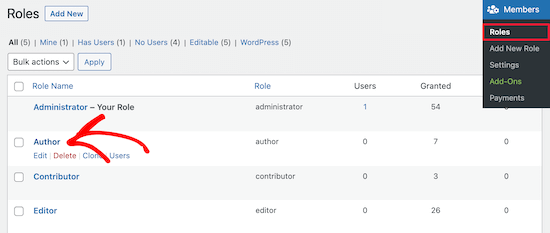
This brings you to a screen where you can fully customize the capabilities for that role.
To remove a capability for the role, simply check the ‘Deny’ box. If you want to add a new capability, check the ‘Grant’ box.
Here, we will check the ‘Deny’ box for the Delete Posts user capability.
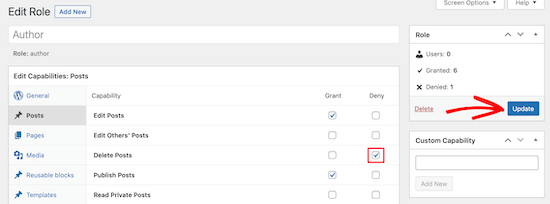
If you don’t check a box for an available role, that user won’t have that capability.
Once you have finished customizing your role, click the ‘Update’ button.
The changes you make will automatically apply to all existing users with that role, and all new users the role is assigned to.
How to Create Custom User Roles in WordPress
Another thing you can do is create completely custom user roles in WordPress with unique sets of capabilities.
To do this, you be using the same plugin as above.
Simply navigate to Members » Add New Role, and give your new role a name.
For instance, you can create a developer role that you can give to a WordPress developer with specific permissions granted.
The left-hand column has different sections that have lists of available capabilities. We will select the ‘Appearance’ tab and then add capabilities to edit, install, and update themes.
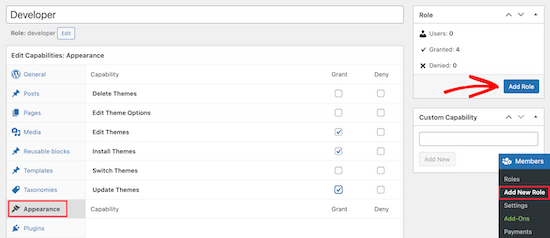
After that, click the ‘Add Role’ button to save the user role.
Next, you can create a new user and assign them the new user role.
To do this, go to Users » Add New and fill in your new user information.
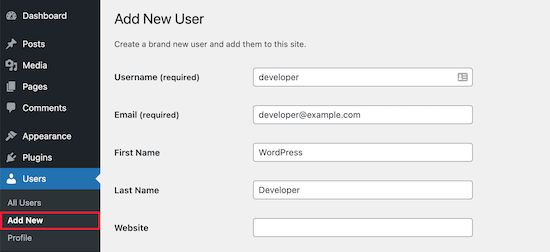
At the bottom of the screen, you will see a ‘User Roles’ section.
Simply check the boxes for the user roles you want to assign to the new user and then click the ‘Add New User’ button.
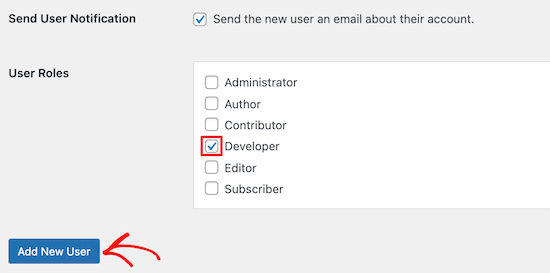
Now, you have created a new custom WordPress user role and assigned it to a new user.
For more details, see our guide on how to add new users and authors to WordPress.
If you want to create a WordPress user role that’s only for moderating comments, then see our guide on how to allow blog users to moderate comments in WordPress.
We hope this article helped you understand user roles and permissions. You may also want to see our guide on how to register a domain name and our expert picks for the best free website hosting.
If you liked this article, then please subscribe to our YouTube Channel for WordPress video tutorials. You can also find us on Twitter and Facebook.




Syed Balkhi says
Hey WPBeginner readers,
Did you know you can win exciting prizes by commenting on WPBeginner?
Every month, our top blog commenters will win HUGE rewards, including premium WordPress plugin licenses and cash prizes.
You can get more details about the contest from here.
Start sharing your thoughts below to stand a chance to win!
Mrteesurez says
This is a detail article that nailed out all what user roles entail and give best practices to assign each to specific users.
My question:
By default, Does a contributor role can see an admin bar ?
I know of athour role.
WPBeginner Support says
Unless you disable it for the user role, all user roles would see the admin bar when logged in.
Admin
Jiří Vaněk says
I need to add a user to the website who will only have specific rights to what he can do on the website and what he must not have access to. Thank you for the instructions on how to create exactly such a user in WordPress. It saved me a lot of time looking for instructions on how to achieve this.
Muhammad Afzal Qureshi says
Very nice explain in detail, I have a great experience after reading out.
WPBeginner Support says
Glad you found our article helpful!
Admin
Waqar says
Your blog is really awesome, especially when ever I need to learn something about WordPress in deep dive.
WPBeginner Support says
Glad you find our content helpful!
Admin
Jen says
Hi WPB, how many “admin” roles can a website have? On my site, the original admin has full rights. But new admin usernames don’t. Is that normal?
WPBeginner Support says
You can have as many admin users as you like on a WordPress site, if you do not have the default admin privileges then either a plugin may have modified the privileges as the most common reason.
Admin
Sam says
Hi – I’m wondering if I can set a default for subscribers that doesn’t allow them access to the dashboard. I have subscribers through a free online course. I want to automatically eliminate the dashboard access so I don’t have to manually uncheck the box “Show Toolbar when viewing site ” Is there a way to do that?
WPBeginner Support says
If you only want to hide the admin bar then we have a guide below that for hiding it:
wpbeginner.com/wp-tutorials/how-to-disable-wordpress-admin-bar-for-all-users-except-administrators
We also have a guide for redirecting users after they log into your site below that can help achieve what you’re looking for:
https://www.wpbeginner.com/plugins/how-to-redirect-users-after-successful-login-in-wordpress/
Admin
Tammy says
What role is suggested if you want someone to be able to view/download the analytics of a woocommerce site but not be able to change and/or update the content of the site otherwise? Do the basic roles cover that or is that a custom role?
WPBeginner Support says
You would likely need to create a custom role for that functionality
Admin
LDB says
Why do all articles on user permissions for WordPress never talk about what can be done with ‘pages’?. Seems like such a glaring omission from these articles. Am I missing something? Why do no articles not give info about permission related to building and editing pages?
WPBeginner Support says
If you take a look at the infographic we cover which roles can modify pages
Admin
Traci says
I am building a website in wordpress for a company. They want a dedicated page for sales or specials but they want to be the one’s handling updating that page each week. Can I give them permission only to post pictures and write add information for the sale items?
WPBeginner Support says
It sounds like you would want to set them as the author role and set them as the author of that page.
Admin
Harish says
Is there any limitation for user roles count?
WPBeginner Support says
No, but you would want to ensure you are not adding roles for every user normally as multiple users can use the same role.
Admin
Maame says
Hi,
Is it possible to customize the role of a shop manager? I would like to make some features accessible to them
WPBeginner Support says
Yes, we cover the default roles in this guide but more roles can be added or modified
Admin
DannyO says
Great writeup. Very close to what I was searching for.
Mine is a bit different,
I have a custom made plugin which I want to assign someone to manage the role. He needs to be entering data on a daily basis in dashboard of this custom plugin. But under the Type-Specific Capabilities, I dont see the name of this plugin. How can I achieve this then, when I cant see the custom plugin name?
WPBeginner Support says
You would want to reach out to the plugin’s creator for what permissions are required to be able to use your plugin.
Admin
Katherine says
Hi! I work for a site and I’m was assigned Editor. But for some reason, I can’t delete drafts, published articles, or media from Gallery that aren’t mine. The Trash/Delete option just isn’t anywhere on-screen. Is there anything I can do?
WPBeginner Support says
You would want to reach out to the admin of the site to ensure there haven’t been any changes to the permissions for your role.
Admin
luka sheklashvili says
Hi,
We have a website where is possible to buy food
We have customers and also we have accountant
which premmision will be best for accountant to do his/her work
we are using woocomerce platforme of ecomerce
WPBeginner Support says
You would want to take a look at the default WooCommerce roles added and you can add or modify the role depending on the access you want to give.
Admin
Kshitij Gajam says
Hi,
Thanks for the great article! it is neatly structured and presented.
I would like to know is it possible to restrict access up to 3 blogs for users who dont subscribe to the website. Only after subscribing they get full access. If yes, how can I do it? Is there a plug in or I have to code?
WPBeginner Support says
For what you’re looking for, you would want to take a look at membership plugins below and you would need to reach out to the support for what you’re wanting to use for if they have that available.
https://www.wpbeginner.com/plugins/5-best-wordpress-membership-plugins-compared/
Admin
Felicia Kay says
I have recently started a new job with a local law firm and we have purchased a form building tool for our WordPress site. My role permissions have been set to Editor, am I able to access it as an editor to build the new form(s) we need?
WPBeginner Support says
It would depend on the specific plugin. If you reach out to the plugin’s support they should let you know what permissions are needed for using the plugin
Admin
lynda says
I have been a WordPress user for many years and decided several months ago to combine two blogs. At that time I added the user name of the other blog as a user on my primary blog. Now that second user appears as the author of posts. It appears as the writer of replies to comments. How do I change this?
WPBeginner Support says
If you do not want your additional user to be on the site you can delete that user and attribute all of their content to your a different user
Admin
Maude says
Hi, do you know if there is a way to create a user who will have access to everything, but can edit nothing. I want to show someone how my website is built so we can talk about it, but I want to be sure he can’t mess anything up.
WPBeginner Support says
That would heavily depend on your site and the plugins you are using, you may want to send screenshots or share screens for what you are wanting.
Admin
Jerusha says
Hi, I have just started my blog. And installed a new theme. My site is not even live yet … it still had the ‘coming soon” page, however today I discovered I have 308 subscribers under the ‘user’s title on my dashboard… how is that possible?
WPBeginner Support says
Your site may be allowing user registration, for more on that you would want to take a look at our article here:
https://www.wpbeginner.com/beginners-guide/how-to-allow-user-registration-on-your-wordpress-site/
Admin
Imran says
And what if a disgruntled author goes to “edit” her post and then removes all the content and then click on “update” button.
This would be a rare case but possible even if you disallow her to “delete published” posts.
WPBeginner Support says
If you are concerned about that, you could disable the ability to edit published posts
Admin
Segun Wonda says
Hello, thank you for this great article.
I have a question please.
After modifying my author role to stop author from deleting their own post with this plugin, will the modification still be active when I disable or delete the plugin?
WPBeginner Support says
Yes, your changes should still be active when you remove the plugin.
Admin
sam thandi says
i was searching for one of your articles in which you showed how to create user like Editorial Staff can you please give me link to that article. thanks
WPBeginner Support says
It would depend on what you mean. If you’re wanting more editorial options you could take a look at our article here: https://www.wpbeginner.com/plugins/how-to-improve-your-editorial-workflow-in-multi-author-wordpress-blogs/
If you wanted to hide the author’s name we have our article here:
https://www.wpbeginner.com/wp-themes/how-to-remove-author-name-from-wordpress-posts/
Admin
Pablo says
I can see that there are more user categories now, in addition to the 5 mentioned here. Participant, Moderator, Spectator… Cant see the permissions for these! Any ideas where to find them?
WPBeginner Support says
If you have other plugins that add user roles those would likely be why you have the extra roles
Admin
Infoneter says
Nice and useful information. thanks
WPBeginner Support says
You’re welcome
Admin
Kirk Bullen says
Great post.. And great site. It’s my ‘Go To’ site, for everything I need, and have learnt so much.
What I want to do, is create a Movie Mod User. So that they can Add Movies/Shows. But I don’t want to give all Admin permissions. They would only require to use the Plugin used to add these Movies/Shows. All it.would require them to do, is use the Import Movie/Show. Then once added, have the ability to edit the Movie/Show. So that they can add the Movie/Show Collection/Genre.
Is there a plugin available that you know of, that gives permissions to use selected Plugin Admin abilities? I have tried Editor User. But it doesnt show the ‘Import’ option.
Any advise is greatly appreciated.
WPBeginner Support says
It would depend on what you are using to import the movies, if it is a plugin you should be able to reach out to the plugin’s support for what permission is required to import the movie/show.
Admin
Steveo says
Users >> Capabilities does not exist. Got another idea?
WPBeginner Support says
You may want to ensure that the plugin was activated successfully on your site.
Admin
sultan haider says
I have school chains in multiple cities and i want to each school have
their login and password and add students in own schools records and
admin have access all schools records.
Its possible with wordpress or not.
WPBeginner Support says
It is possible but you would likely need to have a custom plugin created to do something that specific.
Admin
Tony says
Suggest you use multisite capability, each school can have their own subdomain.
Emzee says
How to check what permissions I have as a user on wordpress site please? Sorry am a beginner?
WPBeginner Support says
Hi Emzee,
Using the capability manage enhanced you can see what permissions a user has on your site.
Admin
shubhangi says
Great post now i can ad more author without confusion thanks friend
Mithilesh Yadav says
How to send notification mail by Guest User in WordPress
Marianne says
Good day!
Thanks for the explanation. I was wondering is there also a date stamp when the user has registered?
regards,
Kagan says
i am using wholesale plugin. we want open manuel order from order woocommerce dashboard
But when i add product wholesale prices are not shown. is it possible to make this wtih user roles plugins. if so which one should we use
thank you
chintan says
Hi i want make a two type of login page first is customer and second is Service provider (like a amazon seller).
service provider uplode it’s services , and it can edit it’s services.
how i do that?
beth says
Hi. I created some new users but they have yet to receive their email notification. How long does it take for that to be generated?
LaVonne Carlson says
Is it possible to setup a user with permission to edit only a particular page? I’m running a website for a Boy Scout troop, and I want the boys to be able to upload and rearrange photos on the gallery page, but not make any other changes to the site.
Gulfam says
I’ve also problem related to your question, want to allow user only on specific plugin and page to post things.
Fahad Rafiq says
How can we remove underscore from users name in wordpress users tab?
Like if name entered is First Second, it will appears as First_Second.
Any fix.?
John says
Whenever my writers try to past an iframe into their stories it vanishes when saving. From a little bit of testing this occurs up to Editor level which also gives publishing ability — which I don’t want them to have.
I’ve got both adminimize and user role editor installed. Staff writers have a custom user role editor setting of Staff Writers.
How can I overcome this limitation on inserting iframes?
Thank you
WPBeginner Support says
Hey John,
The capability to add iframes is part of unfiltered_html capability. However, allowing user roles the ability to add unfiltered html is too risky and not recommended. You should look for other ways to manage this. For example, if this iframe embed is from a third party service provider, they they might already have a WordPress plugin.
Admin
John says
Thank you. Ordinarily I would agree. But these are inhouse writers who need this capability. The most common is Facebook video embeds getting the iframe from Embedded Video & Live Video Player.
We also embed YouTube and other video in the body of the stories often and this explains why the html table that has been prepared for them to use by simply replacing the URL doesn’t work.
The rest of what the different level of access – editor, copy editor, photo editor, contributor, and staff writer can see and access is regulated using adminimize and user role editor.
What is the risk of giving unfiltered html access to inhouse staff?
Thank you
WPBeginner Support says
Hey John,
With unfiltered html capability, users will have the ability to add malicious code which could get executed as soon as the post content is saved.
John says
Ok. Thank you. That won’t be an issue in this instance. But very useful to know.
Akhil says
Is it possible to delete a post by another author.?
WPBeginner Support says
Hey Akhil,
If you are an administrator or editor on that site, then yes you can delete posts created by another author.
Admin
Jake says
I am not getting a lot of “email subscribers” via the subscribe widget to my blog but I do receive a lot of “New user registration” notifications from WP of people that are set up as their user role as “subscribers” and so my WP admin has a list of these people and their email addresses.
As far as I can tell, when I create a new post, no one with the user role “Subscriber” is being notified. Why else does WP give me their email address if not to notify them? Perhaps I am doing something wrong? How do I notify the hundreds and hundreds of people in this list?
WPBeginner Support says
Hi Jake,
Please see our guide on how to add email subscriptions to your WordPress blog.
Admin
Imtiaz Ahmed says
hi, I have many Editors on my website, how I can strict, I mean editors are not able to edit Admin post. I want this on my website
Regards:
Imtiaz Ahmed
WPBeginner Support says
Hey Imtiaz,
The editor user role gives users permission to edit any posts. You should change their user role to author or contributor. You can also edit permissions of a user role or create new user roles using plugins.
Admin
Gary Wicks says
I have a question if I have 300 subscribers what does that mean? Does it mean people subscribed to make a comment? I have no idea where these came from as I only have a few actual comments posted. Does this mean they were all spammers that Akismet software rejected? So the comments did not show but they are all in my users list as subscribers to make comments?
Or is this rss feed or what is it?
Steve Root says
The role attribute selection on my theme has both an Allow and a Deny column. If a particular attribute is only enabled when checked what is the purpose of the Deny column (twenty-sixteen)?
deppak says
Hi there,
Great post!
I created a custom role cloning the “administrator”, is it possible for administrators to change between the two? I can see the administrator can change all others’ role, but can it change its own through the back-end dashboard/menu?
Thanks!
Anne Cohen says
Hi. Thank you for the post! Very helpful, but one more question….
Can Contributor writers DELETE their articles when they’re published?
What about when they’re pending?
Let’s say they had a change of heart? I just noticed a contributor alter an article that I was already editing/pending. I didn’t think that was possible.
Abhiney says
Hi,
I am facing issues with the user creation. I am looking to create an editor for my website but despite deactivating all plugins, changing passwords etc,for the new user – when I try to login in through the ‘New User’ credentials it says – “Sorry, you are not allowed to access this page.”
Can you please help.
Debbie N. says
Can I give permission to use a backup plugin but not other plugins? I see you can add more capabilities but I can’t figure out how to set it up for that. Thanks for any help.
Obed Aikins says
Hi, nice post, very useful. i’m a college student developing a site for publishing hostels information and also book into it using wordpress. i want to create custom agent/landlord roles in WP. please help
Stuart says
Users with the subscriber user role can login to your WordPress site and update their user profiles. They can change their passwords if they want to. They cannot write posts, view comments, or do anything else inside your WordPress admin area.
This user role is particularly useful if you require users to login before they can read a post or leave a comment.
I don’t understand this. So if a subscriber is logged in can they or can’t they comment on a post?
WPBeginner Support says
Yes they can comment on a post.
Admin
Alan Jordan says
This was really helpful. Thank you.
Jez Butler says
Great descriptions – thanks! Is there any way to set an Administrator role for individual sites on a multisite install? TIA, Jez