


Do you want to learn more about WordPress security keys and salts?
WordPress uses security keys to protect your website against hacking attempts. You can use them more efficiently to improve WordPress security.
In this article, we will discuss what are WordPress security keys and salts and why you should use them.
What are WordPress Security Keys and SALTs?
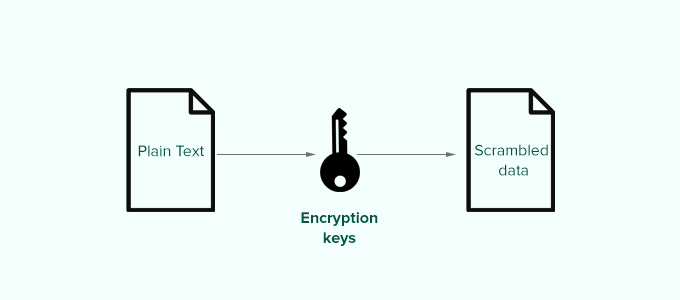
WordPress security keys are an encryption tool that protects login information by making it harder to decode.
These keys act just like real keys and are used to lock and unlock encrypted information such as passwords, keeping your WordPress site secure.
Here is how it works.
Basically, when you log in to a WordPress website, your information is stored on your computer in cookies. This allows you to continue working on your website without the need to log in on each page load.
All information is stored in encrypted form by converting it into a string of alpha-numeric and special characters.
This encrypted data can be translated using WordPress security keys. Without the keys, this data is nearly impossible to crack.
These security keys are automatically generated by your WordPress site and stored in your WordPress configuration file (wp-config.php).
There are a total of four security keys:
- AUTH_KEY
- SECURE_AUTH_KEY
- LOGGED_IN_KEY
- NONCE_KEY
Apart from WordPress security keys, you’ll also find the following SALTs.
- AUTH_SALT
- SECURE_AUTH_SALT
- LOGGED_IN_SALT
- NONCE_SALT
Salts add extra information to your encrypted info which provides another layer of security to your encrypted data.
Why Use WordPress Security Keys?
WordPress security keys protect your website against hacking attempts by making your passwords secure.
For instance, a regular password with medium-level difficulty can be easily cracked using brute force attacks.
On the other hand, a password string like ‘7C17bd5b44d6c9c37c01468b20d89c35e576914c289f98685941accddf67bf32b49’ takes years to decrypt without knowing the security keys.
That’s why you should never share WordPress security keys with anyone and protect them as you would normally protect sensitive information online.
That being said, let’s take a look at how to use WordPress security keys to keep your WordPress site protected.
How to Use WordPress Security Keys?
Normally, you don’t need to do anything extra since in most cases WordPress will automatically generate and use security keys + salts on each new WordPress install.
You can view your WordPress security keys and salts by using an FTP client or the File Manager app in your WordPress hosting account control panel.
Simply connect to your website, and open the wp-config.php file. Inside it, you’ll see your WordPress security keys defined.
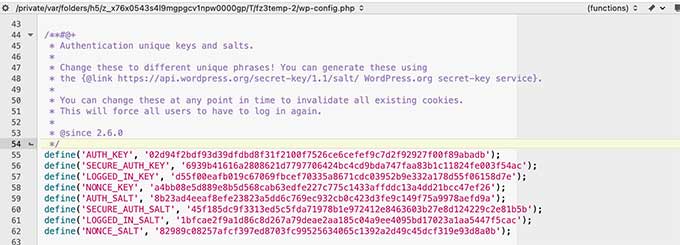
However, depending on how you initially installed WordPress, your website may not have security keys defined at all.
If your security keys are empty, then don’t worry. You can easily add them manually by going to the WordPress Security Key Generator page to generate a new set of keys.
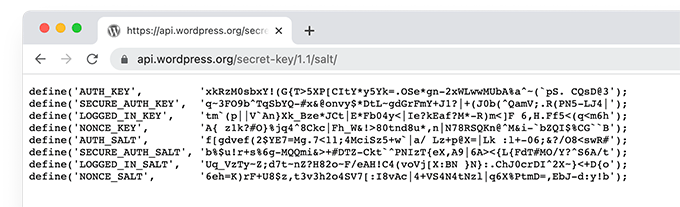
Next, copy and paste these keys inside your wp-config.php file, and you are done.
You can use the same method to delete your current WordPress security keys and replace them with new keys.
Note: When you replace the security keys, all users will be forced to re-login which is great for security.
Regenerate WordPress Security Keys using a Plugin
If you suspect that your website is hacked, then you need to regenerate WordPress security keys and change your passwords.
You can manually copy and paste new security keys as mentioned above. However, a much easier approach would be using a plugin. This way you can also set a schedule to automatically regenerate security keys regularly.
1. Update WordPress Security Keys using Sucuri
The easiest way to automatically regenerate WordPress security keys by using Sucuri. It is one of the best WordPress security plugins on the market that protects your WordPress website against common threats.
Simply install and activate the Sucuri Security plugin. For more details, see our step by step guide on how to install a WordPress plugin.
Upon activation, you need to visit the Sucuri Security » Settings page and switch to the Post-Hack tab.
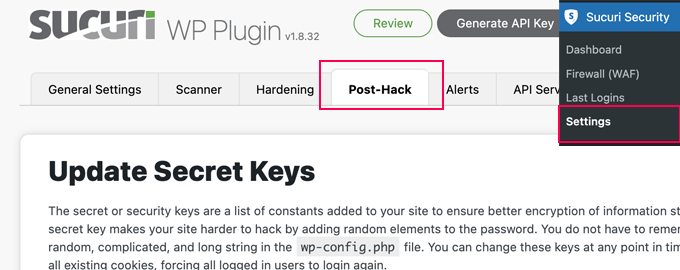
From here, simply click on the Generate New Security Keys button under the ‘Update Secret Keys’ section.
Note: Regenerating new security keys will log you out of the WordPress admin area and you’ll need to login again.
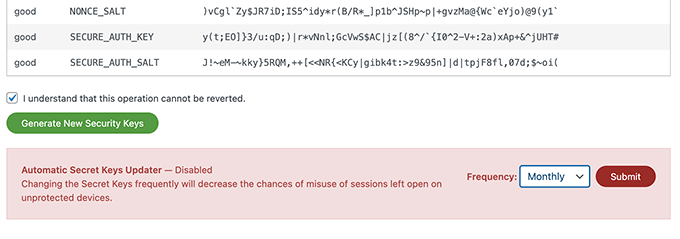
After that, revisit the Sucuri Security » Settings page and switch to the Post-Hack tab again.
Under the security keys section, enable the Automatic Secret Keys Updater by choosing a frequency (daily, weekly, monthly, yearly). Then click on the Submit button.
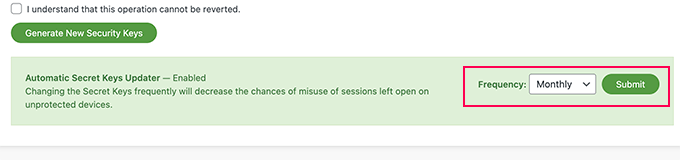
Sucuri will now automatically reset your WordPress security keys based on the frequency you have chosen.
2. Update WordPress Security Keys using Salt Shaker
This method is for users who are not using Sucuri and need to automate security key regeneration.
First, you need to install and activate the Salt Shaker plugin. For more details, see our step by step guide on how to install a WordPress plugin.
Upon activation, you need to visit Tools » Salt Shaker page to configure plugin settings.
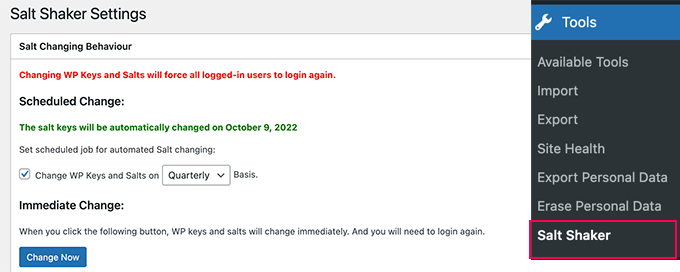
From here, you can set a schedule to automatically generate security keys. You can also just click on the ‘Change now’ button to immediately regenerate security keys.
We hope this article helped you understand what are WordPress security keys and how to use them. You may also want to see our guide on how to fix common WordPress errors, or see our expert pick of the must have WordPress plugins for your website.
If you liked this article, then please subscribe to our YouTube Channel for WordPress video tutorials. You can also find us on Twitter and Facebook.





Syed Balkhi says
Hey WPBeginner readers,
Did you know you can win exciting prizes by commenting on WPBeginner?
Every month, our top blog commenters will win HUGE rewards, including premium WordPress plugin licenses and cash prizes.
You can get more details about the contest from here.
Start sharing your thoughts below to stand a chance to win!
Mrteesurez says
I am just hearing ‘SALT’ here in this post, what’s the difference between SALT and KEY ?
Can I just update those keys even if I didn’t suspect any hack attempt ?
If yes, when often should it be changed ?? Thanks.
WPBeginner Support says
It depends on your personal preference but they can be as changed as often as weekly or once a quarter depending on how much you would like to focus on changing them.
Admin
Jiří Vaněk says
Regarding security keys, I encountered an issue when migrating the website to a new database. Even after changing the connection in the wp-config.php file, WordPress refused to connect to the new DB, reporting an ‘establishing error.’ Eventually, I had to delete the old wp-config.php, upload a new one from the installation package, re-enter the connection to the new database, and then everything worked fine. It seems that the keys in the wp-config.php file were the culprit.
Josh says
How often do you recommend changing the keys? Quarterly as shown in the screenshot?
WPBeginner Support says
We do not have a specific recommended refresh time at the moment other than after a hack on your site at a minimum.
Admin
Bjornen Nilsson says
Hi,
QUESTION »
Will it affect anything besides “extreme” increased security if one has the web browser set to delete all history, temp, cookies etc. every time it is shut down AND if one changes the SALT in wp-config after logging out each time?
Thanks!
shanderman says
Hi,
I have 2 url product,for 1 product.like this:
example.com/?product=product-name
example.com/product/product-name/
why? how should i fix it? please help me.
WPBeginner Support says
Hi shanderman,
Please visit Settings » Permalinks page to make sure that your WordPress site is using SEO friendly URLs.
After that view your website’s source code and make sure that it is showing the URL format that you like.
The ugly URL structure will still work in WordPress if you typed it in the browser. However, your product’s canonical URL will be the one you choose on the permalinks settings page. This is the URLs that search engines will follow and index.
Admin
sam says
I am a beginner to WordPress , i have a doubt how those keys make the WordPress secure ? i want to know the actual role and working of the keys ?
Kishan Dalsania says
What is the actual benefit of these using the keys in config.php. Can you define how it will work to prevent the hackers?
sam says
Hi , i have used this method and can not log onto my site at all. how do i fix it or remove the issues
WPBeginner Support says
Please take a look at our tutorial on what to do when you are locked out of WordPress admin area.
Admin
kOoLiNuS says
Just a quick question… Why do you suggest to:
Instead of the latter? Have you got some links that dig this approach?
Thank you in advance!
Nick says
In wordpress 3.1 these keys are automatically generated.
MichealKennedy says
Was just gonna ask “why don’t they just automatically generate these for you?” but you answered it
Riese F says
Appreciate this information and quickly updated my files. My concern is the same as Ricks’ from April in that if my wp-config.php file is hacked then these keys are available to whomever is looking at them correct? But then I thought that if my wp file is hacked and someone other than me is looking at them I am already in trouble…
Any precaution is better than just hoping for the best though! Thank you for your work and efforts.
Keith Davis says
Hi
Thanks for a short and informative post.
I notice that in your example there are four secret keys.
There appear to be more secret keys in WordPress 3.0 – can these be added to previous versions of WordPress?
Editorial Staff says
Those keys become available with WordPress 3.0
Admin
Dave says
You’ll need to use 3.0 to utilise all eight secret keys, rather than the former four. The new WordPress random key generator can be found at https://api.wordpress.org/secret-key/1.1/salt
Rick says
Um, so does this change your admin password or what? I don’t understand what this does? Maybe that’s because I’m not a hacker. But, if this is just stored in your config.php file, wouldn’t it be way easier for a hacker just to hack into your ftp site and nab this security key out of the config file?
I want my WordPress sites to be more secure, but I just don’t understand what this is preventing?
Jack says
Nicely said. The directions are pretty easy, but I think the security and safety is understated in the documentation. Thanks for spelling it out and making the web a safer place.
gabrielle says
if you develop multiple wordpress sites do you create a security key for each one or use the same one on all of them?
Editorial Staff says
Use a new one
Admin
Konstantin says
While you’re adt it:
Why not define the salt constants and save yourself some database queries?!
It should look like this:
define('AUTH_SALT', 'put your unique phrase here');

define('SECURE_AUTH_SALT', 'put your unique phrase here');

define('LOGGED_IN_SALT', 'put your unique phrase here');

define('NONCE_SALT', 'put your unique phrase here');
This article from Digging into WordPress explains the advantages of this practice.
Tony says
Thanks for sharing!
Editorial Staff says
Good idea, didn’t even think of that.
Admin
maged says
very handy and important thanks for sharing