


Are you looking for the best WordPress slider plugin?
There are dozens of WordPress slider plugins on the market that you can use. However, not all of them are created equal. We’ve found that most of them have poor performance or limited customization options.
In this article, we will show you a list of the best WordPress slider plugins, so you can choose the right one for your needs.
What Makes a Good WordPress Slider Plugin?
When choosing the plugins for this showcase, we installed each tool on our test site to explore its pros, cons, and features. This allowed us to recommend only the best WordPress slider plugins.
We’ve found that a good WordPress slider plugin should offer a good balance of these features:
- Ease of use – A user-friendly plugin interface is very important. The best slider plugins offer a drag-and-drop builder with a visual editor for easy slide creation.
- Responsiveness – The plugin should offer a fully responsive design so your sliders will easily adapt to any desktop, tablet, or mobile device.
- Customizability – The plugin should offer enough customization options to make the slider suit your website design. Examples include transition effects, font options, custom animations, slider templates, and so on.
- Performance – Ideally, the plugin should be fast and not affect the page loading time on your site. This way, your site can be fast and SEO-friendly.
- Support for various media types – If you want to create a testimonial or video slider, then it would be best if the plugin supports other media files besides images.
With all this in mind, the best slider plugin for your WordPress blog or site will depend on your specific requirements, technical skills, and budget. Therefore, we recommend testing the plugins that catch your attention to see if one of them is the right solution for your needs.
Now, let’s look at our expert pick of the best WordPress slider plugins.
1. Soliloquy
Out of all the WordPress slider plugins we’ve tried, Soliloquy is the fastest and most beginner-friendly option.
To test the plugin’s speed, we installed each slider plugin on a demo WordPress site. We uploaded the same images to create a slider, didn’t change any other settings, and embedded the slider on a blank WordPress page.
After that, we used the Pingdom speed testing tool to run the test. Here are the results:
| Slider Plugin | Page Load Time | Requests | Page Size |
| Soliloquy | 860 ms | 22 | 679 KB |
| MetaSlider | 863 ms | 25 | 229 KB |
| Smart Slider 3 | 865 ms | 19 | 382 KB |
| Envira Gallery | 899 ms | 18 | 896 KB |
| Master Slider | 900 ms | 22 | 345 KB |
| SeedProd | 1030 ms | 19 | 349 KB |
As you can see in the above scores, Soliloquy was the fastest-loading WordPress slider in our tests, followed by MetaSlider. Plus, if you look at the test results, then you will see that Soliloquy increased the page size without affecting the speed.
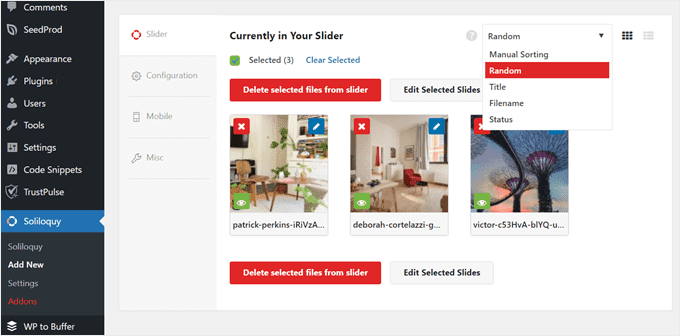
Soliloquy also comes with an easy drag-and-drop user interface to create your sliders. You can then change the slider template, resize the images, adjust the transition duration, and so on.
If you know some code, then you can also use custom CSS to further customize the slider.
Pros of Soliloquy:
- You can create various types of sliders without worrying about slowing down your WordPress website.
- Mobile-friendly sliders out of the box, with support for touch-swipe on mobile and tablet devices.
- Besides images from the media library, you can also use your WooCommerce products, Instagram photos, PDFs, and posts/pages/custom post types to create your sliders.
- Multiple ways to embed the slider in WordPress posts or pages: shortcodes, a Gutenberg editor block, a button for the old classic editor, and a widget.
- Various add-ons to enable advanced features, like dynamic content support, lightbox, right-click protection, thumbnail navigation, and more.
Cons of Soliloquy:
- The free plugin is only enough for creating a simple image slideshow. That’s why we recommend getting the premium version to make the most out of its features.
Pricing: Free plugin available. The premium plans start from $19.50 per year to create unlimited sliders on 1 website and 1 year of support and updates. You can use our Soliloquy coupon code to get 10% off of your purchase.
Why we chose Soliloquy: If you run a photography or any other image-heavy website, then investing in Soliloquy is a great idea. You can create multiple sliders using its easy-to-use controls without worrying it will negatively affect your website speed.
You can learn more about this WordPress slider plugin in our Soliloquy review.
2. Envira Gallery
If you are looking for the best WordPress slider plugin for images, then check out Envira Gallery. This gallery plugin comes with a Slideshow Add-on that can turn your lightbox gallery into a beautiful slideshow.
This means that you can display multiple pictures in a regular lightbox gallery. When users click on an image in that gallery, they can navigate through the different pictures using a slider.

The Slideshow Add-on is pretty easy to use. You can set the slideshow to automatically play once it’s opened, pause it when a cursor hovers over it, and configure the speed of the slideshow.
Envira Gallery offers several gallery layouts to choose from. You can choose the automatic layout so that the gallery automatically adjusts its layout based on how many images are there. Alternatively, the square layout can emulate a social media photo feed.
Besides that, you can enable lazy loading so that the gallery doesn’t weigh down your web page. This way, you can maintain a stable and fast performance and make sure your website is SEO-friendly.
Pros of Envira Gallery:
- Easy-to-use Slideshow Add-on that turns a lightbox gallery into an image slider.
- Beautiful gallery layouts out of the box.
- Lazy loading feature to prevent slowing down the web page.
- Mobile-specific settings to ensure the slideshow looks good on smartphone screens, such as setting custom dimensions for the gallery.
- Right-click protection to make sure no unauthorized users can save your images without permission.
Cons of Envira Gallery:
- The Slideshow Add-on only supports images.
Pricing: Free plugin available, but you need to purchase a Basic plan ($39.50 per year) or higher to use the Slideshow Add-on. You can use our Envira Gallery coupon to get 10% off your purchase.
Why we chose Envira Gallery: Envira Gallery is one of the most beautiful image gallery plugins we’ve tried, so it was a no-brainer for us to feature it in this list. It’s a great option if you want to create a good-looking yet speed-optimized image slideshow for your website.
You can learn more about the plugin in our Envira Gallery review.
3. MetaSlider
MetaSlider is one of the most popular WordPress slider plugins on the market. Many well-known companies like Vimeo and NASA have used this plugin to create fast and fully responsive sliders on their websites.
If you are only looking to create a simple image slider, then the free version is enough. The drag-and-drop builder lets you create a slideshow or a carousel using images from the media library or Unsplash, which is a free stock photo library.
The live preview makes it easy to see what the slider will look like when it’s published.
However, the real power comes in its Pro version. MetaSlider Pro supports various types of content for the slides, like images, videos, posts, eCommerce products, and even HTML.
What’s more, MetaSlider lets you hide slides or display a different slide when viewed on mobile. As a result, you can show slides that look best on a small screen size.
Pros of MetaSlider:
- User-friendly drag-and-drop builder with a live preview that connects with the WordPress media library and Unsplash.
- Support for various types of slide content, from images to products and HTML.
- Settings to adjust the slide for mobile viewing, like hiding the slide or using a different slide on mobile.
- Multiple professional slider layouts to choose from.
- Scheduled slider feature to make a slider visible only on certain dates, which is useful for online stores that want to showcase special deals or seasonal promotions.
Cons of MetaSlider:
- Like Soliloquy, you will need the Pro version to leverage its full offers.
Pricing: Free plugin available. The premium plans start from $39.50 per year for 1 website license.
Why we chose MetaSlider: This WordPress slider plugin costs slightly more than Soliloquy, but we found it to be excellent for people looking to create various types of non-image sliders that look good on all devices.
4. Smart Slider 3

Do you want to create beautiful interactive sliders on your WordPress website? If so, then check out Smart Slider 3.
This WordPress slider plugin comes with 11 free sliders that support images, texts, videos, buttons, and so on. You can also layer each content element on top of each other, like adding text on top of an image. This makes it a great tool for creating presentations in WordPress.
It’s an excellent choice if you want to get users not just to sift through your slide content but also to interact with it, such as clicking on a button to read a post or check out a product.
The user interface itself is pretty different from the rest of the options in the list. The editing screen looks a bit like a photo editor, which can intimidate beginners at first. But once you get the hang of it, it’s pretty self-explanatory.
Pros of Smart Slider 3:
- Professional slider layouts available in the free plugin, from full-width sliders to sliders with thumbnail navigation.
- Layering feature to stack elements on top of each other in one slide.
- Dynamic content support that can pull content from external sources like YouTube or Facebook.
- Advanced parallax effects to make your sliders more eye-catching.
Cons of Smart Slider 3:
- The abundance of customization settings and photo-editing-like user experience can seem overwhelming for complete beginners.
Pricing: Free plugin available. The premium plans start from a one-time fee of $49 for 1 website license.
Why we chose Smart Slider 3: Considering how powerful it is and the fact that it uses a one-time payment system, this WordPress slider plugin offers great value for money. The interface may seem intimidating at first but you can get used to it with some practice.
5. Master Slider
Last but not least, we have Master Slider, which is a freemium WordPress slider plugin. Like many other options on the list, it comes with a drag-and-drop interface to rearrange your slide content.
The free version supports images only, but you are able to choose the slider control buttons (like arrows, tabs, or bullets) to personalize the design. It also includes built-in caching and smart preloading to make the slider faster.
On the other hand, the Pro version includes more features, like full-width and full-screen layouts, custom slider templates, tooltips, and even a slide video background feature. That last feature is a great way to make a strong first impression on visitors when they land on your page.
Pros of Master Slider:
- Easy drag-and-drop builder to move the slider content around.
- Speed optimization features like caching and preloading.
- Comprehensive Pro feature set to customize the sliders to your exact liking, like 90+ premium sliders, premium transitions, a slide video background, tooltips, and more.
- Supports sliders from WooCommerce, Facebook, Flickr, YouTube, and Vimeo.
Cons of Master Slider:
- Some users have complained that the plugin asks them to leave reviews and ratings on the WordPress.org repository too often, so that’s something to keep in mind.
Pricing: Free plugin available. The paid version starts from $34 for a regular license. This means the plugin can only be used on one website by you or a client and is not meant to be sold to end users.
Why we chose Master Slider: We decided to feature this WordPress slider plugin on the list is its unique Pro features, like the slide video background and tooltips, which are not very common in other plugins.
Bonus: Use SeedProd to Build a Landing Page With a Slider
When you use a slider plugin, you may find it difficult to adjust the slider’s design to the rest of your page’s appearance. In this case, we recommend using a WordPress page builder with a slider element, like SeedProd.
SeedProd is a WordPress page builder that comes with an easy-to-use image carousel block.
It’s a great option for people looking to add a slider to a landing page or a custom page on their website. By using a page builder, you can ensure that your slider’s design seamlessly matches the rest of your page.

With SeedProd, you can add as many images as needed from the media library or their built-in stock photo integration. After that, simply pick a slider template that suits your needs best.
You can also adjust the dark or light mode of the slideshow navigation buttons, how many images to show in a single slide, enable autoplay, add captions, and more.
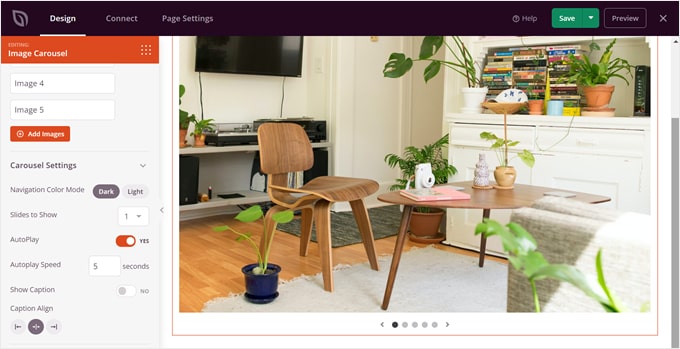
SeedProd has a free plugin, but the image carousel block is only available in the premium version. The plans start from $39.50 per year for 1 website license, but you can get 60% off using our SeedProd coupon code.
You can learn more about the plugin in our full SeedProd review.
What Is the Best WordPress Slider Plugin?
Out of all the plugins we’ve reviewed, Soliloquy is the best WordPress slider plugin on the list. During our tests, it performed the fastest and has a beginner-friendly interface that anyone can use to create their sliders.
What’s more, it has tons of add-ons you can use to extend the basic slider functionality. This way, you can pick and choose features based on what you need and avoid dealing with ones you don’t use.
If you are looking for a free WordPress slider plugin, then we recommend Smart Slider 3. It offers professional-looking slider templates out of the box and there are plenty of customization options to play with in the editing interface.
We also recommend checking out SeedProd. Sometimes, it can be hard to find an image slider plugin that works well with your theme. Since SeedProd already has an image carousel feature, you won’t have to worry about compatibility issues.
Best WordPress Slider Plugin: Frequently Asked Questions
Now that we’ve shown you the best WordPress slider plugins, let’s go through some frequently asked questions about using sliders in WordPress.
Should I use sliders on my website?
Sliders can be a good addition to your website, but whether you should use them depends on your content and design goals. They are useful for showcasing multiple images or messages without taking up too much space.
You will want to consider the visual appeal and relevance to your audience when deciding whether to use sliders on your WordPress blog or website.
What is the best size for a slider in WordPress?
It’s recommended to keep slider sizes responsive so that they adjust to different screen sizes. However, a common practice is to make the slider’s width equal to the device’s width, and its height proportional to the width, typically around 40-60%.
This helps ensure that the slider looks good on a variety of devices and screen sizes.
What is the difference between Soliloquy and Smart Slider 3?
Soliloquy and Smart Slider 3 are both popular WordPress slider plugins, but they have differences in terms of features and user interface.
Soliloquy is known for its beginner-friendliness and fast performance, while Smart Slider 3 offers slightly more advanced customization options. The choice between the two depends on your specific needs and skill level.
Ultimate Guides to Using WordPress Sliders
- How to Easily Create a Responsive Slider in WordPress
- How to Create a Video Slider in WordPress (Easy Tutorial)
- How to Properly Add a Featured Content Slider in WordPress
- How to Show Before and After Photos in WordPress
- Forget PowerPoint, How to Create Presentations in WordPress
We hope this article answers your questions regarding the best WordPress slider plugins. You may also want to see our list of must-have WordPress plugins to grow your website or our tutorial on how to create an image gallery in WordPress.
If you liked this article, then please subscribe to our YouTube Channel for WordPress video tutorials. You can also find us on Twitter and Facebook.
Disclaimer: We also tested other plugins for this article, including Slide Anything, Slider Revolution, Post Slider and Post Carousel, PickPlugins Product Slider for WooCommerce, and Ultimate Responsive Image Slider. However, we only included the very best options in this roundup to avoid choice paralysis.

Syed Balkhi says
Hey WPBeginner readers,
Did you know you can win exciting prizes by commenting on WPBeginner?
Every month, our top blog commenters will win HUGE rewards, including premium WordPress plugin licenses and cash prizes.
You can get more details about the contest from here.
Start sharing your thoughts below to stand a chance to win!
Manir Husain says
A short but perfect list of the top five slider plugins for WordPress. Most of the time, I find only the list of the slider plugins with some features on many sites. But here I’ve got a concise WordPress slider plugin list with pros and cons. Most importantly, the “Why we choose it” part helps me a lot understand the specifications of the plugins and find out the best one for my requirements and preferences.
Dennis Muthomi says
Great roundup!
Site speed is one of my top priorities when choosing plugins, as sliders can often bog down a site’s loading times.
I really appreciate that you tested each plugin’s performance using Pingdom, but I also like to check Google PageSpeed Insights to get Google’s perspective on speed optimization.
Either way, the analysis you provided, especially covering the pros/cons and pricing, gives me a great starting point for picking a fast, lightweight, yet highly functional slider.
Thanks for putting this together!
WPBeginner Support says
Glad our list was helpful!
Admin
Jiří Vaněk says
Thank you for the table where you measured the speed. Values around 900 ms may seem relatively small, but they can influence the Google search console metrics quite a lot. I wanted to use a slider on one of the client’s websites, but I will probably avoid it. Those speeds are great for me. Thank you for the detailed article that answered my questions.
Harry says
I tried Smart Slider 3, but I couldn’t find a way to add images from the media library. Am I missing something?
WPBeginner Support says
If you do not see your media library when you add an image slide we would recommend reaching out to their support to ensure there is not an error with the plugin itself.
Admin