


Do you want to list your upcoming scheduled posts in WordPress?
Showing a list of future scheduled posts to your users can generate a buzz around your content and encourage visitors to return to your website. This can help you improve user interaction and engagement on your blog posts.
In this article, we will show you how to easily display future upcoming posts in WordPress, step by step.
Why Display Future Upcoming Posts in WordPress?
If you have been running a WordPress blog for a while, then you will know that publishing posts at a certain time can get more people to read them.
However, you can’t just sit around and wait for the right time to hit the publish button. That’s why WordPress has a built-in scheduling feature that lets you schedule posts to be published later.
This can help you focus on creating content and managing your editorial calendar like a pro.
Once you have scheduled the posts on your site, it is also a good idea to show a list of these upcoming articles to create hype around them and increase engagement on your blog.
Displaying future scheduled posts can be especially effective for content like serialized stories, product launches, or event announcements.
It may encourage users to discuss upcoming topics in the comments section, sign up for your newsletter, or even pre-register for events.
Having said that, let’s see how to easily list upcoming scheduled posts in WordPress.
How to Show a List of Scheduled Upcoming Posts in WordPress
You can easily show a list of scheduled upcoming posts on your WordPress site by adding custom code to your theme’s functions.php file. However, making even the smallest error while typing the code can break your site and make it inaccessible.
That is why we recommend always adding custom code using WPCode. It is the best WordPress code snippets plugin on the market that makes it safe and easy to add code to your website.
First, you need to install and activate the WPCode plugin. For detailed instructions, you can see our beginner’s guide on how to install a WordPress plugin.
Note: WPCode has a free plan that you can use for this tutorial. However, upgrading to the pro plan will give you access to more features like a cloud library for code snippets, a CSS snippet option, advanced conditional logic, and more.
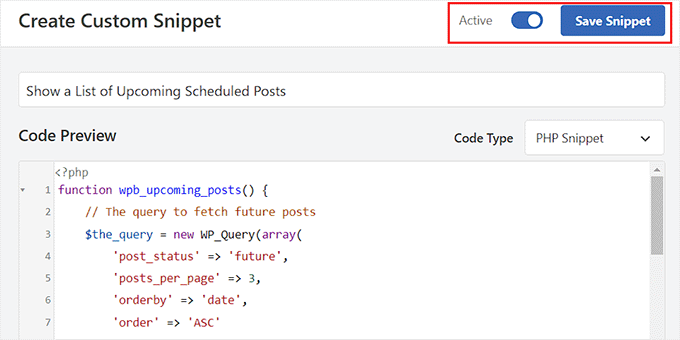
Upon activation, visit the Code Snippets » + Add Snippet page from the WordPress dashboard and click the ‘Use Snippet’ button under the ‘Add Your Custom Code (New Snippet)’ option.
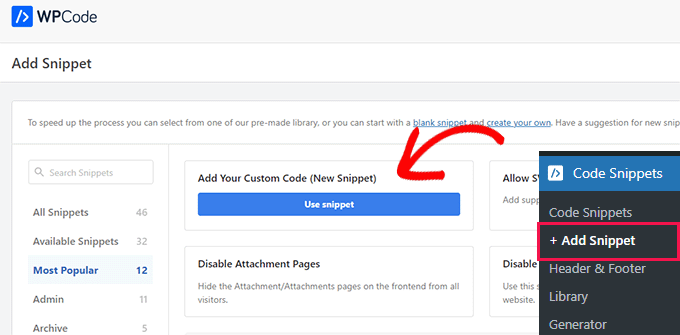
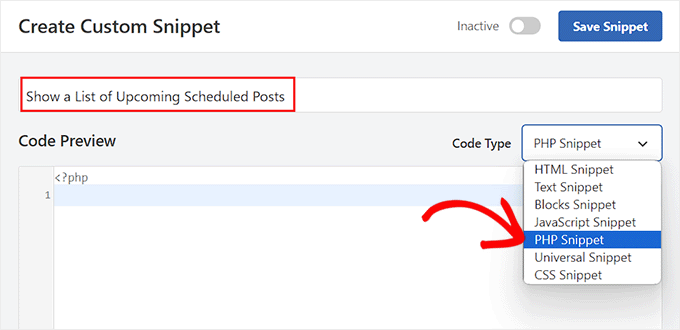
This will take you to the ‘Create Custom Snippet’ page, where you can start by adding a name for your code snippet. The name is only for your identification and can be anything you like.
After that, choose ‘PHP Snippet’ as the Code Type from the dropdown menu on the right.
Next, you need to copy and paste the following custom code into the ‘Code Preview’ box:
function wpb_upcoming_posts() {
    // The query to fetch future posts
    $the_query = new WP_Query(array(
        'post_status' => 'future',
        'posts_per_page' => 3,
        'orderby' => 'date',
        'order' => 'ASC'
    ));

// The loop to display posts
if ( $the_query->have_posts() ) {
    echo '<ul>';
    while ( $the_query->have_posts() ) {
        $the_query->the_post();
        $output .= '<li>' . get_the_title() .' ('.  get_the_time('d-M-Y') . ')</li>';
    }
    echo '</ul>';

} else {
    // Show this when no future posts are found
    $output .= '<p>No posts planned yet.</p>';
}

// Reset post data
wp_reset_postdata();

// Return output

return $output;
}
// Add shortcode
add_shortcode('upcoming_posts', 'wpb_upcoming_posts');
// Enable shortcode execution inside text widgets
add_filter('widget_text', 'do_shortcode');
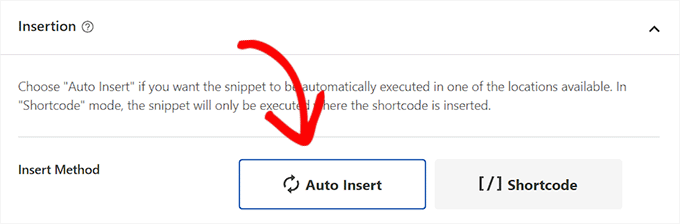
After that, scroll down to the ‘Insertion’ section and choose the ‘Auto Insert’ mode.
Keep in mind that you will still have to add a shortcode to show a list of upcoming posts on your WordPress website.
Finally, scroll back to the top of the page to toggle the ‘Inactive’ switch to ‘Active’.
Once you do that, simply click the ‘Save Snippet’ button to store your settings.
Display a List of Scheduled Upcoming Posts in the Sidebar of a Classic Theme
To display a list of upcoming posts in the WordPress sidebar, visit the Appearance » Widgets page from the WordPress dashboard. Keep in mind that this option will only be available if you are using a classic (non-block) theme.
Here, you need to click the add block ‘+’ button in the top left corner of the screen to open the block menu.
From here, drag and drop the Shortcode block into the sidebar section. After that, add the following shortcode into the block:
[upcoming_posts]
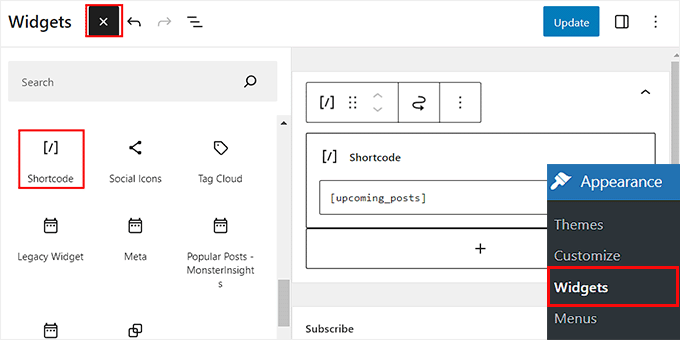
Next, click the ‘Update’ button at the top to store your settings.
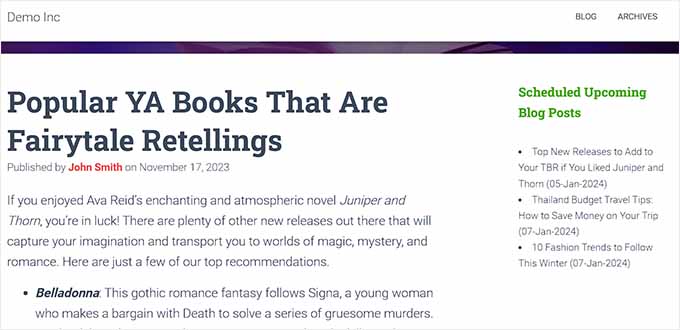
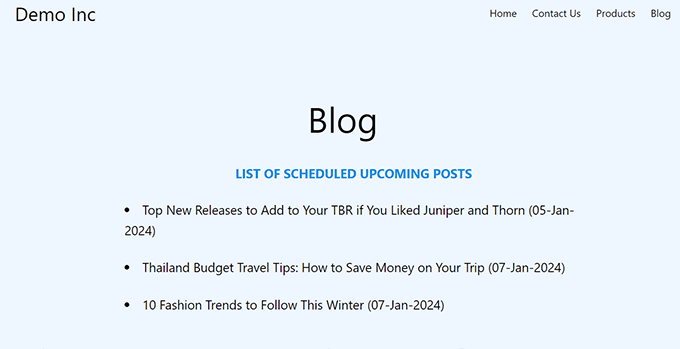
Now, you can visit your WordPress site to view the list of upcoming scheduled posts in action.
Display a List of Scheduled Upcoming Posts in the Full Site Editor
If you are using a block-based theme, then the Widgets menu tab won’t be available for you. In that case, you need to visit the Appearance » Editor page from the WordPress dashboard.
Once the editor opens up, click on ‘Pages’ and then simply choose a page where you want to add the shortcode from the options on the left.
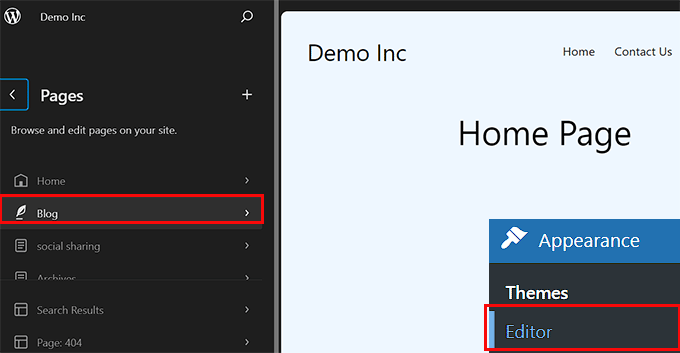
The page of your choice will now be launched in the full site editor. Here, you must click the add block ‘+’ button to open the block menu and add the Shortcode block to the page.
After that, just add the following shortcode into the block:
[upcoming_posts]
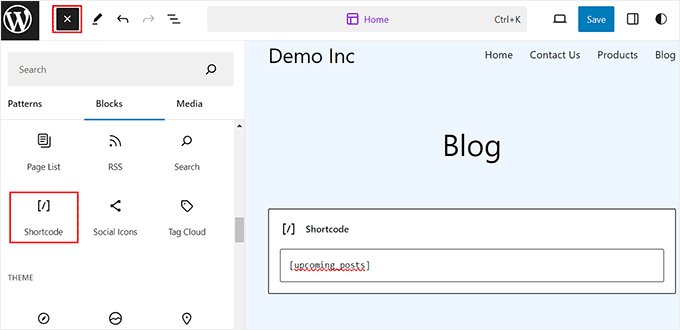
Finally, click the ‘Save’ button at the top to store your settings.
Now, simply visit your WordPress site to view the list of scheduled upcoming posts.
Bonus: How to Display Recent Posts in WordPress
Apart from displaying upcoming posts, you may also want to show a list of recently published posts on your WordPress site.
Doing this can help introduce visitors to new content and encourage them to explore your website more.
You can easily display a list of recent posts in WordPress using the Latest Posts block in the Gutenberg editor.
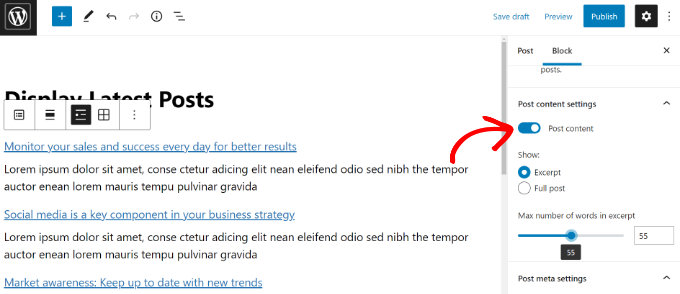
After that, you can further customize this block by adding post excerpts, author name, publication date, or featured image.
For more information, you can see our tutorial on how to display recent posts in WordPress.
We hope this article helped you learn how to list future upcoming scheduled posts in WordPress. You may also be interested in our tutorial on how to bulk schedule posts in WordPress and our top picks for the best WordPress popular posts plugins.
If you liked this article, then please subscribe to our YouTube Channel for WordPress video tutorials. You can also find us on Twitter and Facebook.



Syed Balkhi says
Hey WPBeginner readers,
Did you know you can win exciting prizes by commenting on WPBeginner?
Every month, our top blog commenters will win HUGE rewards, including premium WordPress plugin licenses and cash prizes.
You can get more details about the contest from here.
Start sharing your thoughts below to stand a chance to win!
Jiří Vaněk says
I sometimes use scheduling posts and this is a really great way to entice people to visit again. It’s a really neat idea. Thanks for the tutorial on how to do it.
Pobitro Deb says
Can I make a video post for the scheduled post?
WPBeginner Support says
If you wanted to make a video teaser, that would normally be best done by publishing a post for the specific teaser
Admin
Mrteesurez says
This is a great idea.
Show the upcoming scheduled posts will get users informed of new posts and make them return to read the post when published or live. It will also give user an opportunity to suggest next posts that they need to reads and be best benefited to them.
I will implement this idea, thanks.
Patrick says
Hello,
it was a very useful article! I used to code for a long time because it was exactly what I needed. Unfortunately, it doesn’t seem to be working anymore, and I haven’t found a way to fix it.
WPBeginner Support says
From testing the code is still working, you would want to use the shortcode block if you are not currently and that should allow the shortcode to work in your widget area again.
Admin
Patrick says
I stand corrected! The code is indeed still working PERFECT. I’ve made a mistake in the way I added it to the functions.php of the theme!
WPBeginner Support says
Glad to hear you solved the issue!
Susanne Tamir says
Great function exactly what i need but one thing missing the title is not linked to the post. How do i link the title to the post in this code? Thanks a lot
WPBeginner Support says
We do not have a recommended method for that as this would show the upcoming posts that are not published yet so there is nothing to send the users to.
Admin
rashid says
it is great and exactly what I needed,
now i am thinking about, making the Post test a link, and on hover can give extra info,
plus is it possible to add a url behind them (example: register for an upcoming event.)
Antuan says
I have to do couple to leave me in a normal page all future events with their titles, dates and featured images? Thank you.
kimberly says
thanks, looks super easy
shabir says
thanks for sharing such a wonderful stuff.
Rogier says
Thanks for sharing this manual code. I wonder how it could be modified for Custom Post Types? For example for an ‘event’ post type? Is that something you could reveal? (None of the scheduled post plugins work for custom post types.)
may says
i think you can do that by adding (‘post_type’ => ‘addcustomposttype’,) this in array im not sure but this one is working in my custom post type btw thank you wpbeginner for the tut
Cecilio says
I have found a problem in code:
For exclude sticky posts to add this line to query:
‘ignore_sticky_posts’ => 1,
Useful article
MarkDeafMcGuire says
I like to use the Editorial Calendar. It allows you to drag and drop posts from a calendar point of view. Useful for trending topics and seeing gaps in scheduling posts.
Editorial Calendar says
Is that a plugin??