


In 2010, we wrote our popular step by step guide on how to setup FeedBurner. A little over a year ago, we decided to stop using FeedBurner for all of our sites. Ever since we have received hundreds of questions about various FeedBurner bugs, issues, etc. In this article, we will talk about why you should avoid using FeedBurner. If you’re already using it, then we will show you why you need to stop using FeedBurner, and how you can move to reliable FeedBurner alternatives.
FeedBurner is Google’s RSS feed management service that many bloggers relied upon several years ago (What is RSS?). While Google hasn’t shut it down yet, it has been rumored for quite sometime that Google is going to shut it down.
FeedBurner hasn’t seen any features or updates for as long as we can remember. FeedBurner API was taken down. They also retired the Adsense for Feeds feature. All of this happened in 2012.
So why are writing about this now – two years later?
Well because we are still getting emails from users regarding FeedBurner. In the past 30 days, our old FeedBurner setup guide received over 3500 unique visitors from search engine traffic. Since FeedBurner has no support, we have received dozens of bug reports and support requests.
We want to point all concerned users to a more up to date article.
FeedBurner Alternatives
Aside from subscriber analytics and ability monetize with Adsense, FeedBurner offered two main features that bloggers loved.
- FeedBurner gave bloggers a better way to display their RSS feed along with offering sharing options to users.
- FeedBurner offered a free and easy way for users to subscribe to your blog via Email.
Let’s take a look at how we replaced FeedBurner with alternatives that are better.
At WPBeginner, we use default WordPress feeds and manage them on our own. Using default WordPress feeds gives you the control on your feed. We recommend our users to rely on the default WordPress functionality and manage feeds on their own. Here is why:
Pretty Feed Display with Sharing Options
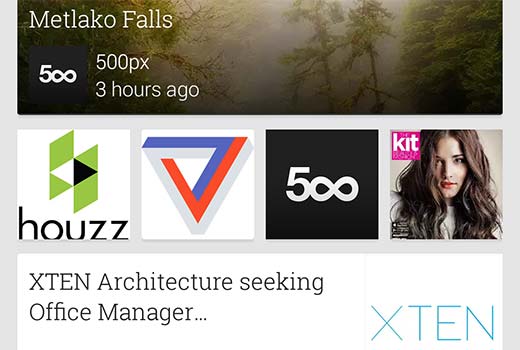
You need to understand that people don’t visit your feed URL to read your content. Instead most folks utilize feed readers like Feedly, Flipbook, Google’s Newsstand, etc. These feed readers already perform most of the tasks that FeedBurner did some five years ago.
If you are using FeedBurner for better feed display and social sharing, then you don’t need to do that anymore. However you can definitely educate your users on how to subscribe to your site.
Blog subscription via Email
A lot of users still prefer to receive blog updates via email, so it’s crucial that you replace this functionality.
While the JetPack plugin offers the closest alternative to FeedBurner subscribe via email functionality, we strongly recommend our users against using that.
Why? Because just like FeedBurner, you can’t send out exclusive updates to your subscribers. The only way to update your subscribers is by making a public post.
Since you have made the decision to do things the RIGHT way, then we recommend you start building an email list.
Professional email marketing services like MailChimp, AWeber, etc allow you to offer blog subscription via email along with giving you the full power of a robust email marketing platform. You get better analytics such as how many users opened your email, how many clicked on it, etc.
You also get higher delivery rate meaning more of your users will get your updates. Last but not the least, you get the flexibility and options.
For example, you can offer multiple subscription option (daily updates, weekly updates, etc) – see our guide on how to create a daily and weekly newsletter.
We’re using MailChimp for our site, and it’s FREE for up to 2000 subscribers.
Now that we have covered the alternatives, let’s take a look at how you can move away from FeedBurner.
Moving Away From FeedBurner
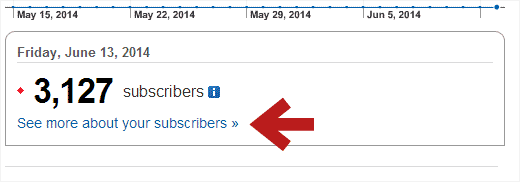
If you had been using FeedBurner’s email subscription service, then the first thing you need to do is to export your email subscribers. Simply login to your FeedBurner account and click on your feed. After that click on the link ‘See more about your subscribers’.
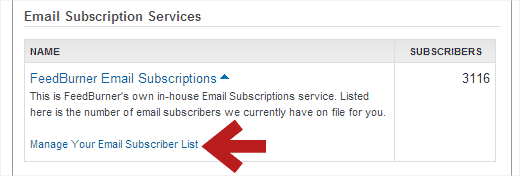
On the next screen, scroll down to the Email Subscription Services section and click on FeedBurner Email Subscriptions. This will expand the section, and you will be able to see a link to manage your email subscribers list. Click on the link to see your email subscribers.
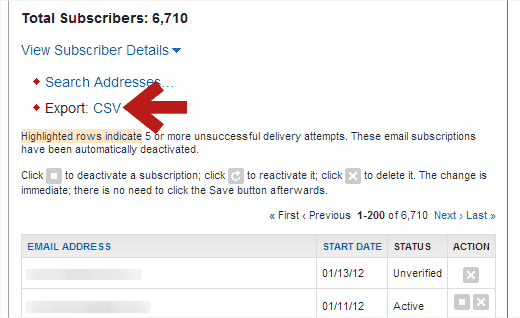
FeedBurner will now show you the list of your email subscribers. You will see an Export CSV link above the list. Simply click on it, and it will download your list in the CSV format. You can then import this file into an email marketing service of your choice such as MailChimp, AWeber, etc.
Because we use MailChimp for our site, we will show you how the import functionality works in MailChimp. Most other providers have a similar process.
First thing you need to do is login to your MailChimp dashboard and create a new list in MailChimp.
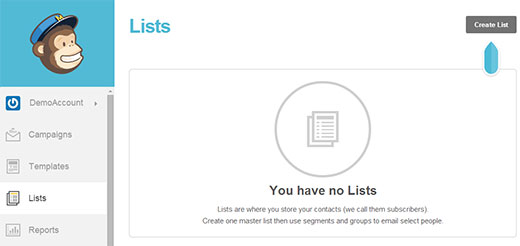
After you have created a new list, you can import your email subscribers using the CSV file you downloaded from FeedBurner. Start by clicking on the Lists menu in MailChimp dashboard and select your newly created list. This will take you to list management page. There you need to click on Subscribers » Import Subscribers.
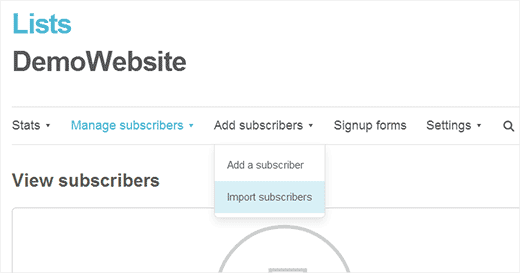
On the next screen, click on the ‘Import from a CSV or TXT file’ option and then import the CSV file you downloaded from FeedBurner.
Once you have imported your list, you will need to create a RSS to Email campaign.
Different email marketing services will have different names for this functionality. In MailChimp, they call it RSS to Email campaign. In AWeber, they call it Broadcasts. Simply Google the “name of your email marketing service and blog RSS”, and you will find a tutorial for that.
After you have all this setup, then you can turn off your Email Subscriptions in FeedBurner, so your users don’t receive two emails. You can do this by going under the Publicize Tab in FeedBurner and click on the Email Subscriptions link in the left column.
Remember that when transitioning your email subscribers to a new email service, you might lose some subscribers, but these are inactive subscribers who you probably don’t want anyways.
Redirect FeedBurner Subscribers Back to WordPress Feed
It was common for bloggers to redirect their WordPress feed URL to their FeedBurner page. Some did it with a plugin like FD FeedBurner, while others used their theme’s built-in functionality, and the more savvy used a code snippet.
If you’re using any of the above methods to redirect your default WordPress feed, then please stop using those right away.
The best way to check if you’re redirecting your feed is by visiting your RSS feed URL:
http://www.yoursite.com/feed/
If this redirects to FeedBurner, then you haven’t fixed it.
Next, write a blog post and ask your subscribers to update the URL and possibly educate them on how they can subscribe to your site using other readers.
Important: DO NOT DELETE your FeedBurner feed. There are some sites that will tell you to DELETE your FeedBurner feeds which supposedly will redirect your subscribers, but it doesn’t. It’s a terrible idea, and you will lose your subscribers. Why?
Because when you delete your feed, FeedBurner will add a new post notifying your readers that your feed has moved. This doesn’t automatically update the feed URL on your user’s feed readers. If the user doesn’t take any action within 15 days, then you lose that subscriber forever. Furthermore after 30 days, a competitor can claim your FeedBurner URL and all the users who didn’t update their feeds will start getting his updates.
Once again, DO NOT DELETE your FeedBurner feeds.
Simply write a blog post to notify your readers to update their URLs. Educate them with resources on how they can do it.
After that simply let the FeedBurner feed die a slow death.
This way those who don’t update your feed URL in their RSS reader still continue to get new content, but all your new readers subscribe the right way.
Create Subscription Forms, Subscribe Page, and More
Now that you have created your email list and defaulted back to the WordPress feed URL, you should make appropriate updates to your site such as remove all mentions of FeedBurner URL, update your email signup forms etc.

For adding signup forms to your site, we recommend that you use OptinMonster. It allows you to create effective opt-in forms such as sidebar signup forms, after post forms, floating footer bar, slide-ins, lightbox popups, etc.
We’re using it on our site, and it has helped us grow our email list by 600%.
Next you probably want to create a subscribe page that shows readers how they can subscribe to your site.
Since you’re using the default WordPress feed, you have a lot of flexibility and customization options.
You can add thumbnails to your RSS feeds, add other custom content to RSS feeds, or you can entirely create custom RSS feeds.
Another neat feature that’s built-in with WordPress is category specific feeds. You can allow your users to subscribe to individual categories with category RSS feed. Read our article on how to allow users to subscribe to categories in WordPress.
We hope this guide helped you find a way to deal with the demise of FeedBurner and move on to better options. We strongly recommend that you stop using FeedBurner.
If you liked this article, then subscribe to our YouTube Channel for more WordPress video tutorials. You can also join us on Twitter and Google+.



Syed Balkhi says
Hey WPBeginner readers,
Did you know you can win exciting prizes by commenting on WPBeginner?
Every month, our top blog commenters will win HUGE rewards, including premium WordPress plugin licenses and cash prizes.
You can get more details about the contest from here.
Start sharing your thoughts below to stand a chance to win!
Andrew Blackman says
Very useful, thanks! I signed up with Feedburner back in the pre-Google days, and I’ve stuck with it out of laziness all these years. Finally getting around to moving away from it, and this guide is just what I needed.
Ryan says
Feedburner now allows for a permanent redirect when deleting a feed. There’s no longer a 30 day window.
Ankit Dhadwal says
I have seen other Rss platform like Alltop. Can you please post a tutorial for this. I have been struggling to figure it out how to use it. Others can also find it useful.
Thanks
WPBeginner Support says
Hey Ankit,
Please see our guide What is RSS and how to use RSS in WordPress?
Admin
Leslie Myricks says
Hello,
I recently subscribed to Feedburner. I went on to other services to enter my blog info. Each time I entered it into Feedage, I got a message saying it wasn’t working. It said take the url and enter it in search. If my feed came up, (which it did) that was supposed to let me know I have the correct url. However, whenever I attempt to submit it to other services, I get the same message. I don’t understand. Maybe you can advise. Thanks!
Coach Maria says
Well, I’ve decided to use feedburner for what it’s worth I do have an ezine, too. I tried Jetpack’s version of subscribing and actually liked it since people get new posts delivered without me having to do anything.
What I’d say is that IF your ideal audience likes RSS feeds (as mine seems to), then use it. If not, don’t.
Anne says
The main problem I see is the difficulty in switching from a free service to a paid service. Website after website talks about MailChimp and other services being free, but it’s only if you have a small number of subscribers. At the same time, these blogs tell us how we should be CONSTANTLY growing our subscribers. Which means we will quickly outgrow the “free” service.
Which will then cost about $40 or more per month.
Could you write an article about truly FREE Rss to Email programs like Feedburner? Or maybe there’s a paid service out there that doesn’t cost an arm and a leg if you have more than 2000 subscribers?
Thanks!
Don says
99% of rss feeds are not read, they exist today only for SEO purposes. You use feedburner because google owns it. Period.
Leslie says
feedburner changed my original feed to
I know you said not to delete it, but I, sadly have no subscribers here. However, I use the above rss for my mailchimp account. Is that easily fixable? It doesn’t matter if I delete the above feed and return to using my original from wordpress?
WPBeginner Support says
Hey Leslie,
If you used your FeedBurner feed to send your posts via email to your MailChimp email list, then you can edit the integration and replace FeedBurner feed with your WordPress RSS feed.
Admin
malcolm says
i dont want feedburner or its alternatives as i have no use for them but i keep getting a message from feedburner with some sort of gambling link how do i stop all feedburner links. i have never subscribed to them so would like to stop them please help
p.s idont have an account with them
WPBeginner Support says
Hi Malcolm,
If you are getting this in your WordPress site’s comments section, then those are called trackbacks. See our guide on how to how to stop WordPress trackback spam.
If you are getting them in your email, then report them as spam and your email filters will start sending those emails to spam.
Admin
toni says
wordpress feed requires users to make a wordpress account.
that is to much efford. most won’t go through that. even feedburner having to type email address, code and a confirmation email is to much for most. is there and option with facebook?
Thomas says
I don’t know if these comment threads are still monitored, but I started with Feedburner back in the beginning and am finally making the transition away. The problem is I use it to track podcast downloads. What’s a good alternative?
David P says
Please help. I am new to WordPress and all this RSS stuff and I find it all very confusing. Someone please help me to understand. Perhaps an article that simplifies for actual WordPress beginners, everything about RSS, from what it is to how to use it and how to set it up in WordPress, RSS Feed, RSS Feed subscriptiona and all that jazz… would be much appreciated.
I am currently setting up a new WordPress site that is going to replace another live WordPress site. But before I begin setting up RSS subscription or a new RSS feed or RSS whatever for the new site I imagine I need to determine whether the current site already has all this, an associated Feedburner account perhaps or any subscribers for that matter. How do I do this? The WP theme I am using has a Newsletter subscription widget that includes in it’s settings an option to enter a Feedburner URI. If I should not bother with Feedburner then perhaps I should not bother with this widget. Maybe I should just go ahead and replace it with a widget from Mailchimp and in the event that current subscribers to the old RSS feed get dropped then I will cross that bridge when I reach it but first…. how do I start?
WPBeginner Support says
Please check out our beginner’s guide: What is RSS? How to use RSS in WordPress?
Admin
monique says
Hi Syed and team, Your article is very much about getting away from feedburner. Can you do one on how to set up an rss feed and what it is and how it works with aweber, etc I still don’t get how it is different to subscribing with email if rss sends you an email anyway. I’m just starting out and I don’t need the move away from feedburner stuff and it’s left me very confused as to what to do now. thank you!
WPBeginner Support says
Hi monique,
RSS it self does not send email to subscribers when you publish a new article. For that you will need an email service. The email service provider then uses your WordPress RSS feed to fetch articles and automatically email them to your subscribers. Hope this helped, let us know if you have more questions.
Admin
Erin says
I feel like I’m missing something here. I moved away from Feedburner YEARS ago when they first announced they would not longer update the API. I moved to Feedblitz and run that feed through Mailchimp in an rss campaign.
The issue I’m having, and how I stumbled upon this post, is that Feedblitz inserts a 1×1 pixel image in the feed and Mailchimp converts it to a 600×600 pixel image that pushes my feed content down the page. SO I’m looking for alternatives. But is having to run the WordPress Feed through an rss service even a thing anymore? Can I skip the whole rss service and run the domain.com/feed straight through Mailchimp’s rss campaign for auto sends?
TIA!
WPBeginner Support says
Yes, you can use the default WordPress RSS feed through MailChimp’s RSS to email campaign.
Admin
Ron says
One thing I hate about Mailchimp is that it displays my physical address and email at the final confirmation message to subscribers. I mentioned that to customer service but it’s part of the anti-spam policy. Address should be kept confidential for a variety of reasons.
I also don’t like the captcha ….there is no way of disabling that functionality. It’s a pain and can turn people off from signing up.
Vince says
I totally agree. I’m looking to switch from mailchimp before my list starts to grow.
Candice says
Hi. I am 3 weeks into building my first blog on WP, haven’t thought about acquiring email lists that much as opposed putting contents in… I have downloaded this plug- in called Ultimate Social Media Plus… It also come with this prompt that ask reader to subscribe for new posts… How is things like different from MailChimp? The WP also has a widget that let’s me put a subscription box on the pages… again, how are these different from these email services you guys are talking about? I have v. little technology background, hopefully my question is not too silly. Thanks in advance!!!
WPBeginner Support says
Please take a look at our guide on why you should start building your email list right away.
Admin
Dan Stafford says
What I’m wondering is how to replace Feedburner’s podcast listing support & pingshot services.
ikomrad says
Same here. I get most of my news from Feedly, and I would like to register with them so that if someone searches for my blog in Feedly, they can find it and subscribe to my rss feed.
Is there a way to do that?
WPBeginner Support says
Hi ikomrad, take a look at our guide on how to optimize your WordPress RSS feed. It has tips on optimizing your WordPress site for Feedly so that your blog is more prominently displayed in Feedly.
Admin
Henning Uhle says
Great post. Thank you. But one thing is strange.
Mailchimp works like a charm. I use RSS driven campaigns that send out emails to my subscribers once a day at a specific time. If WordPress RSS isn’t available at this time, no email is sent. And the Mailchimp guys informed me to use Feedburner or other RSS caching services to prevent this issue.
And since Feedburner didn’t die, I use it as recommended by Mailchimp. Now I think about switching to Google Newsstand to have a RSS caching service that’s more future-like. But I am not sure if Mailchimp works together with it. But I will try.
Cheers, Henning
shan says
There is no alternative to feed burner right now. Because this is a free service. And emails never go to spam folder. If you have lot of money to burn for email subscription close feedburner service and find alternative.
Yeah sure says
Of course. FB is sent by google so it is still the best way to deliver email.
Alana says
Thank you for all of the tips! I just switched over to MailChimp and this helped a ton!
andrea says
I switched to Aweber about a month ago. When we imported my subscribers into Aweber, there were no names, just email addresses. Does feedburner even capture first name? If not, Yikes! Not sure how I can go back and capture the names of 600 subscribers!
WPBeginner Support says
You can contact Aweber support. You may have to require all your users to confirm subscription again.
Admin
Ganesh says
Nice post thanks for sharing feed burner information .
Kady says
Thanks so much for this blog post! It was so helpful as I switched all my email posts from Feedburner and Jetpack to Mailchimp!
Nostromov says
Ugh, dunno whether you guys are unaware – or, what?! FeedBurner is dead and gone… Its domains, feedburner.com/ & feedburner.org/ are parked; outside of Google, it does *not* exist any longer!..
Perhaps updating the article, or something, would be good?? :))
Josh says
Those domains were deactivated about 5-6 years ago after Google’s takeover of the Feedburner service was completed. Feedburner can now be found at feedburner.google.com.
Jennifer Harry says
I use newsletter plugin to send newsletters, but I have a problem understanding what to do about sending regular newsletters. I suppose I’ll just have to focus on it and get it done, but it’s difficult when you have a million other jobs to do!
Lance McGrew says
Email subscriptions are becoming or have become old-school. Instant push notifications are the new way. Better instant gratification experience, no problem with your feeds ending up in junk mail folders. Get your subscriber’s attention even when their email client app is not open. Problem is, I am not finding a clear way of integrating instant push notifications with WordPress posts. Feedburner 30-minute push is insufficient. Boxcar2 requires user to manually type in a custom URL. No obvious way to allow subscribers to custom select what feeds or notifications they want pushed to their mobile devices.
Vince says
No sure I agree. fads come and go but email list is still king in iM.
Kimm Boes says
Hello, I am searching for help regarding a feed issue. I recently acquired a blog, my second, and installed a new theme. I also exported the feedburner subscribers to Mailchimp and set up an RSS campaign within Mailchimp to send my new posts to my subscribers each morning. The problem is that my feed is not updating, so mailchimp is not getting the notification that new content has posted, and isn’t sending out the e-mail. As I understand it, my feed still comes from feedburner, but when I log in to that account, it shows old content, from before I acquired the blog. If I click on “resync”, it will update, but it reverts back. Can you help?
Daniel Boswell says
This comment thread seems a bit old but for those who are inquiring about MailChimp, the RSS to Email feature works in the free version. There are also a few free RSS email templates to chose from that have everything already set up. When going through the RSS to Email setup process, one of the steps lets you select your template. Just add your logo or your name in text on the banner, make any color changes you want, and adjust the font if you don’t like whats there, and you should be good to go.
Chaz DeSimone says
Daniel, thanks for posting even though “this thread seems old.” I need to install RSS and Mailchimp, and your two points about RSS to Email working in the free version, and that I can choose a template and make some simple customization, is the clincher for me. Thank you. (The site I’m building now is for silent films of 100 years ago– . Threading film on a 1906 Powergraph is an “old thread”!)
Jim says
You recommend using the default WP rss feed, but it is broken and does not generate xml files that work. (WP 4.2.2)
Eli says
Hi,
Your blog is very good!
Small question, I’m using with word press blog’s building and have RSS program by WP. When I’m clicking in RSS icon at my website, at Explorer internet the RSS feed is appearing well but at Chrome it’s not appearing. Why? How can I fix so it will appear also at Chrome?
looking forward & thank you!
Eli Kassel.
Lucky Bhumkar says
Most valuable post. Thanks for alerting me before fall into the trap of Feedburner.
Sonia says
I recently moved to MailChimp and now want to stop using FeedBurner altogether, but I’m afraid I have no idea how to get that done…
Now that FeedBurner offers a permanent redirection option, would you say that deleting the feed would be an acceptable way of redirecting the feed back to the original source, i.e. wordpress, or would I still need to take additional steps even if I did that? It has been years since I started using FeedBurner and now I have no idea how to undo that. I know for a fact that I didn’t use a redirect plugin and I wouldn’t have modified the header.php file, as I have no idea how to do that…
I am at a loss as to how to recover my feed and ditch FeedBurner… Please help!
suryatejaaaa says
but,the problem with mailchimp is when we send the emails through mailchimp,they will go directly to promotions tab and no one will care about them..If you have any suggestion better tell me..
Tri Wahyudi says
For me Feedburner remain useful for capturing traffic to my blog
Lukas Brandt says
What about Feedpress.it?
Nancy Ward says
I have 50 email subscribers that are listed on Feedburner and getting email updates. I also have 740 registered users that are not listed on Feedburner as subscribers and therefore not getting emails. What are my options to moving from Feedburner to another email app to incorporate the registered users?
Quinn W says
Thanks so much for this! I do have one question – you mentioned being able to put together a campaign for either a blog category or tag in Mailchimp RSS to email. I’ve tried to do both, but Mailchimp seems to revert it every time back to my main blog feed. Do you have any insight as to why? ~Quinn
Mary A. Axford says
My blog uses Feedburner to let people subscribe by email. Very early on (blog started in mid-2012) I could log on. However, I started getting a message to log in to claim my Feedburner account, the ID and password didn’t work. The only way I knew to try and get help was to post on a Google forum, and so far Google has ignored mine and a lot of other people’s request for help on this. Any ideas? I don’t want to force my email subscribers to subscribe via something else. Thanks!
WPBeginner Staff says
MailChimp has a feature called RSS to Email.
Kennis Wong says
MailChimp is not exactly an alternative to email subscription of blog posting, is it? My understanding is that you will need to manually create an email to send to your subscribers if you are using MailChimp, whereas in WordPress Jetpack, your subscribers automatically receive an email alert for any new post. I see the two services are complimentary to each other (although it could be confusing to readers if you have two separate sign-ups). Correct me if I am wrong about MailChimp though.
Anya says
The paid version of mailchimp can be programmed to pull in the RSS feed from a blog and create emails automatically. They can also be styled and branded. It’s fairly simple and it takes some testing, but it is possible.
Doreen says
I believe I have inadvertently signed up for two feedburner accounts, but I can only find one. Can you tell me how I can find the other account so I can ditch feedburner and transfer my subscribers?
WPBeginner Staff says
The best way to figure this out is to retrace the steps you took implementing FeedBurner and just undo them.
WPBeginner Staff says
Go to Plugins page and see if you can find a plugin installed that has feedburner in the name or description. If you find such a plugin, then deactivate it.
Also check your theme’s header.php file look for a line that contains your feedburner feed URL.
Lastly, check your theme’s functions.php file. Look for a code block with your feedburner feed’s URL in it.
Jacqueline says
The only Plugin I see referencing feedburner is WP Subscriber Form. Currently it is deactivated. I’ll be honest and say I have no clue as to how to find my .php files, much less edit them. I’m a serious newbie to this stuff, and I appreciate any help.
Jacqueline says
I found this post exactly one day after implementing Feedburner. Ugh! I’m very new to blogging and the technical stuff, i.e., editing files, FTP, CSS and the rest. Can you please help me put everything back in order? I can find no way to redirect my feeds back the way they were two days ago. I would appreciate any help!
WPBeginner Staff says
I can understand the issue with sharing your real address. But you also have to give that when you’re registering your domain name.
Unless you bought private registration or WhoIsGuard, then anyone can find out your address.
We’ve seen a lot of bloggers simply put their house address for their MailChimp Email.
I wish I can give you a better solution, but that’s about it. You can use JetPack but again you run into the same restrictions. With FeedBurner you were at the mercy of Google, and now you will be at the mercy of Automattic.
Hangry All The Time says
Thank you for the article. Just what I was looking for online.
I am a new blogger and at this point have nothing to sell on my site (no income). While I understand that MailChimp is free to use, I will need to submit a physical mailing address to comply with anti-spam laws. That means that I will need to rent a PO Box which is a cost I don’t want to take on now. Other plugins/services for email subscriptions don’t ask for this information, but I realize they have their own limitations.
Any advice on how to proceed?
Heather Solos says
Transparency, I work for FeedBlitz.
Native RSS Feeds do work well in most new readers, that said, services like ours have additional features, like the ability to measure the RSS audience and the ability to ad advertising to the RSS feed, creating an additional source of passive revenue.
We also make it easy to your own static ads to your RSS feeds.
We also have live support during business hours.
I would be happy to answer any questions you may have about the service.
just passing by says
Feed Demon. ’nuff said
WPBeginner Staff says
You don’t need to add any code to your RSS feeds. The default WordPress feeds work out of the box. However, if you feel that you need to add something to your RSS feeds, then there are plugins that will let you do that. For example, WordPress SEO will let you add content that will appear below each post in your RSS feed.
As we mentioned in the article, you will not be deleting your Feedburner Feed. So you will not loose those subscribers and they will continue to receive updates from your site.
Heather Solos says
To add to this, do not delete your FeedBurner feed as that allows someone else to step in and claim your extension. Your subs that didn’t move their subscription likely won’t notice that the feed has gone quiet, until one day someone steps into your old extension with something exciting like adult content or pill shilling. I’ve seen it happen many times.
Doreen says
This is a helpful and timely post, as I’ve been thinking about moving away from Feedburner for quite some time. The main thing holding me back is Feedburner has been showing my number of subscribers as 1 for quite some time (and yes, I’ve been following the steps you outlined) and I know this is not the case. Getting help from them is next to impossible, so I’m not sure how I can rectify this. Any advice?