


There are many tutorials out there that shows you how to password protect your website content. Many of those utilize complex membership plugins that require user registration. But what if you just want to password protect your site without user registration? Let’s say you have a demo site for client work. You may only want that specific client to see your site. In this article, we will show you a very simple way to quickly password protect your WordPress site with a single password.
Video Tutorial
If you don’t like the video or need more instructions, then continue reading.
First thing you need to do is install and activate the Password Protected plugin. For more details, see our step by step guide on how to install a WordPress plugin.
Upon activation, you need to visit Settings » Password Protected page to configure plugin settings.
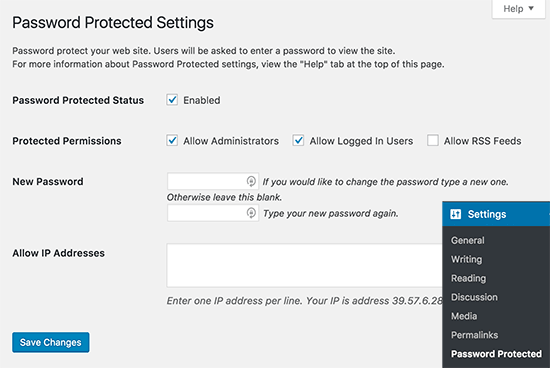
You will need to check the box next to Password Protected status to enable password protection.
Next, you have option to allow administrators and logged in users. You can also allow RSS feeds but if you want to keep your site private, then you should leave it unchecked.
Now you need to enter a new password. Anyone with the password will be able to view your WordPress site so you should choose a strong password with letters, numbers, and symbols.
You can also limit access to specific IP addresses. However, if you don’t have this information, then you should leave this blank.
Don’t forget to click on the save changes button to store your settings.
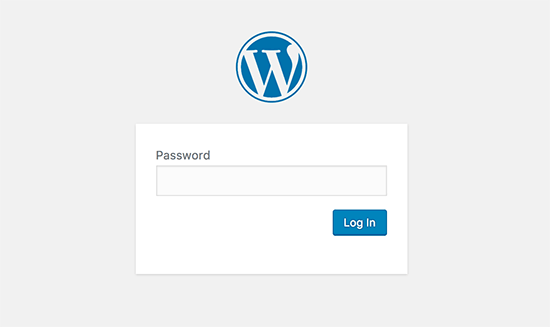
Now whenever someone tries to reach your WordPress site, they will see a password screen like this:
We hope this article helped you learn how to password protect a WordPress site without user registration. You may also want to see these vital tips and hacks to protect your WordPress admin area
If you liked this article, then please subscribe to our YouTube Channel for WordPress video tutorials. You can also find us on Twitter and Facebook.



Syed Balkhi says
Hey WPBeginner readers,
Did you know you can win exciting prizes by commenting on WPBeginner?
Every month, our top blog commenters will win HUGE rewards, including premium WordPress plugin licenses and cash prizes.
You can get more details about the contest from here.
Start sharing your thoughts below to stand a chance to win!
Mike says
Great articles. Thanks.
WPBeginner Support says
You’re welcome
Admin
tony cook says
I’m trying to password protect just the_content() on the homepage – it works on all other pages with just the standard wordpress visibility = “Password protected” functionality but on the homepage the content is still visible. The plugin you mention will hide the whole page behind the login page, but in this instance I need to see the page template with just the_content() hidden. Even googling is not coming up with anything.
I only way around I can think of is to auto redirect from the homepage to a duplicate homepage that is just a standard page.
Ebube says
please I’m trying to build an online examination site and I want each user to have a different password to view the page of the exam. How do I go about this
WPBeginner Support says
Hi Ebube,
You may need a WordPress LMS plugin to do that more efficiently.
Admin
Ebube says
thanks a lot it was really helpful
Alex says
This plugin hasn’t been updated in a year and the developer is not responding to questions/problems posted on the support forum. I was wondering if anybody else knows of another solution like this that is actively being maintained?
Anshuman says
What if I want it to ask password each time I close the page. Currently it is not asking for password once password has been entered.
Please suggest.
pratikk says
your case need 2 sub answers. do you login as admin or do you enter password as user?
Benedicte says
Hello, 2 questions:
– I have just installed and activated this plugin, but it doesn’t seem to be working yet.. (maybe some cache issues)
– Does the plugin allow to password protect any page that is first being clicked? (so if people click on any subpage – not only the homepage – it is being protected?)
Thanks,
pratikk says
– did you check those boxes? ()allow admin ()allow logged in users
– yes when i did that test, i saw that sub pages were protected as well.
Megan says
Naïve question: Will this work for WordPress.org and WordPress.com sites?
WPBeginner Support says
This guide is for self hosted WordPress.org sites only, please see the difference between WordPress.org vs WordPress.com
Admin
Elizabeth Johnson says
I want to password protect 3 sets of pages. Each of the 3 sets will have 3 pages. And each set will have its own password. I tried creating each of the pages within a set as separate pages but the passwords would only work on 1 and sometimes 2 pages.
Can I create 3 parent pages (one for each set) and give each parent page its own password? Then can I create 2 sub pages within each parent page and not give those pages a password? Would this eliminate my problem? Would the sub pages be protected by the parent page or would they be unprotected with no password of their own?
Thank you so much for any help. I am only moderately knowledgeable and feel I am stumbling around in the dark on this.
mel says
Is there any way to create a custom page with the plugin for password protection? I saw you can replace the login logo but I would like to create a custom page for sign in.
WPBeginner Support says
You can try Theme My Login plugin.
Admin
Nigel Spence says
I’m password protecting a monthly membership site. What happens when I have a member who as been with me for say 4 months, then I get a new member,how do I give them a different password for the same month 1 content? Won’t the new member also get 4 months worth of content???
Please clarify, as I can not for the life of me fathom this out…
WPBeginner Support says
yes and you probably need a more complex solution than this to handle memberships and subscriptions
Admin
Hughes says
Thanks for the suggestion. This seems very handy and straightforward. Once installed, do you know if this will prevent content from the site to come up in search engines? And can you remove it without any weirdness later if as you say you use this for client demo purposes? In my case, I wonder if it would work for a client that wants his site private just until ready to reveal his redesign.
Noumaan Yaqoob says
@Hughes it will partially protect your websites from search engines. To block search engines you should add this in your robots.txt file
User-agent: *
Disallow: /
ellie says
would this plug in work if i just wanted to password protect a certain area/group of pages on my site? eg. most of it would be available to the public but with a password protected area for members?
i don’t want to password protect the whole site.
Editorial Staff says
No, you would need a membership plugin for that. This plugin is mainly for totally private blogs (family blogs or company blogs).
Admin
D says
Excuse my ignorance but I just wanted to clarify….
Allowing password access to a group of people (say students in a class for a given time period e.g. 3 months) can be done and then the password changed when the new term begins – to use for an entirely different set of students.
However, if I am the owner of a wordpress website, I control content/settings etc. i.e. I remain the owner of the site. No such user (allowed in via password access) can ‘hijack’ my site so as to speak.
Editorial Staff says
Yes that is correct. You own the site entirely. The students can only view the site. They cannot change anything.
Admin
Namita says
Hi,
What if I want to protect multiple pages (menu/sub menus/sub-sub menus) from the clients until I give them the password? Can I still use this plugin?
Please suggest a way to accomplish my goal if you know a way.
Thanks!
Editorial Staff says
This would work for all pages not just the homepage. So yes, you can use this plugin.
Admin
Klaas Cuvelier says
I’ve been using this plugin: http://wordpress.org/extend/plugins/basic-authentication/
It pretty much does the same, but you can choose between a “predefined” password, or a WordPress login to secure your WordPress installation
Michael Hanna says
Very interesting, we are looking at using this on our website…
Liza says
Won’t hackers be able to find another way around this?
Editorial Staff says
This is NOT for hackers. The intended purpose of this plugin is for private blogs. For example, you adopted a kid, and you only want their biological family to see the kid’s pictures. Chances are hackers are not targeting your site because you don’t make any $$$. Another use case would be that you have a client demo area. i.e clients.yoursite.com. You can password protect the site, and change the password for every new client (granted that you are not working with numerous at the same time). Hope that clear things up.
Admin
Zachary Williamson says
Love it thanks to all the WPBeginner team for taking the time to share all this useful information with the world.