


Do you want to monitor user activity on your WordPress site?
An activity monitoring plugin can show you what your team has been doing, help you identify and fix website problems more quickly, and warn you of dishonest activities on your site.
In this article, we will show you how to monitor user activity and keep a security audit log in WordPress.
Why Monitor and Log WordPress User Activity?
Running a multi-author blog or membership site comes with its own unique challenges, such as stopping spam registrations and managing editorial workflow. One day, someone might even accidentally make an error that breaks your WordPress website.
Having an activity tracking log puts a check and balance system in place. If things go out of control, then you can easily figure out what went wrong, who did it, and how to fix it.
Since the audit logs will show you which user made the mistake, you can also educate them on best practices to prevent the same mistake in the future.
For example, if a moderator approves a comment that doesn’t fit your comment guidelines, then you can quickly correct their mistake and notify them about it.
Security audit logs also help when you hire a WordPress developer from third-party contract websites like Codeable or Upwork. While most developers are trustworthy, you may run into a dishonest developer who causes your business to lose money.
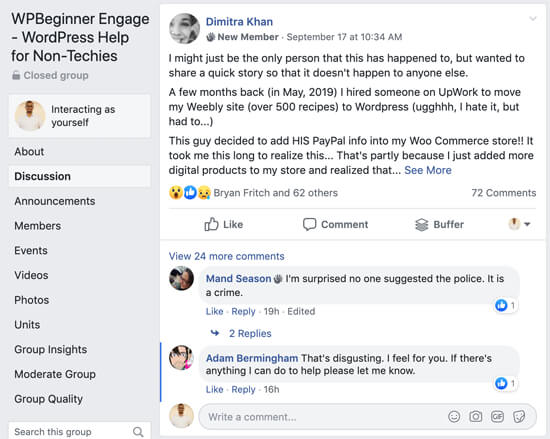
This happened to one of our Facebook group members. She hired a developer who changed the PayPal address in her WooCommerce store. Subtle changes like this are hard to detect unless you have a WordPress user audit log that keeps track of all activity.
WPBeginner founder Syed Balkhi had a similar experience a few years back. He hired a freelance developer who quietly changed several affiliate links. Luckily, Syed caught and fixed the issue thanks to a security audit log plugin.
With these benefits in mind, let’s take a look at how to set up and monitor user activities on your WordPress website. We will cover two plugins, one free and the other best in class:
Method 1: Monitoring User Activity With Simple History (Free)
Simple History is a free user activity monitoring plugin for WordPress but has fewer features. If you run a small website or WordPress blog, then this plugin will work for you.
The first thing you need to do is install and activate the Simple History plugin. You may follow our beginner’s guide on how to install a WordPress plugin for detailed instructions.
Configuring the Simple History Plugin
Upon activation, head over to Settings » Simple History from the left sidebar of your WordPress admin panel.
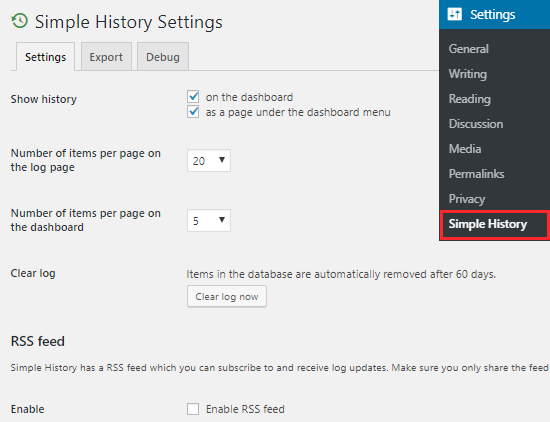
On the settings page, you can choose whether you want the activity log to appear on the dashboard, on a separate page, or both.
You can also decide the number of items that will appear on the Dashboard and the log page.
By default, the Simple History plugin cleans the activity log history that is older than 60 days. You can also delete the history manually by clicking on the ‘Clear log now’ button on the settings page.
This plugin allows you to monitor the history with the help of a secret RSS feed. However, you need to check the Enable RSS feed’ option to use it.
Viewing User Activities With Simple History
To check the user activity log, you need to visit the Dashboard » Simple History page. You can also view them on the Dashboard, but this will depend on how you have configured the settings of this plugin.
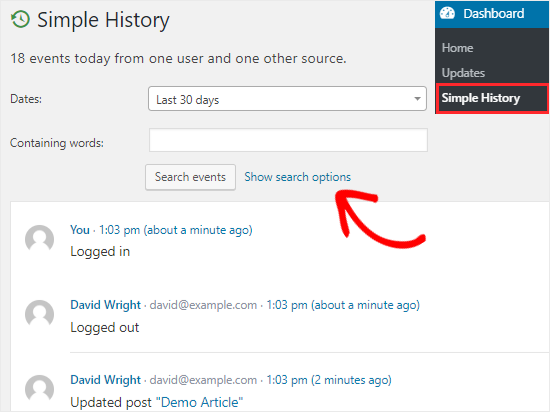
This plugin displays the events of the last 30 days by default. You can change it to a fixed range (up to 60 days) or to a custom range by clicking on the ‘Dates’ dropdown menu.
To search for specific events on your site, you need to click on the ‘Show search options’ link. This will open up a number of fields. You can either use a single field or a combination of them to find the desired data.
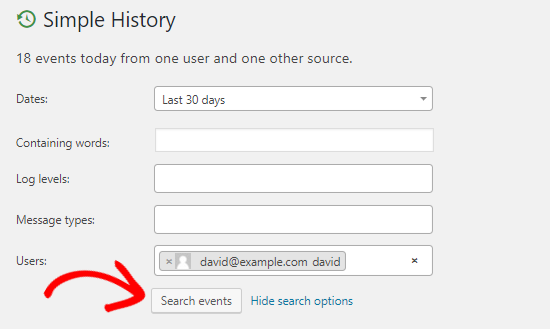
For example, you can use the ‘Users’ field to find someone and then click on the ‘Search events’ button to see the activities of that person in the last 30 days.
By default, the Simple History plugin allows you to monitor these activities: login, logout, wrong password, post/page editing, media upload, plugin install/update, user profile changes, and more.
It also has support for bbPress forums, which lets you monitor forum and topic activities on your website.
Simple History allows you to add your own custom events as well. If you have development experience and want to add a custom event, then you can check out the details on the Simple History page in the WordPress Plugin Directory.
Method 2: Monitor User Activity Using the WP Activity Log (Best)
Although Simple History does a good job of tracking user activities on your website, it is limited in functionality.
If you are looking for a plugin that provides detailed and real-time user activity reports, then you should use the WP Activity Log plugin.
It is a feature-rich plugin that allows you to keep track of every change that happens on your website. You can also get email and SMS notifications for important site events.
To get started, you need to install and activate the WP Activity Log plugin on your WordPress site. For more details, see our guide on how to install a WordPress plugin.
Configuring the WP Activity Log Plugin
Upon activation, you will see a new menu item, WP Activity Log, in the left sidebar of your admin panel. You’ll be asked to enter your license key and click on the ‘Agree & Activate License’ button to start using this plugin.
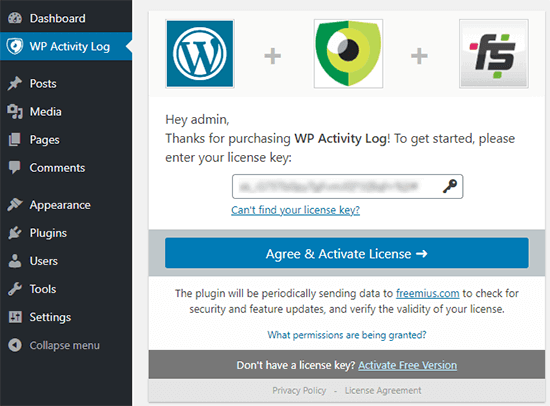
You’ll find the license key in the welcome email that you received after purchasing the plugin. Once activated, you will see new options under the WP Activity Log menu in the left sidebar.
Monitoring User Activity with WP Activity Log
To monitor the events on your website, you need to head over to the WP Activity Log » Log Viewer page.
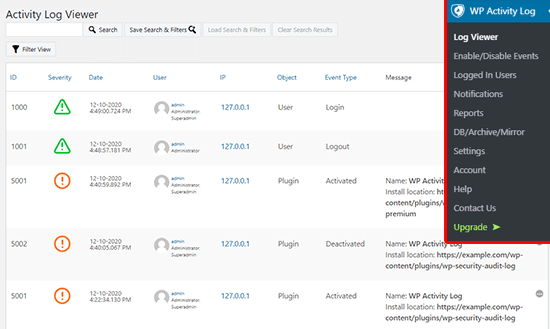
This plugin also displays the latest events at the top bar of your screen. You can also click on those notifications to go to the Log Viewer page.
The log page will allow you to see all events on your website. You will get important details like the date of the event, the user involved, the IP address of the user, and the event message.
For example, if someone logged into your site, then you will be able to find out who it was, what time they logged in, and their IP address.
You can also control the events that you want to track by going to the WP Activity Log » Enable/Disable Events page.
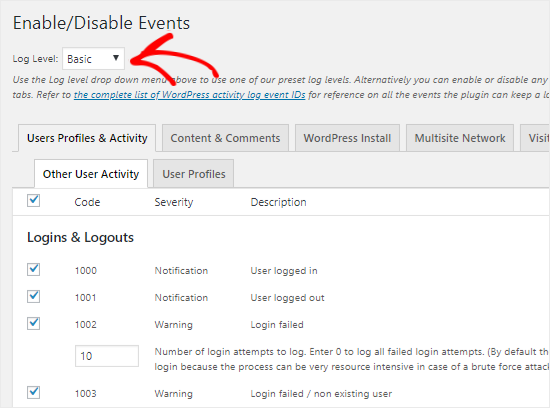
Here, you can select Basic, Geek, or Custom from the ‘Log Level’ dropdown menu. Based on your selection, you will see different event names and their description on that page.
You can now enable or disable individual events by checking or unchecking the boxes. You can do the same by going to different tabs like Content & Comments, WordPress Install, Visitor Events, and more.
To track the logged-in users on your site, you need to go to the WP Activity Log » Logged In Users page.
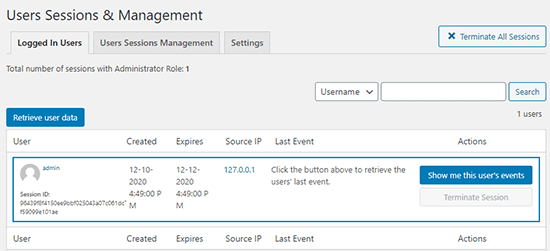
From here, you will see all the users who are logged into your site. You can view all the activity of a certain user or force someone to log out by clicking on the ‘Terminate Session’ button.
If you want to download the activity log of your site, then simply go to the WP Activity Log » Reports page to generate a report based on the criteria that you may have.
Expert Guides on Using WordPress Logs
Now that you know how to monitor WordPress security logs, you may like to see some other guides related to using logs in WordPress.
- How to Perform a WordPress Security Audit (Complete Checklist)
- Best WordPress Activity Log and Tracking Plugins (Compared)
- How to Set Up WordPress Error Logs in WP-Config
- How to Find and Access WordPress Error Logs (Step by Step)
- How to Setup WordPress Email Logs (and WooCommerce Email Logs)
- The Ultimate WordPress Security Guide (Step by Step)
We hope this tutorial helped you to understand how to monitor user activity in WordPress. You may also want to see our ultimate WordPress security guide and our expert pick of the best WordPress firewall plugins.
If you liked this article, then please subscribe to our YouTube Channel for WordPress video tutorials. You can also find us on Twitter and Facebook.



Syed Balkhi says
Hey WPBeginner readers,
Did you know you can win exciting prizes by commenting on WPBeginner?
Every month, our top blog commenters will win HUGE rewards, including premium WordPress plugin licenses and cash prizes.
You can get more details about the contest from here.
Start sharing your thoughts below to stand a chance to win!
Lorenzo says
Hi, very good article, thanks! I would need to know the activity of a user before the installation of a plugin, is it possible? Do you know a way to do it?
WPBeginner Support says
We do not have a recommended way to do that at the moment.
Admin
Artem Russakovskii says
I’ve been using a paid version of this plugin for about a year now, and it’s proven invaluable several times already. Any small business and up with multiple authors should be using it.
WPBeginner Support says
Thanks for sharing your opinion of the plugin
Admin
Jorsana says
Syed Balkhi and your team, I just have to say huge, huge Thank you.
Your emails, FB answers, and advices are priceless.
WPBeginner Support says
Glad we could be helpful
Admin
Naomi says
I just put this on my website and in the last hour I see 56 events that say something like “Failed to login with username “[login]” (incorrect password entered)” Is this normal? Am I having some sort of hacker issues??
WPBeginner Support says
Your site may have had a brute force attack attempted on it. You can use plugins such as login lockdown from our article:
https://www.wpbeginner.com/plugins/how-and-why-you-should-limit-login-attempts-in-your-wordpress/
for a protective measure against this.
Admin
Naomi says
Thanks! I actually just found that site a few minutes ago. I’m going to install it now.
WPBeginner Support says
Glad our recommendation could help
Marilyn says
I’m reading and putting in practice your article “How to Make an Internal Communication System in WordPress Using P2” and I just installed the Simple History plugin, but I noticed that this plugin’s last actualization was 8 months ago. Is it still safe to use it?
WPBeginner Support says
Yes it is.
Admin
Napstor says
going to test
Purab Kharat says
very informative information given by you. We need to log the user activity and actions somewhere in wordpress. But unfortunatly we do not have best user management in wordpress like drupal.