


Are you looking for a way to upload PDF files to your WordPress site?
WordPress allows you to upload PDF files and make them available for download easily.
You can also use PDF file downloads to grow your email subscribers or even sell PDF digital downloads in a members-only area.
In this article, we will share how to upload PDF files to your WordPress site. We will also talk about using PDFs to grow your email list, accept user-generated content, or even create a members-only area.
Why Upload PDF Files in WordPress?
PDFs are one of the most popular file formats, and there are many benefits of uploading them on your WordPress website.
You can repurpose your existing content by converting long guides and tutorials into PDF files.
Then, you can offer them as exclusive content to users or use them to build an email list.
Another benefit of uploading PDF files is that you can use them to boost user engagement. You can easily reduce a high bounce rate by allowing visitors to download PDF files and complete an action.
You can even use PDF files to offer exclusive members-only premium content for your paying subscribers as part of your course or membership site.
That being said, let’s see how to upload PDF files in WordPress.
Video Tutorial
If you prefer written instructions, then just keep reading.
How to Upload PDF Files in WordPress
If you are just looking to upload a PDF file and share it with everyone on your site, then this is the easiest method because it works without installing any plugins.
Uploading PDF files in WordPress is similar to uploading images and other media files on your WordPress website.
To get started, you need to log in to your WordPress admin area and then go to Media. After that, click the “Add New” button.
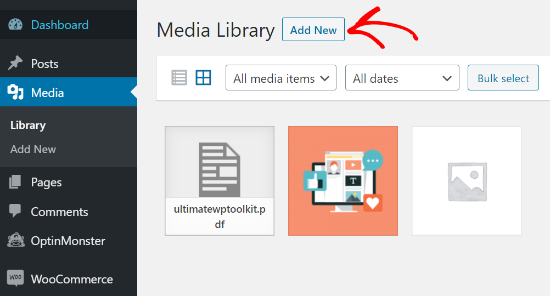
Simply drag and drop your PDF file into WordPress.
Or, you can click the “Select Files” button to upload it.

After that, the PDF file will be uploaded to your WordPress blog.
How to Add a PDF File to a Post or Page in WordPress
Once you have uploaded the PDF file, the next thing to do is add it to your posts or pages.
WordPress allows you to easily embed PDF files or show them as links that users can click to download the files.
To get started, you need to edit the post or page where you want to add the PDF file.
On the post edit screen, you must click on the ‘+’ add block button and then add the File block to the content area.
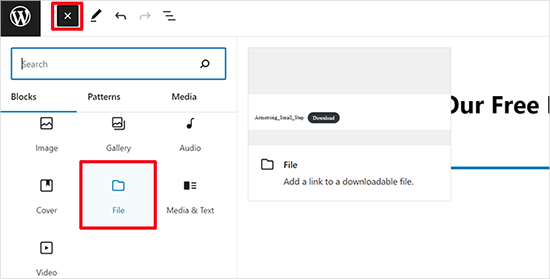
Next, click the ‘Media Library’ option.
This will bring up a popup where you can select the PDF file to add to the post or page.
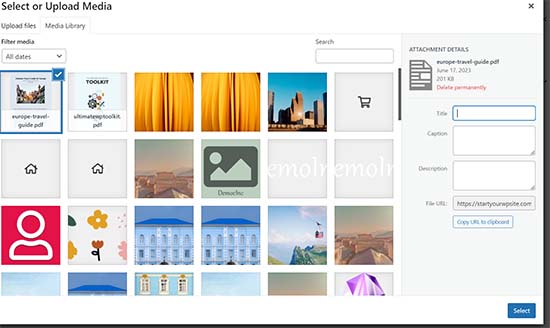
Click ‘Select’ to continue.
WordPress will now automatically embed your PDF file in your post or page. You will also see a live preview of the PDF embed in the editor.
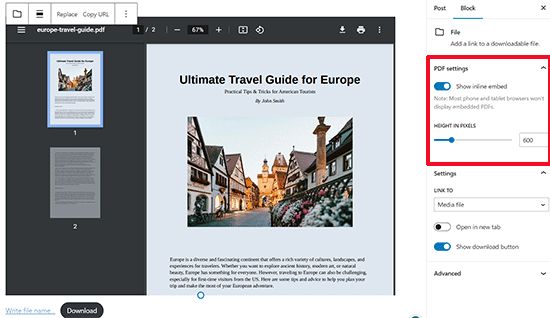
If you only want to show the download instead of the full PDF embed, then you can turn off the toggle next to the ‘Show inline embed’ option in the block settings.
Once you are satisfied with the changes, preview the PDF file upload and then publish it.
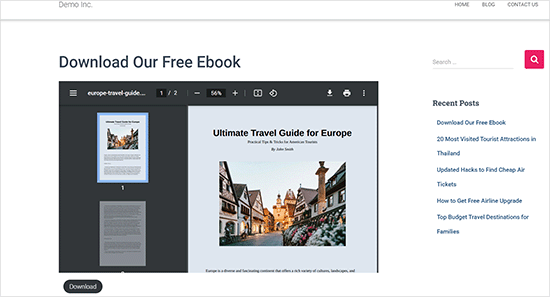
This is the quickest and simplest way of showing your uploaded PDF files on a WordPress site.
However, if you want to display PDF documents with more options and better PDF viewers, then you will need a WordPress PDF plugin.
We recommend using the WP PDF Embedder plugin, which lets you easily embed mobile-friendly PDF files in WordPress. The PDF viewer comes with a toolbar so users can zoom in, navigate to specific page numbers, enter fullscreen mode, download PDFs, and more.
There’s also a free version of WP PDF Embedder that you can get started with.
For more information, follow our detailed guide on how to embed PDFs, spreadsheets, and others in WordPress blog posts.
Pro Tips for Making the Most of Your PDF Uploads
After uploading a PDF file, there’s a lot more that you can do.
Here are some pro tips on how to use your PDF uploads to grow your email list, measure the number of downloads, allow users to upload PDF files, or even sell PDF downloads as premium content.
1. Offer Content Upgrades to Build Your Email List
One of the fastest ways to grow your email list is by offering content upgrades to website visitors.
Content upgrades are bonus content that people can download in exchange for their email addresses. You can turn your blog posts into PDF files and then allow users to download them when they sign up for the email list.

The easiest way to add content upgrades in WordPress is with OptinMonster.
It’s the best lead generation plugin that allows you to create beautiful opt-in forms like popups, in-content signup forms, floating bars, scroll boxes, etc.
Using their drag-and-drop builder and different pre-built templates, you can build and show a content upgrade option in just a few clicks.
Here’s an example of the results of content upgrades from one of our other websites:
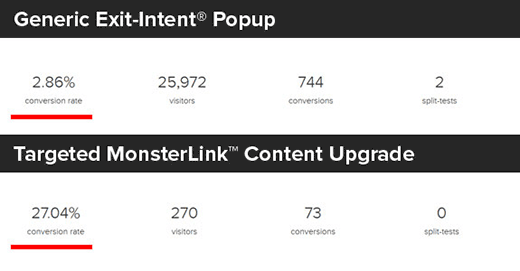
The OptinMonster blog has even more content upgrade ideas that you can use to get more email subscribers.
2. Measure PDF Download Stats in WordPress
As you start to offer different PDF files for downloads, it is important to find out which files are performing well and which are not.
To measure PDF file downloads in WordPress, you can use MonsterInsights. It’s the best Google Analytics plugin for WordPress, used by over 3 million websites.
Once enabled, it automatically tracks file downloads on your site.
MonsterInsights Top Download Links report helps you see which PDF files get the most downloads. You can use this information to create more PDF documents on similar topics.

3. Allow Users to Upload PDF Files
Aside from uploading PDF files in WordPress by yourself, you can also allow users to submit PDF files to your site without giving them admin access.
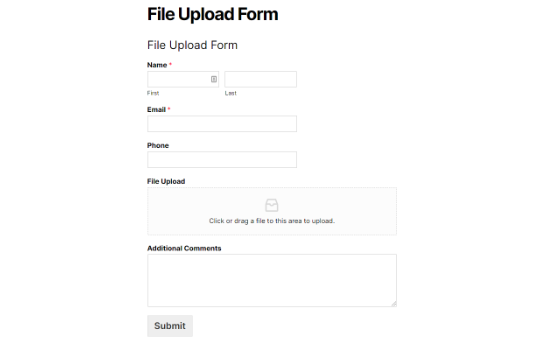
For this, you need to create a file upload form. We recommend using WPForms because it’s the best WordPress contact form plugin used by over 6 million websites.
Once activated, you simply need to create a file upload form using WPForms and let users submit PDF documents.
4. Create Members-Only PDF Documents area
If you want to sell PDFs as digital downloads or upload premium PDF content to a members-only area, then you can do it in WordPress using a membership plugin.
We recommend using MemberPress because it’s the leading membership platform that allows you to create courses, add members-only content, and more.
We have created a complete step-by-step guide on how to create a membership site in WordPress.
We hope this article helped you learn how to upload PDF files to your WordPress site. You may also want to go through our guide on how to create an email newsletter and our comparison of the best WordPress SEO plugins and tools to grow your traffic.
If you liked this article, then please subscribe to our YouTube Channel for WordPress video tutorials. You can also find us on Twitter and Facebook.




Syed Balkhi says
Hey WPBeginner readers,
Did you know you can win exciting prizes by commenting on WPBeginner?
Every month, our top blog commenters will win HUGE rewards, including premium WordPress plugin licenses and cash prizes.
You can get more details about the contest from here.
Start sharing your thoughts below to stand a chance to win!
Jeanne says
Hello!
When I upload an interactive pdf file to the Media Library, the area of the document that has the clickable links is totally blacked out. It looks fine and the links work when I open it from my computer. Any idea why this is happening?
Thank you,
Jeanne
WPBeginner Support says
There are some possible reasons for this, for a starting point we would recommend trying the plugin from our article below:
https://www.wpbeginner.com/plugins/how-to-add-a-pdf-viewer-in-wordpress/
Admin
Neil Jones says
Excellent work! It works. many others are out of date and ask you to add useless plug-ins. Thank you for saving an afternoon’s work!
WPBeginner Support says
Glad our guide was able to help!
Admin
Harriet says
Thanks for the article! Is there a limit on how many pdfs can be uploaded on certain plans? (i.e no more than 5000 pdfs, no more than 1000MB in total, etc.)
WPBeginner Support says
While there is a limit, it would depend on your hosting and how quickly a file of that size would load for your visitors.
Admin
Harriet says
Thank you for letting me know! Would it be possible to get more information on that limit so I can make an informed decision about adopting WordPress or not? Ideally I would like to know if it would be feasible to host 2000+ documents of approx 200KB-1MB each.
WPBeginner Support says
As there are many different hosting providers and plans, you would need to reach out to the host you are looking to use and they can let you know their specifications.
Karen Tankersley says
When I upload the pdf into the media library and then place it in the post, it puts not only the name and download button but the entire PDF is shown above the link. How can I not have the actual document show and only have the link show? I don’t see any way to eliminate the document from being shown. Am I missing something?
WPBeginner Support says
It sounds like the PDF is being embedded. You should be able to add the URL as a link to text or use a button following our guide below for preventing the embed.
https://www.wpbeginner.com/plugins/how-to-add-buttons-in-wordpress-without-using-shortcodes/
Admin
Karen Tankersley says
Yes, that is exactly what was happening. Thanks for the informative video. I was able to create a button for the download with the info on the video.
WPBeginner Support says
Glad it was helpful!
Gin says
Hi,
I’m trying to figure out why once I deleted a PDF file from my media library in WordPress, the URL link to the PDF is still working and showing the document. Once I delete the PDF shouldn’t that URL no longer be accessible?
WPBeginner Support says
That would delete the file from your site, you would want to ensure you clear the caching on your site to ensure you’re not seeing the cached version of the file.
Admin
Sam Onuegbu says
Thank you for this tutorial.
I’d like to know if hosting PDFs on my WordPress site will slow the site speed in anyway?
WPBeginner Support says
Only if you start to run low on your hosting provider’s storage space for your site.
Admin
Anjana says
Hi…I am trying to upload a pdf file size as small as just 3.5mb, but it’s unable to upload on my WordPress website. I also tried uploading it through internet explorer but it won’t work. Also, I tried by changing the file location on my pc. Please suggest how to upload the file.
WPBeginner Support says
For changing the maximum upload size, you would want to follow our guide below:
https://www.wpbeginner.com/wp-tutorials/how-to-increase-the-maximum-file-upload-size-in-wordpress/
Admin
Sheila Goldberg says
I am trying to upload a PDF to my Word Press site but it says it’s too large to preview. It’s about 750mb. Is there some way for me to get the PDF on my website?
WPBeginner Support says
For a file that large, if you are unable to reduce the file size, we would recommend having the file on a third-party service like Google Drive or Dropbox and embedding a download link on your site.
Admin
Gabor Szendrei says
Hello,
I am trying to find download count for a PDF I uploaded to a blog post.
I did not install any plugin to track downloads – I guess I just assumed that this would be easier to figure out.
Godaddy hosts the site and they want to charge me $50 to investigate.
Google searches keep taking me to plugins I could download, but none seem to be able to retroactively tabulate downloads.
Any help would be much appreciated!
Thank you,
Gabor
WPBeginner Support says
We do not have a recommended method for retroactively counting downloads at the moment.
Admin
rahul sharma says
hi,
the WordPress plugin “Google Doc Embedder” is retired (only the gview shortcode is still working ).
please suggest a few more plugins to make it more easy and secure in terms of upload or download.
thanks
Glenda says
We use WordPress for our blog. The blog is maintained by one individual but the posts are written by numerous other people and emailed to the person in charge of maintaining the blog. Our posts are written with images placed in specific areas within the text, some have frames, and some have citations with the image. They are written using Word with images inserted into the appropriate place within the text.
The problem is that the person maintaining the blog says she has to Copy&Paste the text and go back and add the images manually since there are only blank spots where the images should be. This causes issues with the posted blog not being the same as the written blog, since there is an issue with sizing, the framing, and citation placement for the image.
It has been suggested that we convert the word doc to a .pdf file and post it, but I don’t see anything on the WordPress site that tells me the document will appear in the blog in the same layout as the original (images in exact location, same size, framing, and citations in place). Or if we would still need to load the images separately.
Also, if there is a way to upload the Word doc as written into WordPress without the image issues PLEASE let me know what that would be.
Please help,
WPBeginner Support says
Hi Glenda,
Unfortunately, there is no reliable way to do that. You can add users to your WordPress blog and assign them Contributor user role. Contributors can add new post and edit their own posts but they cannot publish them. They will be able to write inside WordPress admin area and save their work.
The person responsible of maintaining the blog can review their articles and publish them.
Admin
Maureen says
I started a blog recently and this site has proved to be very useful. But I have a question regarding file uploads. What if the file I want for download is not just pdf but like psds and other files. Can I do that too? Or will I need to register to another file hosting provider if I have too many to upload? Because that will eat a lot of space. What is your suggestion on that?
Leighann says
Thank you so much–this tutorial was an answer to prayers, seriously!
Rosana says
Hello!
I am trying to upload a pdf into a post using the fist method.
So far so good, everything works like it should but the pdf title has special characters and the link created by wordpress looks normal inside post editor. But when published it shows some errors like extra spaces between characters.
If I copy and past the link into a plain text editor I can see some erros and if I delete the special characters inside post editor and type again it works fine.
That would solve the problem but I will be inserting some files and I wish I could rely on something else than typing every special character by myself.
In the past wordpress had problems dealing with text pasted from word. Is it the case?
Can you help me, please?
Mariam says
I would like to learn how to use wordpress and want to install it on my personal computer. Is this possible
…and. What is wamp…do i need this too?
I have windows 10 are they compatible?
WPBeginner Support says
Hi Mariam,
Please see our guide on how to install WordPress on your Windows computer.
Admin