


Are you looking for the best tutorials to work with WordPress navigation menus? WordPress navigation menus allow you to easily customize and manage menus on your website. In this article, we will show you the best tutorials to master WordPress navigation menus.
Since this is a lengthy article, we have added a list of contents for easier navigation.
- Getting Started with WordPress Navigation Menus
- Add Social Media Icons to WordPress Menus
- Show Different Menus to Logged In Users in WordPress
- Add Conditional Logic to Navigation Menus
- Styling WordPress Navigation Menus
- Add Image Icons with Navigation Menus in WordPress
- Add Custom Navigation Menus in WordPress
- Add Slide Panel Menu in WordPress Themes
- Creating a Mobile Ready Responsive WordPress Menu
- Add a Fullscreen Responsive Menu in WordPress
- Adding Description with Navigation Menus in WordPress
- How to Add Topics in WordPress Navigation Menus
- How to Add Navigation Menus in WordPress Sidebar
- Add WordPress Navigation Menu in Posts and Pages
- Add NoFollow Links in WordPress Navigation Menus
1. Getting Started with WordPress Navigation Menus
In web design, navigation menu is a list of links that allows your website visitors to visit different pages and sections on your website. It helps users navigate around your website, hence the name navigation menu.
WordPress comes with a built in tool that allows you to create and use menus on your website. This tool is located at Appearance » Menus page in your WordPress admin area.
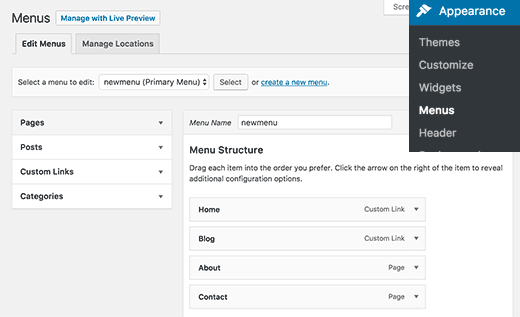
Here you can create menus by adding items from left hand column to the right. You can add any WordPress post, page, categories, and custom links to your menus.
For detailed instructions see our beginner’s guide on how to add navigation menus in WordPress.
2. Add Social Media Icons to WordPress Menus
WordPress menus can also be used to add social media buttons to your website. This allows you to easily update icons, rearrange them, and add new social media icons whenever you want.
The easiest way to do this is by using the Menu Social Icons plugin. For more details, see our step by step guide on how to install a WordPress plugin.
Upon activation, head over to Appearance » Menus page. Create a new social menu and then on custom links tab from left column.
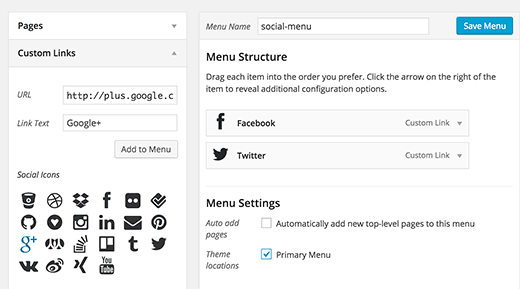
You will see the social media icons below the link text and URL fields. All you need to do is click on a social media icon and enter your social profile URL. When you’re done, click on add to menu button.
Repeat this process for all social media profiles that you want to add. Once you are done select a menu location and then click on the save menu button.
For more detailed instructions see our guide on how to add social media icons to WordPress menus.
3. Show Different Menus to Logged In Users in WordPress
If you run a WordPress membership site, then you may want to show different menus to your logged in users. Here is how you can easily achieve this.
First you need to create two different menus. One for your logged in users and one for users who are not logged in. You can name these menus logged-in and logged-out.
Next, you need to add this code to your theme’s functions.php file or a site-specific plugin.
function my_wp_nav_menu_args( $args = '' ) {

if( is_user_logged_in() ) {
	$args['menu'] = 'logged-in';
} else {
	$args['menu'] = 'logged-out';
}
	return $args;
}
add_filter( 'wp_nav_menu_args', 'my_wp_nav_menu_args' );
That’s all. You can now test your navigation menus in action.
For more detailed instructions see our tutorial on how to show different menus to logged in users in WordPress.
4. Add Conditional Logic to Navigation Menus
Want to change menus based on certain conditions? Like a different menu on homepage, or hiding an item on single posts. Here is how you can achieve this in WordPress.
First you need to install and activate the If Menu plugin.
Upon activation, visit Appearabnce » Menus screen and click on a menu item that you want to edit. You will notice a new option to ‘Enable conditional logic’.
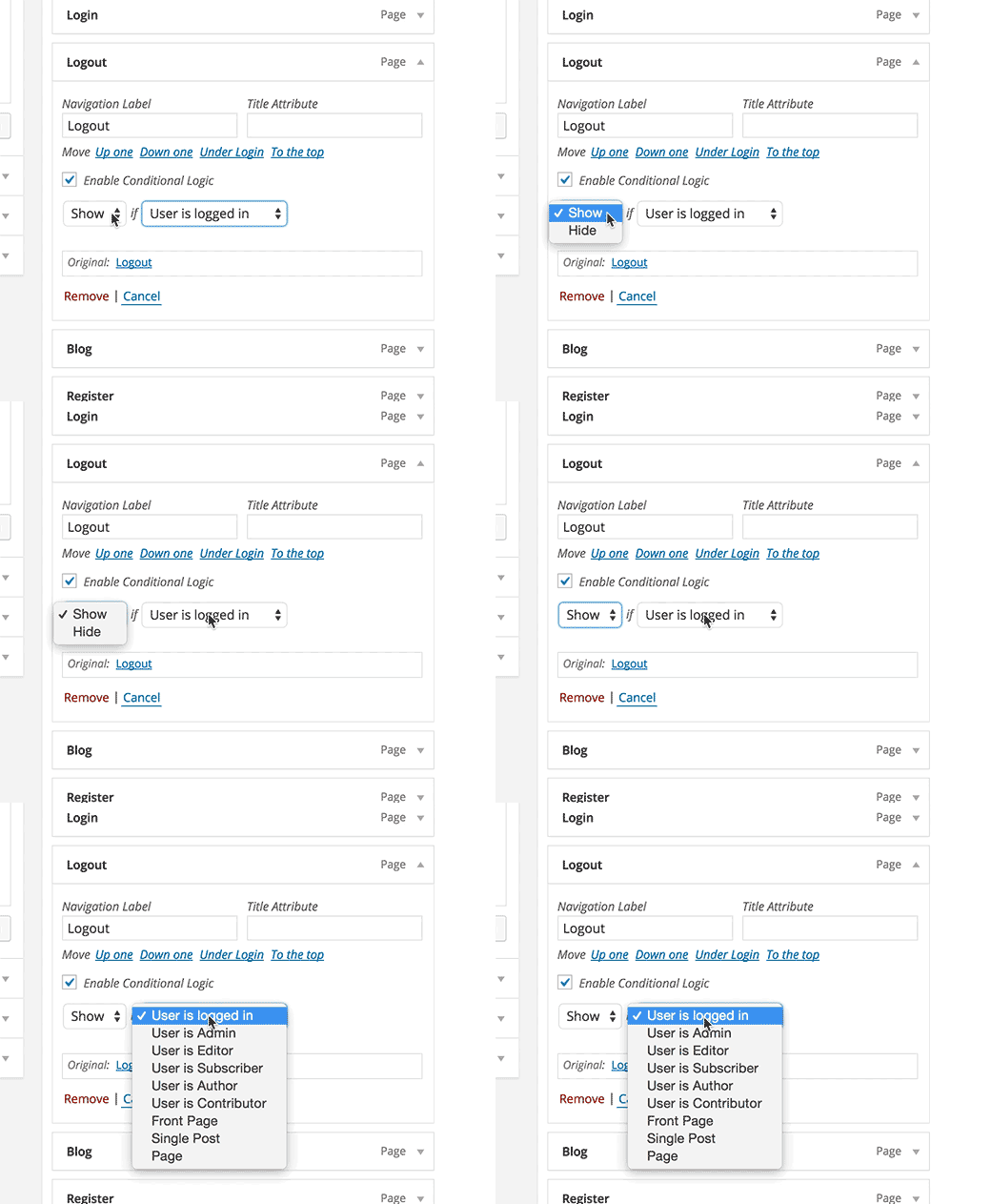
Checking this option will show you two drop down options. You can select show or hide for a menu if it matches the certain conditions. For example, hide menu item if a user is an admin or show a menu item only if a user is vewing a single post.
For more detailed instructions see our article on how to add conditional logic to WordPress menus.
5. Styling WordPress Navigation Menus
Your WordPress theme controls the appearance of navigation menus on your website. Using CSS you can customize the appearance of navigation menus.
The easiest way to do this is by using the CSS Hero plugin. It is a premium WordPress plugin that allows you to customize any WordPress theme without writing a single line of code (No HTML or CSS required). See our CSS Hero review to learn more.
You can also style your navigation menus by manually writing CSS. For detailed instructions, see our guide on how to style WordPress navigation menus.
6. Add Image Icons with Navigation Menus in WordPress
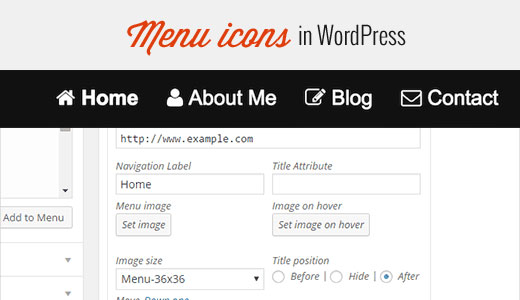
Many popular websites using image icons next to their navigation menus to make them more noticeable. Here is how you can add image icons with navigation menus in WordPress.
First, you need to install and activate the Menu Image plugin. Upon activation, go to Appearance » Menus. There you will see an option to add images with each item in your existing menu.
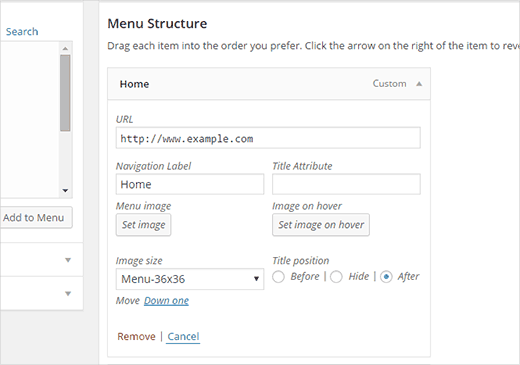
You can also use CSS to add image icons. For detailed instructions, see our guide on how to add image icons with navigation menus in WordPress.
7. Add Custom Navigation Menus in WordPress
Most free and premium WordPress themes come with pre-defined locations to display your navigation menus. However, you can also add custom navigation menus to your themes.
First you will need to register your new navigation menu by adding this code to your theme’s functions.php file.
function wpb_custom_new_menu() {
  register_nav_menu('my-custom-menu',__( 'My Custom Menu' ));
}
add_action( 'init', 'wpb_custom_new_menu' );
This code will create ‘My Custom Menu’ for your theme. You can see this by editing a menu on Appearance » Menus page.
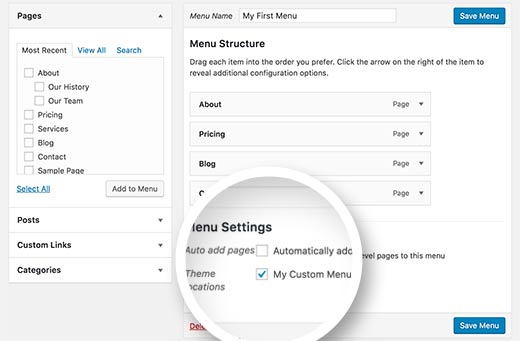
To display your custom menu, you will need to add this code to your theme where you want to display the menu.
<?php
wp_nav_menu( array(
    'theme_location' => 'my-custom-menu',
    'container_class' => 'custom-menu-class' ) );
?>
For more detailed instructions, see our article on how to add custom navigation menus in WordPress themes.
8. Add Slide Panel Menu in WordPress Themes
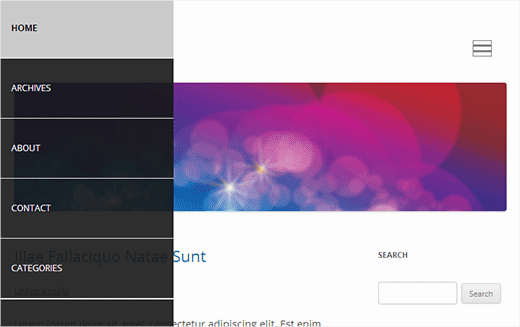
Want to show your site’s navigation menu is a slide-in panel? Using slide in panels makes your menus more interactive, less intrusive, and fun specially on mobile devices.
However, in order to add them you will need medium level understanding of JavaScript, WordPress themes, and CSS.
For step by step instructions, see our guide on how to add a slide panel menu in WordPress themes.
9. Creating a Mobile Ready Responsive WordPress Menu
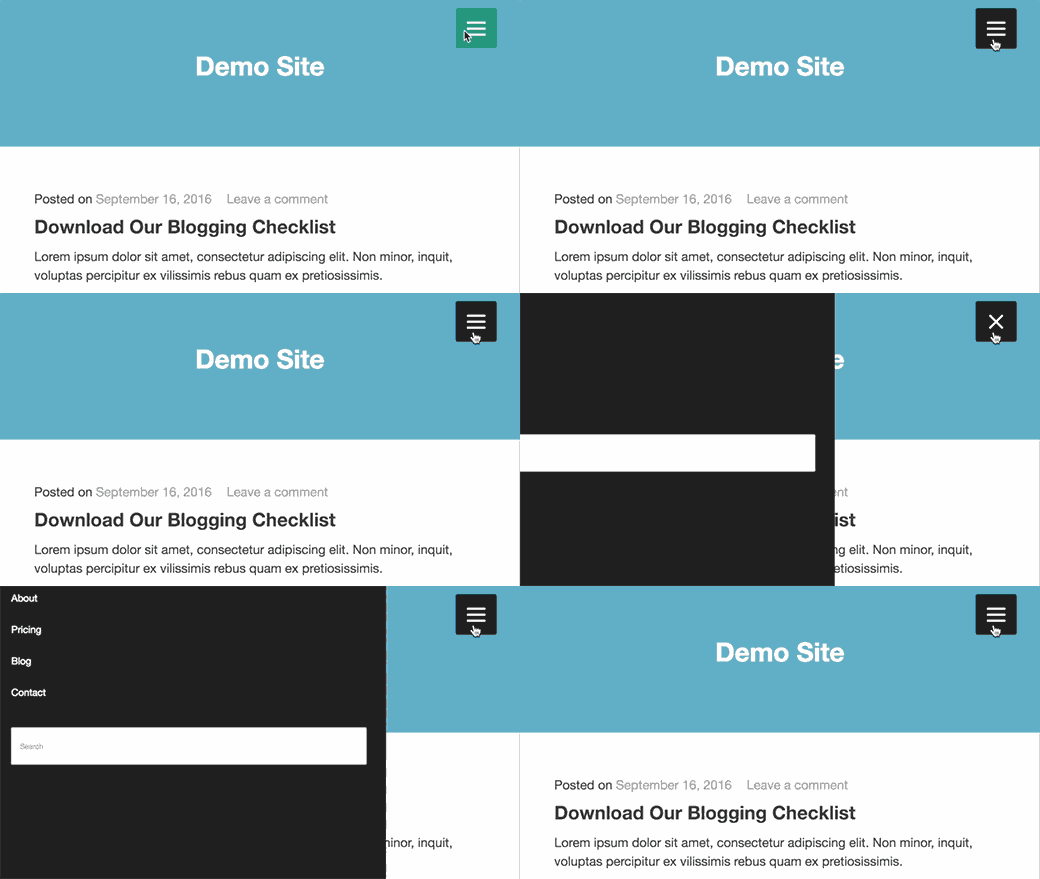
Most WordPress themes are responsive and come with mobile-ready navigation menus. However, if your theme doesn’t handles navigation menus well on mobile devices, then it affects user experience on mobile devices.
Luckily, there are some easy ways for you to add mobile ready responsive menus without writing any code.
First, you need to install and activate the Responsive Menu plugin.
Upon activation, you need to click on ‘Responsive Menu’ in your WordPress admin bar to configure plugin settings.
Simply select a width after which mobile responsive menu should be visible. After that you need to select an existing navigation menu.
Don’t forget to click on ‘Update Options’ button to store your settings. That’s all you can now visit your website and resize browser screen to see the mobile responsive menu.
There are many other ways to add a mobile responsive menu. Like a menu that appears with a toggle effect, a slide in menu, and responsive select menu. Learn more about all of them in our guide on how to create a mobile-ready responsive WordPress menu.
10. Add a Fullscreen Responsive Menu in WordPress
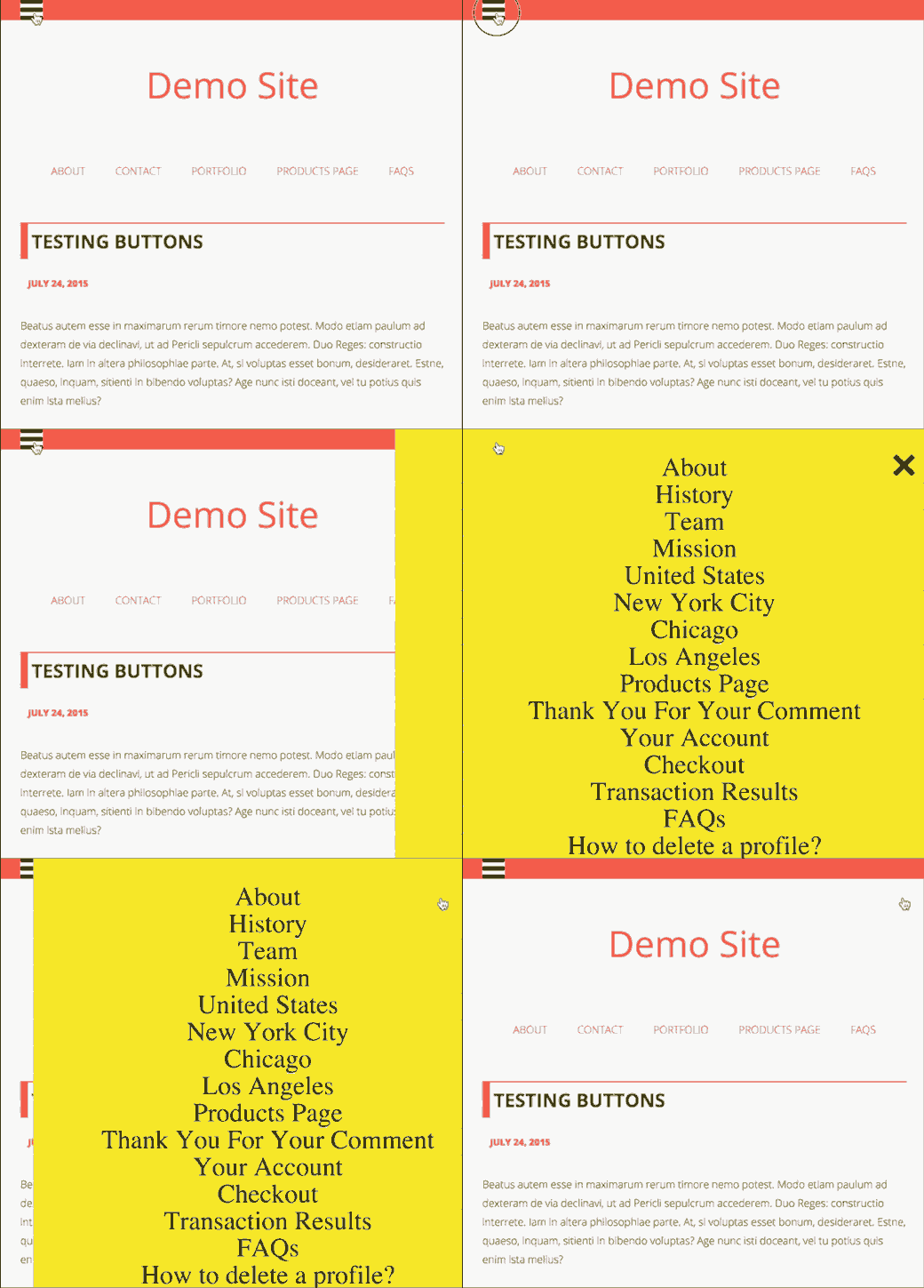
Have you noticed how some popular websites use a fullscreen navigation menu? Usually it requires some creative use of JavaScript and CSS. Luckily, you can do this in WordPress without writing any code.
First, you need to install and activate the DC – Full Screen Responsive Menu. Upon activation, you need to visit Appearance » DC Fullscreen Menu page to configure the plugin settings.
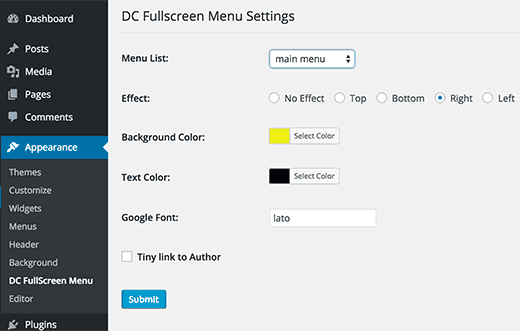
Here you can choose a menu, background and text color, and Google font for your fullscreen menu.
Click on the submit button to store your settings. You can now visit your website to see your fullscreen responsive menu in action.
For more on this topic, see our guide on how to add a fullscreen responsive menu in WordPress.
11. Adding Description with Navigation Menus in WordPress
WordPress navigation menus are usually just text links showing the link label or anchor text. What if you wanted to add a little description or tag line for each item in your navigation menu?
Luckily, WordPress comes with built-in functionality to add description with every item in your navigation menus.
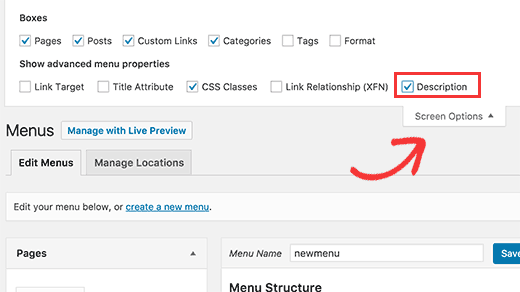
First, you will need to enable the descriptions item. Click on the Screen Options button at the top right corner of the screen.
This will show a list of boxes and options that you can enable. You need to check the box next to Description.
Now scroll down and click on a menu item to edit it and you will see an option to add description.
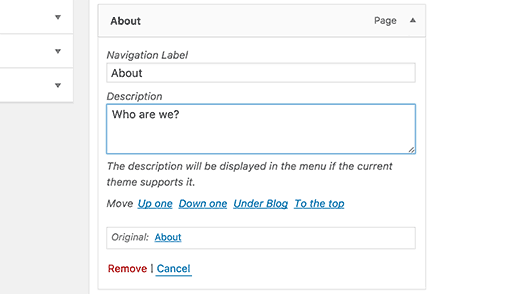
Add your description and click on the save menu button.
If your theme supports menu descriptions, then you will be able to see them right away. Otherwise, you will have to edit your theme files to show descriptions.
For detailed instructions, see our guide on how to add menu descriptions in your WordPress theme.
12. How to Add Topics in WordPress Navigation Menus
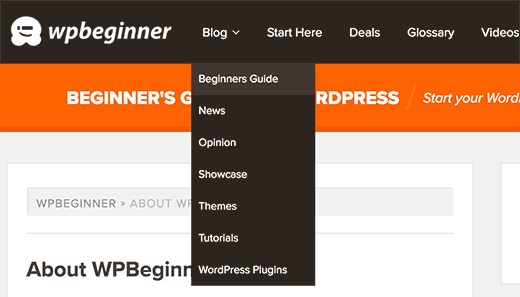
We are often asked about how to add blog topics to navigation menus in WordPress. Many beginners assume that they need to create pages for each topic in order to add them to menus.
What you actually need is categories. Categories and tags are built in WordPress taxonomies which allow you to sort content into relevant topics.
Add your articles into relevant categories and then head over to Appearance » Menus page. Click on the categories tab to expand it and then select the categories that you want to display in your navigation menus.
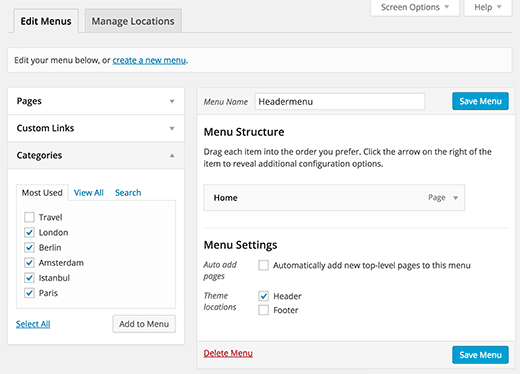
For more details, see our article on how to add topics in WordPress navigation menus.
13. How to Add Navigation Menus in WordPress Sidebar
WordPress themes usually have navigation menus on the top or bottom. However, you can also create and add menus into your WordPress sidebar as well.
Simply visit Appearance » Widgets page and add ‘Custom Menu’ widget to your sidebar. For detailed instructions, see our guide on how to add and use widgets in WordPress.
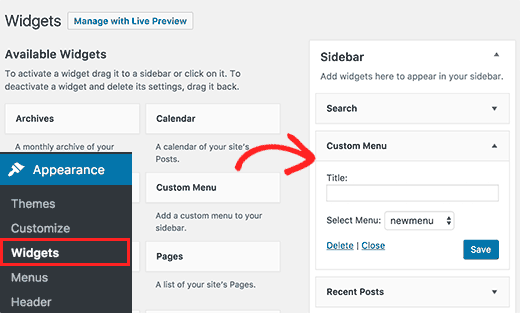
After adding the widget to a sidebar you can select a menu from the drop down option. Don’t forget to click on the save button to store your settings.
14. Add WordPress Navigation Menu in Posts and Pages
Usually navigation menus are shown in the header or sidebar of a website. However, sometimes you may want to add a menu inside a WordPress post or page. Here is how you would do that.
First, you need to install and activate the Menu Shortcode plugin. Upon activation, edit the post or page where you want to display your menu and add this shortcode:
[listmenu menu="Your Menu Name"]
Don’t forget to replace ‘Your Menu Name’ with the name of your own navigation menu. Save or publish your post and then click on the preview button.
For more details, see our guide on how to add WordPress navigation menu in posts or pages.
15. Add NoFollow Links in WordPress Navigation Menus
Typically, your site’s navigation menu contains links to your own posts and pages. However, sometimes you may need to add a link to an external site.
Many SEO experts recommend adding rel=”nofollow” attribute to external links. Here is how you will add nofollow attribute to links in WordPress navigation menus.
First, you need to visit Appearance » Menus page and then click on Screen Options button at the top right corner of the screen.
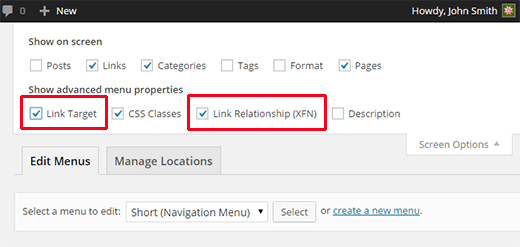
This will bring down a menu where you need to check the boxes next to Link Relationship (XFN) and Link Target options.
Now click on the menu item you want to edit. You will notice two new options, Link Relationship and Open link in a new window/tab.
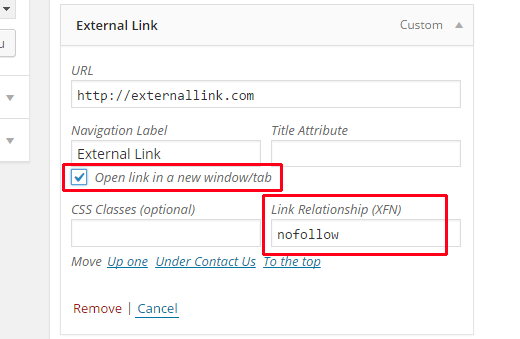
You need to enter nofollow in the link relationship option. You can also check the open link in new window/tab option if you want.
Click on the save menu button to store your changes. Now this particular link in your WordPress navigation menu will have rel=”nofollow” attribute added.
For more detailed instructions, see our tutorial on how to add nofollow links in WordPress navigation menus.
We hope this article helped find the best tutorials to master WordPress navigation menus. You may also want to see our list of 24 must have WordPress plugins for business websites.
If you liked this article, then please subscribe to our YouTube Channel for WordPress video tutorials. You can also find us on Twitter and Facebook.





Syed Balkhi says
Hey WPBeginner readers,
Did you know you can win exciting prizes by commenting on WPBeginner?
Every month, our top blog commenters will win HUGE rewards, including premium WordPress plugin licenses and cash prizes.
You can get more details about the contest from here.
Start sharing your thoughts below to stand a chance to win!
ERFmama says
Thank you so much for a fantastic overview! I’ve learned a few new things!
