


Are you looking to do a mass search and replace in WordPress?
Whether you want to find and replace a specific text, URL, or image on your WordPress website, you can easily do so by using a find-and-replace WordPress plugin or a simple SQL query.
In this article, we will show you how to find and replace text in your WordPress database.

When Do You Need to Find & Replace in the WordPress Database?
There are a few scenarios when you might need to find and replace items within the database of your WordPress website.
For example, let’s suppose that you have added specific text or URLs to a number of your posts. You don’t know which posts you have added that text to, but you do know that there are a lot of them.
Now, you can manually search your site and edit every single post one by one. But that’s going to take a lot of time and has a high chance of you missing some of the text you want to change.
Using a single command to automatically find and replace the items will do the same thing but much quicker and more efficiently.
There is one downside to this method, though. If you make a mistake, then you will not be able to undo it. Once you replace the text, it is gone. You will need to carefully type the text you are looking for and the text you want to replace it with.
Having said that, let’s see how you can easily find and replace text in your WordPress database.
Before Running Search and Replace on Your Database
As we mentioned earlier, the changes you make to your database will not be reversible. You need to be very careful to make sure that you don’t lose data.
First, you need to create a WordPress database backup. You can do that by using a WordPress backup plugin like Duplicator.
Alternatively, you can also create a database backup using phpMyAdmin.
After creating the backup of your WordPress database, you can move on to run your find and replace commands.
Running Find and Replace With a WordPress Plugin
If you are not familiar with code and don’t want to write a custom SQL query, then there is an easy-to-use find and replace WordPress plugin called Better Search Replace.
First, you need to install and activate the Better Search Replace plugin. For more details, you can see our guide on how to install a WordPress plugin.
Then, you must visit the Tools » Better Search Replace in your WordPress admin dashboard.
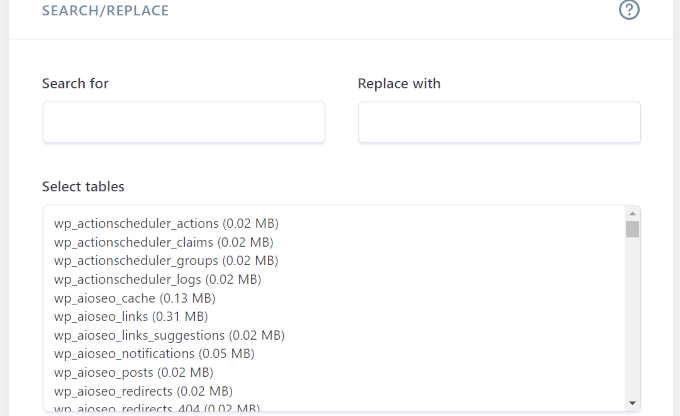
From here, enter the text you want to change into the ‘Search for’ field. You must then write the text you want to replace it with into the ‘Replace with’ field.
You also have the option to select specific tables within your WordPress database.
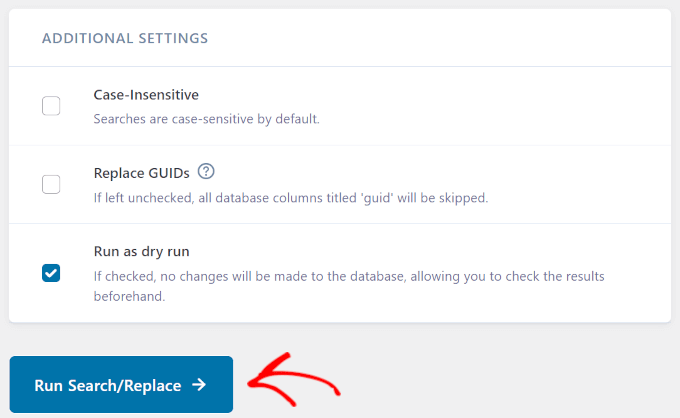
In the ‘Additional Settings’, we also recommend checking ‘Run as dry run’. That way, the plugin will allow you to check the changes it will make before it applies them.
Then, simply click on ‘Run Search/Replace’.
If you need more help, we have a detailed guide on how to search and replace in WordPress with a Better Search Replace plugin.
Running Find & Replace MySQL Query with phpMyAdmin
You can also use phpMyAdmin to find and replace text from your WordPress database.
First, you need to log in to the dashboard of your WordPress hosting account. For this tutorial, we will be using Bluehost.
Once you are there, click on the ‘Websites’ option from the left column and then switch to the ‘Advanced’ tab.
After that, scroll down to the ‘PHPMyAdmin’ section and click the ‘Manage’ button next to it.
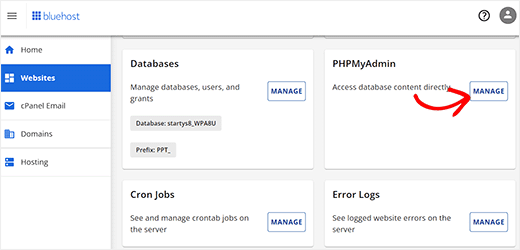
This will launch phpMyAdmin in a new window.
Here, you must click on your WordPress database name and then click on ‘SQL’.
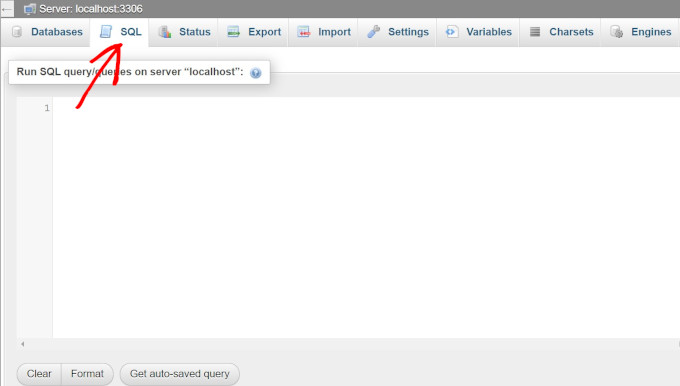
You will then need to enter your SQL query in this format:
update TABLE_NAME set FIELD_NAME =
replace(FIELD_NAME, 'Text to find', 'text to replace with');
For example, if you wanted to search for text in a WordPress post’s content, then you would write your query like this:
update wp_posts set post_content =
replace(post_content,'Text to find','text to replace with');
Then, click on the ‘Go’ button to continue.
phpMyAdmin will run your SQL query, and upon success, it will show the number of rows affected by the query.
You can now visit your WordPress site to see the changes in action.
We hope this article helped you learn how to find and replace text with one click in your WordPress database. You may also want to see our beginner’s guide on WordPress database management with phpMyAdmin and our expert picks of the best WordPress database plugins.
If you liked this article, then please subscribe to our YouTube Channel for WordPress video tutorials. You can also find us on Twitter and Facebook.



Syed Balkhi says
Hey WPBeginner readers,
Did you know you can win exciting prizes by commenting on WPBeginner?
Every month, our top blog commenters will win HUGE rewards, including premium WordPress plugin licenses and cash prizes.
You can get more details about the contest from here.
Start sharing your thoughts below to stand a chance to win!
Chris says
Can do search and replace HTML code? I have snippets of (table td tr) code I would like to replace.
WPBeginner Support says
It would depend on where that code was added from, you should normally be able to edit the page that it is on for modifying the code.
Admin
Shahala says
Hey there! could you please tell me how can I do this find and replace in sql for a word only in specific language?
I tried using language queries but din’t work out!
I really appreciate any help towards this. Thank you
WPBeginner Support says
Unless I hear otherwise, we don’t have a language specific search at the moment sadly.
Admin
Saud Shah says
How can we change 2018 to 2019 in categories and page titles with this plugin or phpmyadmin
WPBeginner Support says
For the post and page titles, you would search the wp_posts table but, for changing categories and their urls you would want to do that manually and create 301 redirects.
Admin
Aminu says
please, how do you replace texts in posts title?
Vishal says
Thanks a lot for this. I was looking for the exact same solution.
Anang says
Thanks a lot. It saves me hours of work.
RCdiy says
I want to replace all instances of “OpenTx” with “OpenTX” but skipping URLs. So basically only what the viewer sees… How do I do this? I’ve installed both Search Replace and Better Search Replace but they also replace in the URLs…
Piter says
I tried plugins “Search $ replace” and “Better Search Replace” but there was no effect. Links in my posts was there. But…
Thanks a lot for code metod, it works fine. It takes only few seconds.
samowal says
Thank you very much, man.
Peter says
You already wrote an article about this last year: https://www.wpbeginner.com/plugins/search-and-replace-plugin-for-wordpress-database/
WPBeginner Support says
Thanks for noticing This is actually a rewrite of an old article that only showed the code method. We decided to add the plugin method and more explanation to it.
Admin
KMurphy says
Is this something that would work in migrating a site – to change the DB urls to a new location?
Kim Hopkins says
I just did this.
Oscar Estepa says
I’m not 100% sure but I’d say the SQL query can’t handle serialised data. If you search & replace your database using the suggested SQL query you’ll break the serialised data and get yourself into lots of troubles down the road like widgets not working, images dissappearing, broken javascript, etc.
It’s well explained in this link http://davidcoveney.com/782/mysql-database-search-replace-with-serialized-php/
So better look for a plugin, script or tool which handles serialised data, like the suggested plugin Better Search Replace or the interconnectit script.
Personally I use search and replace tool integrated in WP-CLI, in my experience it’s the best and fastest tool out there, never had a problem so far, tested in dozens of websites. For less savvy people, I’d recommend a plugin since WP-CLI is a terminal command tool and might not suite everyone.
Damien Carbery says
I like internetconnect/it’s Database Search and Replace Script.
Unlike the phpMyAdmin example in the article, it will search all fields. It will also do a dummy run.