


Do you want to add a custom author profile page to your WordPress site?
Many WordPress themes have limited author profile information on their author archive page.
In this article, we will show you how to create a custom author profile page in WordPress.
We will cover three methods. Just use the links below to jump to the section you are interested in:
Method 1: Create a Custom Author Profile Page in WordPress with SeedProd (Recommended)
The best way to make a custom author profile page in WordPress is by using the SeedProd plugin.
SeedProd is the best drag-and-drop page builder for WordPress. It lets you easily create custom WordPress themes and page layouts, including beautiful author pages for every writer on your website.
It comes with a library of pre-made themes to instantly give your page a professional look. Plus, you can use page blocks to fully customize your author profile page with images, social profiles, recent posts, and more.
To get started, you need to install and activate the SeedProd plugin. For step-by-step instructions, see our tutorial on how to install a WordPress plugin.
Note: There is a free version of SeedProd. However, you’ll need the Pro version to use its custom author page template.
Once the plugin is activated go to SeedProd » Theme Builder from the WordPress dashboard and click the ‘Theme Templates Kit’ button.
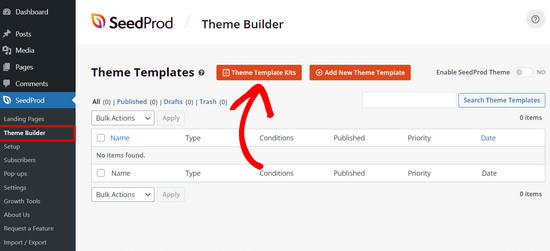
This will take you to SeedProd’s library of pre-made website kits.
To choose a website theme, simply hover your mouse over the design you like and click the checkmark icon.
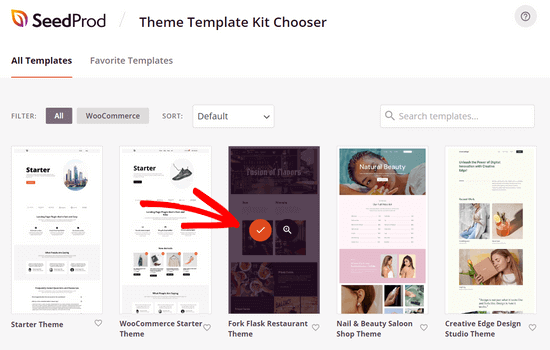
After you’ve made a selection, SeedProd will import the website kit and you’ll see a list of template parts on the theme builder dashboard.
You’ll get all the template parts you need to set up a website including a homepage, blog page, contact page, and more.
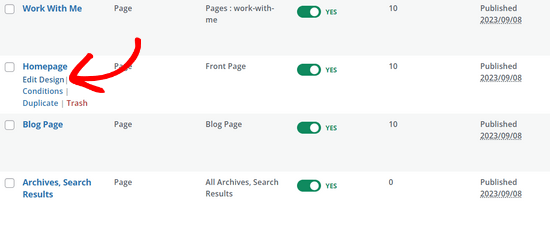
You can click the ‘Edit Design’ link on any template to customize it using the drag-and-drop theme builder.
For step-by-step instructions, see our guide on how to create a custom WordPress theme.
Creating a Custom Author Page Template
Once you’ve finished customizing your website theme, it’s time to create a custom author profile page.
To do that, navigate to SeedProd » Theme Builder and click on the ‘Add New Theme Template’ button.
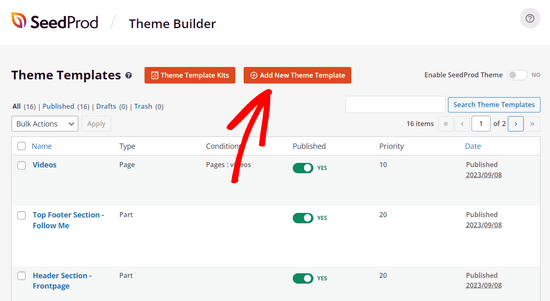
This will open the New Theme Template popup.
Next, in the ‘Type’ dropdown menu, select the ‘Author Page’ option.
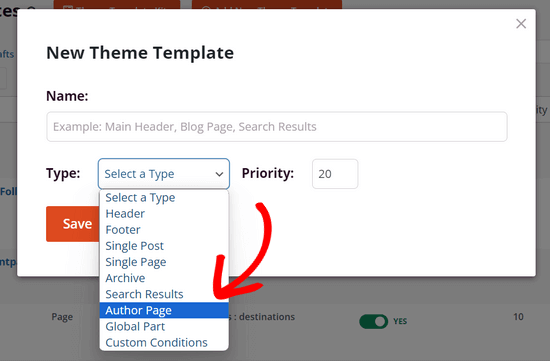
If you want to have the same author page layout for all writers, you can ignore the blank field that appears under the ‘Conditions’ section.
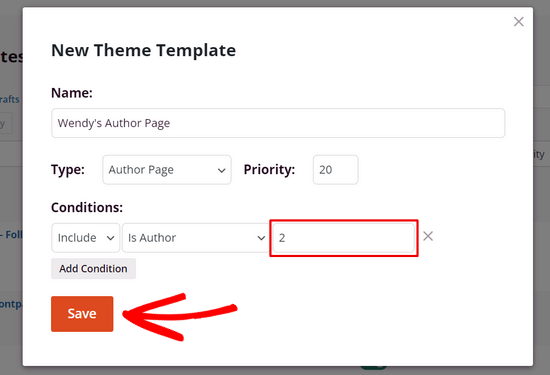
However, if you want to make a unique author page for each writer, you need to enter the user ID of a specific author into this field. For example, if the user ID is 2, enter it into the blank field.
See this guide if you need help finding the user ID in WordPress.
Next, click the ‘Save’ button to continue.
Customizing the Author Profile Page
Now that you’ve set up the author page template, you can start customizing it by clicking the ‘Edit Design’ link underneath it.
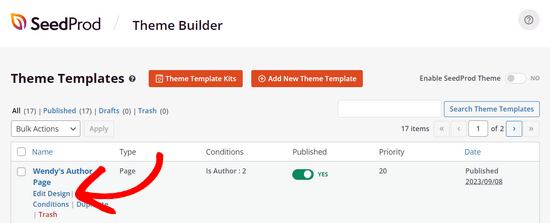
This will open up the template in SeedProd’s page builder.
On the left, you’ll see blocks and sections that you can add to the page. On the right, you’ll see a preview of your page, which will be blank because we haven’t added any content yet.
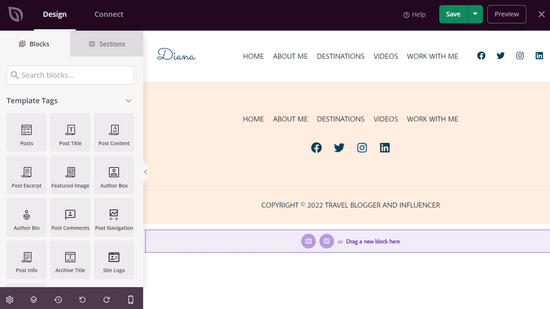
Now you can start adding content.
Click on the ‘Add Columns’ icon to set up your page layout.
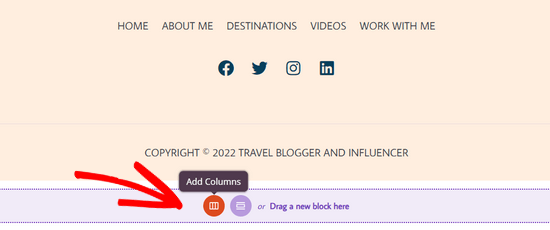
Next, you will see a selection of column layouts.
Choose the type of column layout you want for your author page.
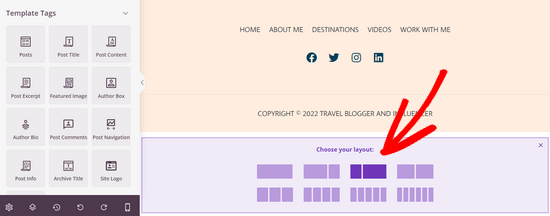
Now you can add SeedProd’s ready-made blocks to the page.
For example, you can drag the ‘Headline’ block onto the page to add an author headline.
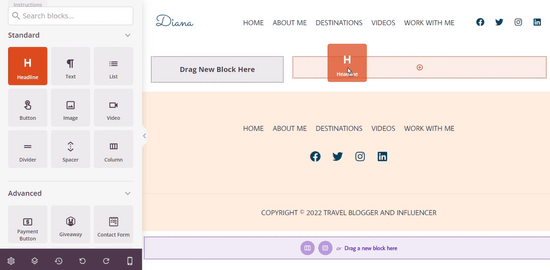
To customize the headline, simply click on it.
This will open a panel where you can enter the author name, as well as adjust the size, alignment, and more.
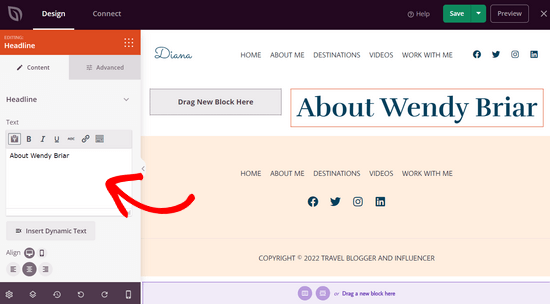
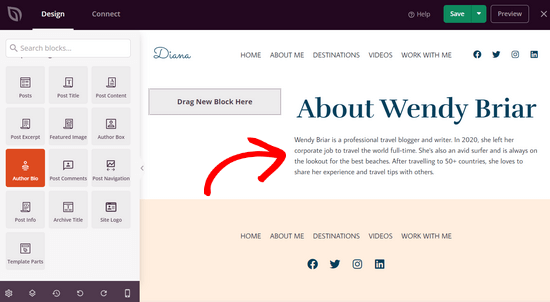
Next, you can drag the ‘Author Bio’ block onto the page to display information about the author.
This block automatically pulls the content from the author’s WordPress user profile.
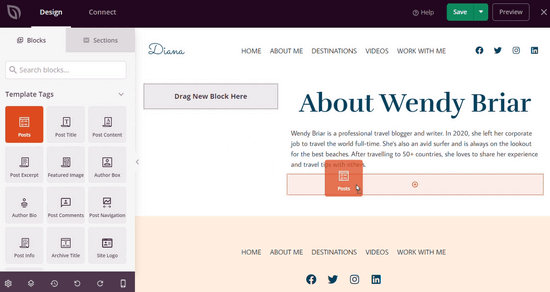
Now you can showcase the author’s recent articles.
Simply drag the ‘Posts’ block onto the page.
After adding the Posts block, click on it to set the ‘Query Type’ to Custom.
Then, enable the ‘Query by Author’ toggle and choose a specific author from the dropdown list.
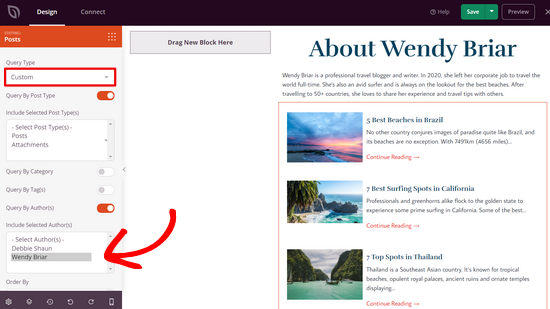
Now only posts from that author will be displayed on the author page.
You can continue customizing your author page even further. For example, you can add ‘Text’ and ‘Image’ blocks to include additional information about the author. You can also add blocks like social profiles, social sharing, testimonials, and more.
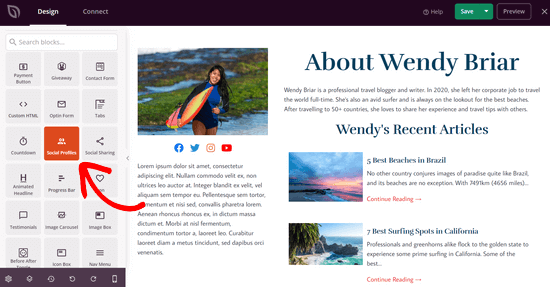
When you’re happy with how your author page looks, click the ‘Save’ button at the top of the screen and exit the page builder.
Publishing Your Custom Author Profile Page
To make your author page live on your site, you’ll need to activate your custom SeedProd theme.
You can do this by going to SeedProd » Theme Builder. From there, find the ‘Enable SeedProd Theme’ toggle and switch it to the ‘Yes’ position.
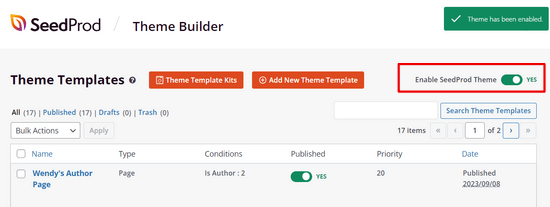
SeedProd will now publish your custom WordPress theme.
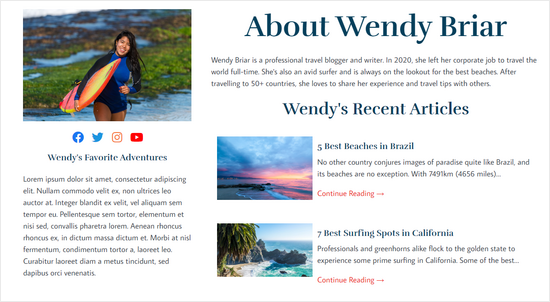
You can visit your site to see your new author profile page in action.
Method 2: Add Custom Author Profile Page in WordPress With WP User Manager
This method is easy to set up, but it doesn’t offer as many design and customization options as SeedProd.
The first thing you need to do is install and activate the WP User Manager plugin. For more details, see our step-by-step guide on how to install a WordPress plugin.
Upon activation, you need to visit the Users » Settings page to configure the plugin settings.
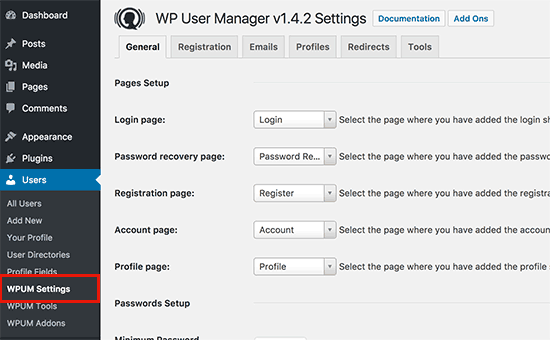
The plugin will automatically create different pages to use as custom login, custom user registration, forgot password, account, and profile pages.
WP User Manager offers a range of options for your author profile pages. You need to carefully review them and turn off the features that you don’t want to use.
Next, you need to click on the ‘Profiles’ tab to set up user profile settings.
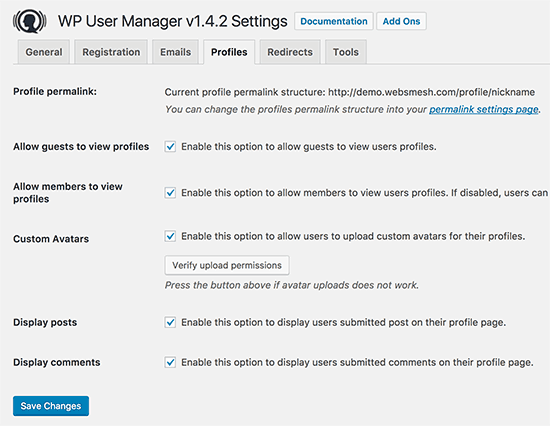
Here you can enable the profile page option for guests, which means anyone can view user profiles. You can also allow members to view each other’s profiles. If you uncheck this option, then users will only be able to view their own profile pages.
You can also allow users to upload custom profile photos and display their recent articles as well as comments on their profile page.
Don’t forget to click on the ‘Save Changes’ button to store your settings.
Next, you need to select SEO-friendly URLs or permalinks for the author profile pages. You can do this by visiting the Settings » Permalinks page and scrolling down to the ‘User profile permalink base’ section.
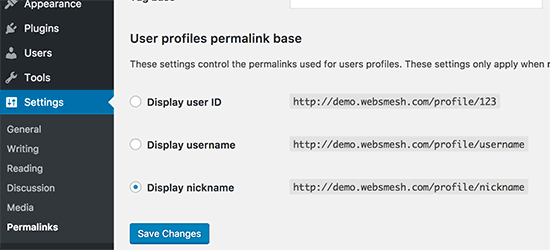
The plugin allows you to use a user ID, username, or nickname in the URL. Both nickname and username are more SEO-friendly options than user ID. Click to select either one of them and then click on the save changes button to store your permalink settings.
Your custom author profile pages are almost ready. Now we just need to let users easily find their profile pages on your WordPress website.
Head over to the Appearance » Widgets page and add the Login Form widget to a sidebar.
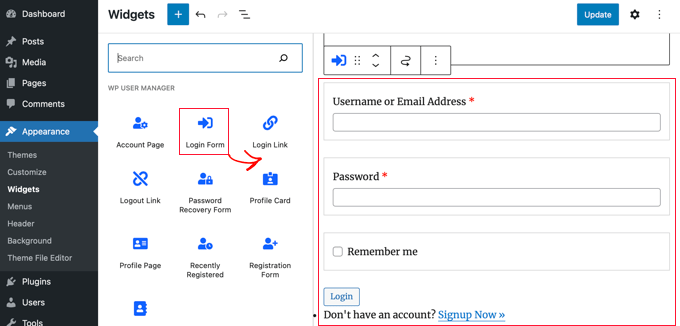
You can now visit your website to see the author profile page in action.
As a logged-in user, you will see your own account information in the sidebar widget. Clicking on the username will take you to your author profile page.
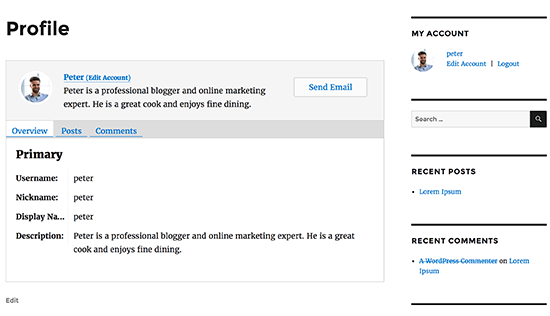
The sidebar widget will show a login form to logged-out users. If you allow users to register on your website, then the form will also include a link to sign up.
The plugin will also change author links on your website and point them to the author profile page instead of the default author’s archive pages.
Changing Appearance of Author Profile Pages
If you just want to change colors or borders, then you can do that by adding custom CSS.
However, if you want to change the layout and order of things, then you will need to edit the plugin’s template files. WP User Manager comes with custom template support, which means you can create your own templates inside your current theme for the plugin to use.
First, you need to connect to your website using an FTP client and go to /wp-content/plugins/wp-user-manager/templates/ folder. Download all the files you see there to your computer.
Next, you need to go to your current theme folder and create a new folder called “wpum” inside it. Now upload the files you downloaded earlier to the wpum folder.
Now you can edit these files to customize the appearance of your profile pages as needed.
Method 3: Manually Create a Custom Author Profile Page in Your Theme (Code)
This method requires you to edit your WordPress theme or child theme files. If you haven’t done this before, then please see our guide on how to copy and paste code in WordPress.
First, you will need to connect to your website using an FTP client and go to the /wp-content/themes/your-current-theme/ folder.
Inside your current theme folder, you need to create an author.php file. After that, you need to copy the contents of the archive.php file and paste them inside your new author.php template.
If your theme already has an author.php file, then you can edit that as well.
Your goal here is to get the author’s profile information and then display it. You will need to decide where you want to start editing. Usually, you can edit anything between the get_header(); and get_sidebar() lines:
<?php
// Set the Current Author Variable $curauth
$curauth = (isset($_GET['author_name'])) ? get_user_by('slug', $author_name) : get_userdata(intval($author));
?>

<div class="author-profile-card">
    <h2>About: <?php echo $curauth->nickname; ?></h2>
    <div class="author-photo">
    <?php echo get_avatar( $curauth->user_email , '90 '); ?>
    </div>
    <p><strong>Website:</strong> <a href="<?php echo $curauth->user_url; ?>"><?php echo $curauth->user_url; ?></a><br />
    <strong>Bio:</strong> <?php echo $curauth->user_description; ?></p>
</div>

<h2>Posts by <?php echo $curauth->nickname; ?>:</h2>

         <?php if ( have_posts() ) : while ( have_posts() ) : the_post(); ?>
<h3>
<a href="<?php the_permalink() ?>" rel="bookmark" title="Permanent Link: <?php the_title(); ?>">
<?php the_title(); ?></a>
</h3>
<p class="posted-on">Posted on: <?php the_time('d M Y'); ?></p>

<?php the_excerpt(); ?>

<?php endwhile;

// Previous/next page navigation.
the_posts_pagination();

else: ?>
<p><?php _e('No posts by this author.'); ?></p>

<?php endif; ?>
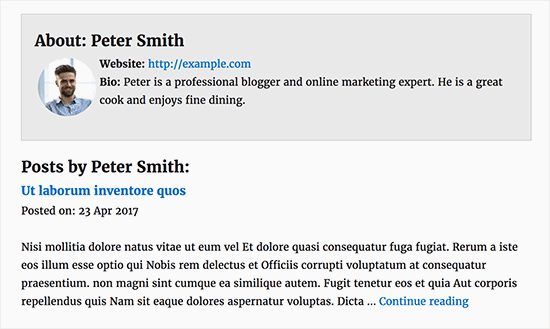
This code simply adds an author profile card at the top of the page and then displays recent posts by the author.
Feel free to customize this code as much as you need. You can add additional user profile fields to your website, add the author’s Twitter and Facebook profile links, display featured images for posts, and so on.
Here is some sample CSS to give your author profile card a decent look. You can add it as custom CSS in your theme or use a code snippet plugin like WPCode.
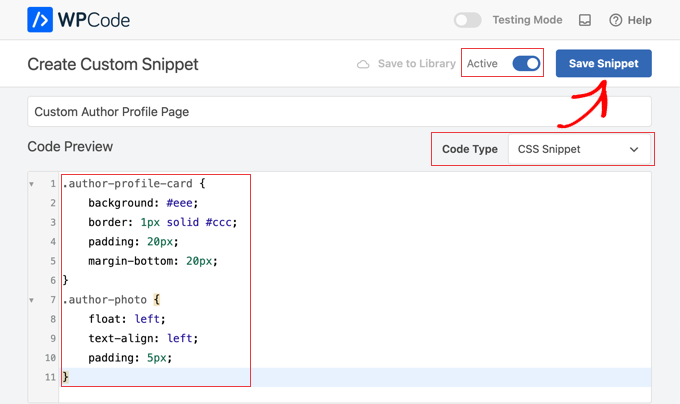
You can also customize the code to match your theme colors:
.author-profile-card {
    background: #eee;
    border: 1px solid #ccc;
    padding: 20px;
    margin-bottom: 20px;
}
.author-photo {
    float: left;
    text-align: left;
    padding: 5px;
}
Now you can visit your website to see the custom author profile page in action.
Here is how it looked on our demo website:
We hope this article helped you learn how to add a custom author profile page to your WordPress site. You may also want to see our ultimate WordPress SEO guide for beginners or our expert pick of the best social proof plugins for WordPress and WooCommerce.
If you liked this article, then please subscribe to our YouTube Channel for WordPress video tutorials. You can also find us on Twitter and Facebook.




Syed Balkhi says
Hey WPBeginner readers,
Did you know you can win exciting prizes by commenting on WPBeginner?
Every month, our top blog commenters will win HUGE rewards, including premium WordPress plugin licenses and cash prizes.
You can get more details about the contest from here.
Start sharing your thoughts below to stand a chance to win!
Benky says
Do you know how I can add Phone number fields to the author pages?
WPBeginner Support says
If you are using the plugin then you would need to use their method for adding custom fields
Admin
Subodh Gupta says
The username is showing in the author archive URL.
How can I easily change it to display name or nickname for admin and all authors?
WPBeginner Support says
If you are using the method from this article then you should be able to update that under Settings > Permalinks
Admin
Ben Osborne says
I was hoping to make the author pages editable in the WordPress dashboard, is this possible?
WPBeginner Support says
Should we find a method we would recommend, we will look into updating this article.
Admin
Ben Osborne says
I know this maybe isn’t something you can recommend…. but I used advanced custom fields to create a wysiwyg editor right in the edit user screen, then call that custom field in the customised author.php. Works pretty good.
Nomi says
wpbeginner is top. Always comes up with the best solutions. When I see on serp wpbeginneer, I just click it
WPBeginner Support says
Thank you, glad you like our content
Admin
Rouni Haddad says
Hello, I am trying to add the login page to the top of my website in the menu area but when I add it, it doesn’t show on the website, anyway I can fix this.
Annapurna Agrawal says
Hi guys,
I am really stuck with this. My author template is not working. As in, I am getting 404 error for the author archive page.
I have no spaces in the author nice_name, i have deactivated all plugins to check for conflicts. I couldn’t find any solution to this. Can you help me out please?
WPBeginner Support says
Hi Annapurna,
Try updating your permalink structure. Simply visit Settings » Permalinks and then click on the save changes button without changing anything.
Admin
grab says
in wordpress job site how put each company description permanently ,i don’t want to add everytime each job descriptions and keywords
Sharif Mustajib says
On my website, there are writers who send through e-mail. If they don’t create any profile, how can I add their profile? Please..
Naa says
how do i remove the author profile page if i don’t want to use it anymore?
William says
THank you for this tutorial. However I can’t seem to find an author.php or archive.php in my theme. I am using Customizr Pro. Any ideas would be greatly appreciated. I love the look in your demo image!
WPBeginner Support says
Hi William,
If you don’t have an author.php file, then you can create one. If you don’t have archive.php, then you can copy the contents of index.php, category.php, or any other archive template in your theme. Please contact your theme’s support and they will be able to guide you better.
Admin
Ifeanyi says
Hello
Please, is there a way I can add a radio button field to the registration page?
WPBeginner Support says
Hi,
You can do so by creating a custom registration form with WPForms.
Admin
Adel says
i’m looking desperatly for a way to make child pages in author’s page..
a menubar or tabs to display categories seperatly…
thanks in advance
Gatera says
Thanks for this article. I used Method 2.
I would like to display the current author’s woocommerce products under their bio. Do you know how I can achieve this?
Thanks,
Muhammad Ibrahim says
Really helpful article specially for beginners like me. a video tutorial could be a great way to know more about it. but still it is enough to know how to setup custom author profile page.
i always use to visit this site whenever i need to learn anything about WordPress.
thanks a lot dear Syed Balkhi to create such an amazing wordpress resource site.