


An attachment in WordPress is any media file you upload to your website and attach to a post, page, or custom post type.
When you upload a media file through the WordPress post edit screen, it becomes an attachment linked to that specific post. WordPress will also create a dedicated attachment page that displays the file, its title, and description.
Is Media File the Same as Attachment in WordPress?
No, a media file and an attachment in WordPress are not exactly the same, although they are closely related.
A media file refers to any digital file, including images, videos, PDFs, documents, and more. It can be uploaded to your WordPress site through various methods. These include the block editor, the media library, FTP, or your WordPress hosting’s file manager.
An attachment is a specific type of media file that gets linked to a particular WordPress post or page. When you upload a media file through the editor, it becomes an attachment for that specific post.
That said, you can also use the media library to attach a media file to a post, page, or custom post type, even if the page doesn’t display that specific media file.
How to Attach a Media File to a WordPress Post, Page, or Custom Post Type
Uploading media in the block editor automatically attaches it to the post. You don’t need to do anything else after that.
In the Media Library, the ‘Uploaded to’ column shows the name of the post or page you added the file to. That means the file is now an attachment on your WordPress blog.

On the other hand, let’s say you upload a media file directly to the Media Library or via FTP/File Manager. That file won’t be automatically attached to any specific content. Instead, it will have the status ‘Unattached’ listed in the ‘Uploaded to’ column.
To attach the file to a post, page, or custom post type, you can click the ‘Attach’ button below the Unattached status.

After that, just click on the content you want to link the file to.
Then, click ‘Select.’
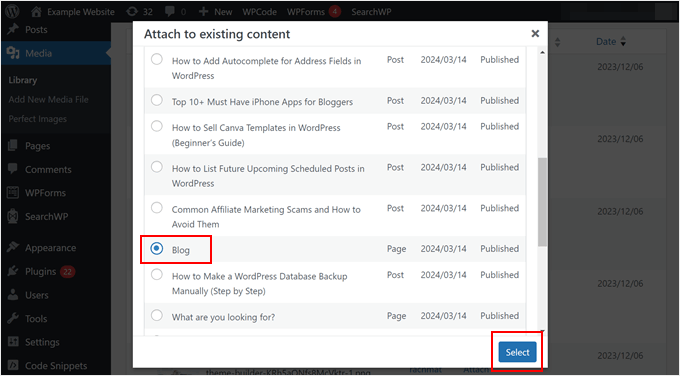
Do note that attaching a media file this way won’t make the file appear on the post, page, or custom post type content itself. It just links the file to the page on your WordPress website.
That said, if you want to show multiple image attachments together, you can use the shortcode in the block editor. This shortcode creates a gallery displaying all the images attached to that specific post.
What Is a WordPress Attachment Page?
A WordPress attachment page displays information about a particular media file you’ve uploaded to your site.
While the attachment itself might be embedded within a post or page, the attachment page provides a more detailed view of the media file.
Typically, WordPress themes use the attachment.php file to display attachment pages. However, some themes might rely on other page template files within the template hierarchy, like single-attachment.php, single.php, or even single-post.php.
The exact appearance of an attachment page depends on your theme’s design. Some themes might simply display the media file itself, perhaps along with the title and description you’ve added.
Here’s what the Twenty Twenty-Four theme’s image attachment page looks like:

If you want to create a custom attachment page, then check out our guide on how to create a custom single attachments template in WordPress.
The attachment post type also stores and links to metadata information about the media file. For images, this can be the file type, image size, thumbnails, file location, HTML alt text, and so on.
Are WordPress Attachment Pages Good for SEO?
In general, attachment pages don’t offer much SEO benefit. Search engines and visitors prefer content-rich pages, and these attachment pages simply don’t provide much value.
However, if your attachment pages include detailed descriptions related to the file, then they can be beneficial for WordPress SEO. This richer content can help you rank for relevant keywords.
For example, if you run a photography website, then you may want to include technical, behind-the-scenes descriptions for each photo, incorporating relevant keywords.
This will not only improve SEO but also provide more information for visitors interested in your photography.
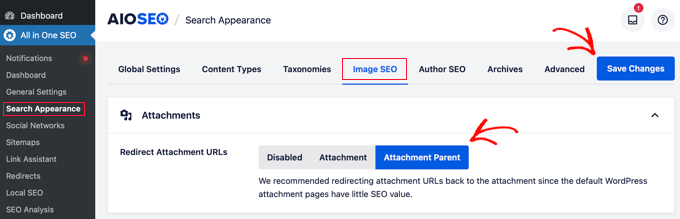
Otherwise, you can consider disabling attachment pages and redirect those pages’ URLs.
This is because search engines might see all your attachment pages as separate content. This can create duplicate content issues with your main posts and hurt your website’s ranking.
Luckily, there is a WordPress plugin that can help you redirect these pages’ URLs easily: All in One SEO (AIOSEO).
This SEO plugin makes it easy to disable your image attachment pages and redirect the URL to the file itself or the page where the image is embedded.
We hope this article helped you learn more about attachments in WordPress. You may also want to see our Additional Reading list below for related articles on useful WordPress tips, tricks, and ideas.
If you liked this article, then please subscribe to our YouTube Channel for WordPress video tutorials. You can also find us on Twitter and Facebook.




