


Are you looking to learn WordPress and build a website? Ease of use is one of the best things about WordPress which makes it the world’s most popular website builder.
Learning WordPress does not require a lot of time or money. You can do it on your own, at your own pace, and then build upon it as you go.
In this article, we’ll show you how to learn WordPress for free in a week (or less). The goal is to help you familiarize yourself with WordPress, so you can build websites on your own.
Why Learn WordPress?
WordPress is the world’s most popular open-source content management system. That’s a fancy way of saying that it allows you to create any type of website.
WordPress powers more than 43% of all websites on the internet. It generates thousands of job opportunities around the world, and there are millions of websites making money using WordPress.
Apart from economic opportunities, WordPress enables people to share their stories, ideas, build communities and do awesome things.
It is ideal for small businesses to make their online presence, at the same time it is economical enough for bloggers to launch their first blog.
WordPress also powers the most popular eCommerce platform called WooCommerce. It is used by millions of small and big online stores. You can use WordPress to start an online store (without writing any code).
With a ton of plugins and themes, WordPress is easy to extend and allows you to make any kind of website imaginable.
What do I need to learn WordPress?
Learning WordPress is easy as long as you are willing to commit a few hours each day for a week.
You would need some very basic search skills (i.e know how to use search engines like Google), and the ability to follow instructions.
No, you don’t need to know HTML or other programming languages to code a website. It will be helpful to learn them in the future, but you don’t need them to make a website using WordPress as a beginner.
The majority of WordPress users don’t have coding or programming skills, and they have been using WordPress for years.
Similarly, many successful WordPress developers started out just like you, and now they are making websites as full-time web developers.
Now that you are committed to learning WordPress, we want to welcome you to the awesome WordPress and WPBeginner community.
Let’s get started.
Monday: Getting Started with WordPress
There are two types of WordPress websites. First, there is WordPress.org also known as self-hosted WordPress, and then there is WordPress.com.
We recommend using self-hosted WordPress.org because it gives you access to all the WordPress features out of the box. For more information, see our comparison of WordPress.com vs WordPress.org.
Now that you have chosen the right platform, the next step is to choose your domain and web hosting .
Your domain is the website address that users will type to visit you (example wpbeginner.com). We have a guide that will help you pick the best domain name for your website.
The next step is to choose web hosting. This is where all your website files will be stored, so users can view your site.
Normally, a domain costs $14.99 per year and web hosting starts from $7.99 per month. This is a lot of money if you are just starting out.
Luckily, Bluehost has agreed to offer WPBeginner users a free domain name and a generous discount on hosting. Basically, you can get started for $2.75 per month.
→ Click Here to Claim This Exclusive Bluehost Offer ←
If you want to look at a Bluehost alternative, then checkout SiteGround or see our guide on how to choose the best WordPress hosting.
Once you have signed up for a domain name and web hosting account, it is time to install WordPress.
WordPress is famous for its easy installation and most hosting providers also offer 1-click WordPress installers. If you need help, then follow our step by step WordPress installation tutorial.
We also have a step by step tutorial on:
- How to start a WordPress blog
- How to create a website with WordPress
- How to start an online store with WordPress
- How to make a membership site WordPress
- How to start a podcast with WordPress
For other dedicated tutorials, see our guide on different types of websites you can create with WordPress.
If you’re just wanting to learn and create a test site, you can also install WordPress on your Mac or windows computer. But remember, local websites are not visible to other users on the internet. To make it available to everyone, you’ll need to move WordPress from your computer (local) to a live site.
Once you have installed WordPress, you’ll reach the WordPress dashboard or the admin area. It has a sleek layout with a toolbar at the top and an admin sidebar menu on the left.
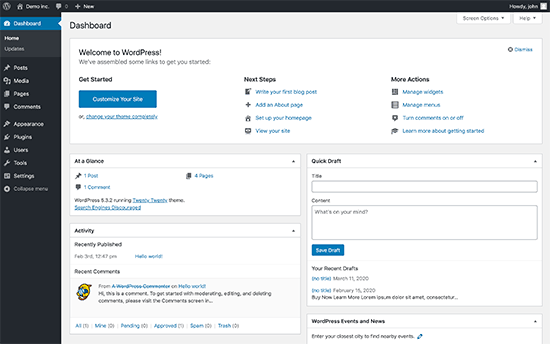
Congrats, you have created a WordPress site. However, your website is currently empty and uses a very basic design and no noticeable features.
In the next few days, you’ll familiarize yourself with the WordPress features and learn how to set it up to work for you.
Tuesday: Learning The WordPress Basics
After installing WordPress, it is time to get familiar with the system. You can do so by going through options in the left-hand bar.
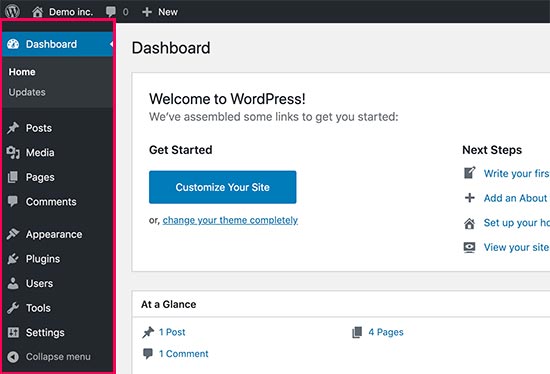
However, you may still need guidance on how to use each of the items you see in the WordPress dashboard.
The best place to start is our free WordPress video series for beginners. These 34 videos will guide you through the WordPress dashboard, show you how to add images, videos, audio, etc.
We recommend going through these videos as you work on your website. Don’t worry if you can’t watch them all at once. You can always come back and resume where you left off.
As you work on your website, you’ll come across terms that you may not understand. We have a handy WordPress dictionary with a list of commonly used WordPress terminology along with detailed explanation of each term.
Next, you should familiarize yourself with the WordPress block editor. This is where you’ll be spending most of your time when creating content for your website.
While you are at it, let’s go through some key WordPress concepts along the way.
- Difference between Posts vs Pages in WordPress
- Difference between Categoris vs Tags
- How to add images in WordPress
If you still have some time left today, then you should explore our beginners guide section which is full of useful information.
Hopefully by this time, you have a good grasp of your WordPress admin area, and you’re probably eager to play with plugins.
Wednesday: Using WordPress Plugins
The real power of WordPress is in the plugins.
Think of plugins as the apps for your WordPress website. They allow you to add new features to your website such as adding contact forms, create a store, etc.
There are more than 60,000+ free plugins available in the official WordPress plugin repository alone. This abundance of plugins can be overwhelming for beginners.
That’s why you should look at our beginner’s guide on how to choose the best WordPress plugin.
Now, as a beginner you may be wondering which WordPress plugins you should install. We have prepared a list of essential WordPress plugins for all types of websites.
We recommend every user to install a WordPress backup plugin, WordPress SEO plugin, and WPForms for your contact form.
Also, check out our WordPress Plugins category where you will find the best WordPress plugins to do anything you want on your WordPress website.
Exploring plugins will keep you busy for most of the day. Take your time to explore plugins that may help you grow your business.
When you come back, the next thing we’ll cover is WordPress themes.
Thursday: Using WordPress Themes
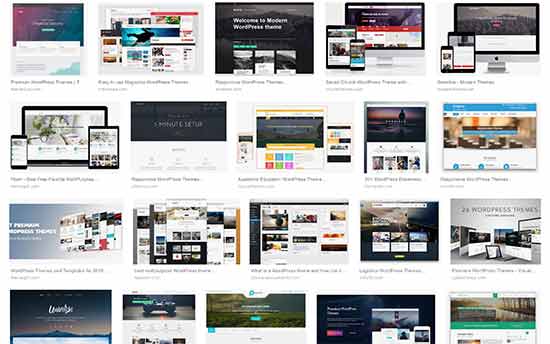
WordPress themes control the look of your website. Themes are pre-made templates that you can install and customize for your site.
There are thousands of free and premium themes available for WordPress. You can download free themes from the WordPress Themes directory.
For premium themes, you can go to commercial theme shops like Elegant Themes, Themify, etc.
A perfect theme should be a balance of beautiful design and powerful features. Too many features are not always a sign of a good Theme. Check out our guide on choosing the perfect WordPress theme for your website.
You can even create your own custom WordPress theme without touching any code using a theme builder like SeedProd.
It gives you a drag & drop interface to build your site (no-coding needed).
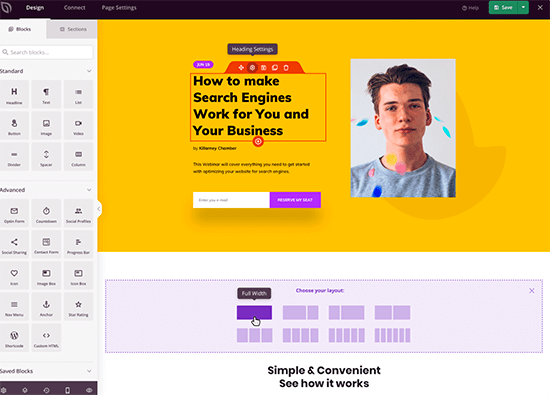
If you want to look at specific WordPress themes, then see our WordPress theme showcases:
- Best and most popular WordPress themes (all-time)
- Best free WordPress blog themes
- Best free WordPress business themes
- Best WordPress magazine style themes
- Best WordPress themes for photographers
Once you have found a theme, follow the instructions in our guide on how to install a WordPress theme to properly install it.
After that, refer back to our WordPress videos from Tuesday to see how you can change the background, add header images, add menus, and more in your WordPress theme.
Friday: Customizing WordPress
Each website has different customization needs. Depending on what you want to do with your website, you will come across new questions.
For example how to add a contact form, or create separate page for blog posts.
We recommend browsing through our WordPress Tutorials section which has 700+ step by step tutorials for beginners.
You can also subscribe to WPBeginner’s YouTube Channel for free WordPress video tutorials. We have hundreds of video tutorials there for you to watch at your own pace.
Continue Learning WordPress
Hopefully, by the end of the week, you have been able to set up your website and familiarize yourself with how WordPress works.
However, WordPress is an incredibly powerful platform, and you’ll keep discovering new things as you work on your website.
The following are a few tips to help you continue learning WordPress.
As you come across a problem, you can search for it using the Search feature on our website.
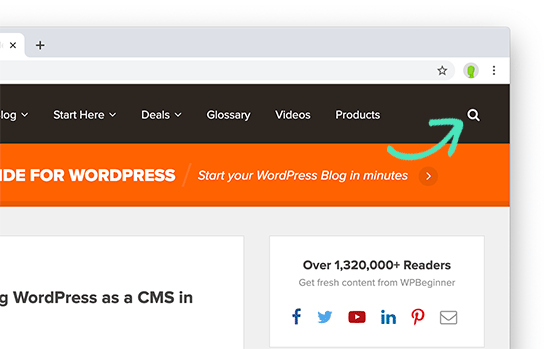
Alternatively, you can simply enter your question in Google and add WPBeginner at the end of your search query to find the most helpful answer.
As the largest WordPress resource site in the world, there is a good chance that you’ll find a step-by-step guide written specifically for beginners.
Can’t find an answer? Join our WPBeginner Engage Facebook group. It is an online community of WPBeginner users with more than 90,000 members. Our team of experts and other industry veterans are actively helping out users there (for free), and you’ll also get advice from other WordPress users as well.
How do I start learning WordPress development?
Many of our beginner users often graduate to intermediate and advanced level users. They ask us for guidance on learning how to code their own solutions.
WordPress is mainly written in the PHP programming language along with HTML, CSS, and JavaScript. We recommend starting with HTML and CSS and then move on to PHP and JavaScript.
Once you have learned a good bit of these languages, you can start learning how to code your own plugins and custom WordPress themes from scratch.
You can learn all these things for free using Google and free resources available. However, there are websites offering professional training courses in different WordPress development areas.
We hope this article helped you learn WordPress in a week. You may also want to see our guide on how to increase your website traffic, how to create an email newsletter, and how to speed up your WordPress site.
If you liked this article, then please subscribe to our YouTube Channel for WordPress video tutorials. You can also find us on Twitter and Facebook.





Syed Balkhi says
Hey WPBeginner readers,
Did you know you can win exciting prizes by commenting on WPBeginner?
Every month, our top blog commenters will win HUGE rewards, including premium WordPress plugin licenses and cash prizes.
You can get more details about the contest from here.
Start sharing your thoughts below to stand a chance to win!
Peter Iriogbe says
While the idea of mastering WordPress in a week sounds enticing, achieving it would require consistent effort from the learner. What about individuals who learn at a slower pace? Can they keep up with this timeframe to learn WordPress?
WPBeginner Support says
It depends on your personal learning style and you do not have to master everything in a week if you prefer to go at a slower pace
Admin
Mrteesurez says
WordPress being the most popular CMS is to me the best and easiest CMS that gives you flexibility to create any type of blog or website.
This guide is very useful if you are serious about learning WordPress within short period of time. It includes all the basics things you need to know especially if you a beginner.
If you are able to follow the guide form Monday till Friday, that means you will be able to setup a working WordPress site within a week.
And as you are engaging with WordPress, you will be learning more other things.
Moinuddin Waheed says
wao, starting from Monday and till Friday. By Sunday we will be someone who is able to use wordpress and make websites.
provided that we repeat the cycle of Monday to Friday until we get enough of the WordPress.
And must continue with these knowledge base after acquiring through this routine.
you deserve much appreciation wpbeginner.
I really appreciate your efforts putting these much valuable content for absolutely free.
Sah Yee says
This site is really awesome and a great help for us beginners. Just curious, is this site also built with wordpress ?
WPBeginner Support says
Yes, our site is built with WordPress
Admin
Ishmal Majid says
It is a treasure house, I would say. Even we can learn deeply whatever we want to learn through the links within the blog. And above all, the videos and courses are completely free. It’s a big heart of yours.
Thank you very much!
WPBeginner Support says
You’re welcome we hope you find all of our content helpful
Admin
Kabsha Majid says
It’s an amazing reality-based motivational and informational blog. I’ve made the decision to restart my learning journey with WordPress again after reading this article.
I had skipped it a long time ago because I got frustrated due to incomplete information, a lack of guidance, and the unavailability of sufficient resources. Finally, this post has fueled me up for work.
No doubt, hard work pays off. I’m now resolved to continuously learn and build a great WordPress website, as I have gotten a lot of inspiration here.
Thank you for such great and wonderful free, in-depth informational materials and resources.
WPBeginner Support says
You’re welcome, we wish you luck in your journey learning and we hope our guides are a good staring point for you
Admin
Ellen says
I’m working at a place where they already have a WordPress website set up. I need to learn more about making changes to it.
WPBeginner Support says
Our guides should help you get started learning. You may want to look into creating a local site for a safe place to start learning
Admin
muneebah kanwal says
where I can get your WordPress course videos? are those free?
WPBeginner Support says
They are linked in the article but you can also follow the link below and our videos are free
https://videos.wpbeginner.com/
Admin
Abid Ahmed says
Thanks you so much it’s very help full for us.. Thanks Thanks Thanks WP team..
WPBeginner Support says
Glad you found our content helpful!
Admin
Taa Magwati says
Thank you so much, but I want to create a website(not live one) just to test and learn,, how do I do that
Christopher Kefas says
Please I want to start a WordPress site but I want to be sure that I don’t need to code.
WPBeginner Support says
It would depend on what you were specifically looking to do with your site but for most if not all applications you should not need to code.
Admin
amin says
Hello, what is the approximate cost of designing a site?
With WordPress…For example, a small store site or a personal site and not very professional
Can it be seen as a job?
WPBeginner Support says
For the cost of creating a site, you would want to take a look at our guide below:
https://www.wpbeginner.com/beginners-guide/how-much-does-it-cost-to-build-a-wordpress-website/
Admin
Jones Tichaona Rundora says
i am very excited and encouraged to have come across this platform. I hoping that i will be able to be a wordpress expert through your guidance and support.
WPBeginner Support says
We hope our guides can help give you a solid starting point
Admin
Minhajul says
I am new here.
With your support (Team wpbiginner.com) I will learn WordPress.
WPBeginner Support says
We hope you find our content helpful
Admin
Rana Fakhar says
I am new here.
With your support (Team wpbiginner.com) I will learn WordPress. I A.
I shall be very thankful to all of you for your kind attention and hassel free discussions.
WPBeginner Support says
We hope our content continues to be helpful
Admin
Poppy says
Hello! This has been extremely helpful. I was wondering… I want to create my own website on WordPress for my company, should I do it by myself by learning all of your videos? Or would you recommend that we get someone who is a pro at this? The company is not that huge to be honest. So I am torn in between but its not a small business either.
WPBeginner Support says
That would be a personal preference question for what is best for you, you can always start from scratch and if you run into an issue, you can look for a developer then.
Admin
Sarmad Rasheed says
Hey! I am much more thankful to you for helping me out in using wordpress. You have given almost every useful information about using word press. Now it will be my fist step to jump into it.
WPBeginner Support says
Glad our guide was helpful
Admin
Tsd singh says
Very helpful, from Monday iam starting this.
WPBeginner Support says
We hope our guides are helpful
Admin
pasha says
I wanna learn WordPress.
WPBeginner Support says
We hope this guide helps you
Admin
Sri Sriniwass says
This was very helpful. Thanks!
WPBeginner Support says
You’re welcome
Admin
Rhonda says
I’m so thankful for this! It will be very helpful!
WPBeginner Support says
You’re welcome
Admin
Aimee says
This looks to be exactly what I need!
I purchased a turn-key set up for my website, but am now having problems understanding how to make changes and customize it the way I want.
Having the information broken down in bite-sized pieces will allow me to do the work as I have the time/brain space.
WPBeginner Support says
Glad our article could be helpful
Admin
Stacy Batista says
Get post on how to get started with WordPress. I like the easy to follow steps and the extra posts that explain the sections in WordPress such as the Categories vs Tags. Very Helpful!!!
WPBeginner Support says
Glad our article was helpful
Admin
Dada says
Insightful, thanks
WPBeginner Support says
You’re welcome
Admin
Vruti Shah says
Thanks for sharing best tips and guidance. You are always a problem solver.
WPBeginner Support says
Glad you found our content helpful
Admin
Annajean Shields says
Looking forward to learning this new skill
WPBeginner Support says
We hope our guide is able to assist you in this process
Admin
john says
great info… with this guide, i will be able to set up my own blog. thanks
WPBeginner Support says
You’re welcome, glad our guide could be helpful
Admin
Marcy Everest says
OK–I filled out the form and added you to my email list. Now, how do I see the videos? I’m confused.
WPBeginner Support says
If you signed up for the videos you should have received a message with an activation url, if not then you would want to check your spam and reach out to us using our contact form if you’re unable to find the email.
Admin
Pearl says
I tried many times to create my accounts for watching the videos serie, but the system didn’t work.
That’s a pity.
WPBeginner Support says
Please reach out to us using our contact form here: https://www.wpbeginner.com/contact/
and we can assist you with whatever error you’re having with our video section
Admin
devraj says
how to add another address in contact us page.i have watch many tutorials on youtube but no bady showing how to add secondy address in contact us page in wordpress.pls resolved it waiting your reply.thanks in advance
WPBeginner Support says
It would depend on what contact form plugin you’re using. If you reach out to the plugin’s support they should be able to let you know how to add a secondary email address to your contact form.
Admin
Sylvia says
I’m new to WP too, been building my WP website with ecommerce for the past 2 weeks, needles to say, I’m struck with http errors, upload errors, json errors, website down errors, blank page errors, no preview, publish errors. Not giving up yet but I’m close. Been on long chats with blue host 5 times already, but no solution, asked to reset the WordPress, and start from scratch. Back to square one, and the same issues.! I’ll be looking very closely at all your videos before I do anything else, have 2 more weeks before I reach deadline for cancellation.
WPBeginner Support says
We hope our articles can help make the process easier for you
Admin
sylvia says
there was something wrong with the configuration of my website, hours on bluehost chat, got a senior technician and the issues were fixed but my website lost some feutures and pages. All was visible on line but not in the design view. Eventually i have asked to cancel the subscription – so i can have the website closed and i am going to purchase the subscription again next week. the good thing was the chat people were trying to help , quick to answer questions offer support , i actually am imperssed on how good the experience was, and i was on the chat at least 2x per day. It is possible that ive messed up something there with the wordpress myself, im trying to learn as much as i can before i start again. once i familiarised myself with the design and customisation I found the wordpress and woo commerce got progresively easy to navigate , and if it wasnt for the errors i would keep building it. So much to learn …
Dev Star says
I started learning wordpress
WPBeginner Support says
We hope our guide helps you get started
Admin
Abu Bakar Siddique says
I would like to learn WordPress free of cost. Please let me know the details.
WPBeginner Support says
You would follow the steps in this article, you can also install WordPress locally for free on your computer using: https://www.wpbeginner.com/how-to-install-wordpress/#installlocal
Admin
Eugene says
I find your contents very helpful, but can you please allow pdf of your contents to readers
WPBeginner Support says
We will certainly take a look into that as a possibility in the future
Admin
Hamed khan says
Hi
I’m using elementor plug in ( both free version)
My design theme is black and gold
I need to switch it as white and gold or something else with a button, as most of website has option as (dark/ light mode) but more customisable.
Please help
Thanks!!
jim says
I think the free version of wordpress limits a lot of options. But still, its free so I guess we can’t complain to much eh!
Rehana Sk. Sajjad says
Can’t comment as yet to go through the guide and youtube tutorials. Well I’m sure will enjoy going through the Guide and am wishing myself GOOD LUCK.
kanishka sahu says
how can i build an blogging interface for users/authors in wordpress just like blogger.I am struck where a user will write its post and have some features like to make some text bold or to add bullets to text,i’m missing knowledge to add that panel.please help me.looking forward for an answer thank you in advance.
Lahiru Supun says
Many thanks for this. Clean and easy understanding. I’m a new to WordPress. Let me know how can I add freely live chat option for my WordPress web site ? Already I following these lessons. Thanks !
Rob says
Thank you! I believe I’ve seen some of your videos on YouTube and they were very helpful!
Yatheesh says
Sir, Suggest me best wordpress and blogger themes for affliate marketing like flipkart
WPBeginner Support says
Hi Yateesh,
Please take a look at our list of best WordPress themes for affiliate marketers.
Admin
Mary N says
This doesn’t tell me what I really need to know which is formatting. I am already on WordPress but can’t figure out how the heck to get the formatting to do what I want it to do. it always has these huge gaps in between the sentences and I hate that. It didn’t used to be this way as far as I remember. I stopped using it and came back and now it is a total pain.
Barry says
Hi Mary
I’m just a beginner with WordPress but also believe as you do that the formatting could be improved but since I’m an early beginner I have had to put the thoughts aside until I am a bit more advanced. My thoughts are at this stage that maybe PDF pages may be the answer. Or formatting a page in a program such as Dreamweaver and loading it to WordPress. Will be trying these things when I get a bit further along. The current line spacing though readable is very limiting. Where there’s a will there’s a way. ♥♥♥ (alt+keypad 3)
Saad Rauf says
Thanks for the guide guys.Now I know where to learn WordPress, I appreciate it.
Jabita Adedoyin says
I want to create an entertainment website alongside with a blog. I want to use a welcome page to be different from the homepage so if they click on ENTER someone can now get to home. is it possible to do this on WordPress?
Emo LeBlanc says
Can I add music to my wordpress web page ? So when people land on my website, my music starts playing.
Yolanda says
I can hardly wait to get started. I will soon begin learning how to use WordPress. I want to create an online store. Thank you for sharing this invaluable information.
Best wishes!
Carleigh says
Hello- Can I use wordpress to edit a website that a website company set up and is already on the web? I need to add photos and text.
Thanks!
Carleigh
WPBeginner Support says
Hi Carleigh,
If the website was built using WordPress, then you can edit it by logging into the admin area of the website. If it was not built with WordPress, then you cannot edit it using WordPress.
Admin
Ian says
Can you convert a HTML site to a WordPress site?
Bryan says
Hello
My name is Bryan and I am working in the field of public relations. I have written press releases, articles and other stuff in the past that I would like to put up in a personal website to aid job seeking and hopefully get writing jobs on a freelance basis.
Could I seek your sagely guidance on whether it is possible to set up a personal website, showing a bio and past works, with a blog?
Thanks
Bryan
WPBeginner Support says
Hi Bryan,
Yes, you can setup a personal website showing your bio and past works with your blog. See our list of beautiful WordPress resume themes for some ideas.
Admin
Mason Masterman says
Hi,
I have taken over a word press site and wish to keep the same style in follow up content. When I try to update the new content I find that what I see in the editor is not the same when publisher.
MJM
D Sharp says
Thank you for your great information
mutabazi says
thanks for the information