


Do you want to add custom post types to your main WordPress RSS feed?
By default, the WordPress RSS feed only shows your recent blog posts. However, if you are using custom post types for other content, then you may want to include them in your main RSS feed as well.
In this article, we will show you how to easily add custom post types to your main WordPress RSS feed.
Why Add Custom Post Types to the Main RSS Feed in WordPress?
By default, WordPress comes with two commonly used content types: posts and pages. However, you can also create custom post types to add more content types if needed.
For instance, a movie review website may want to create a custom post type using custom taxonomies suitable for that particular content type.
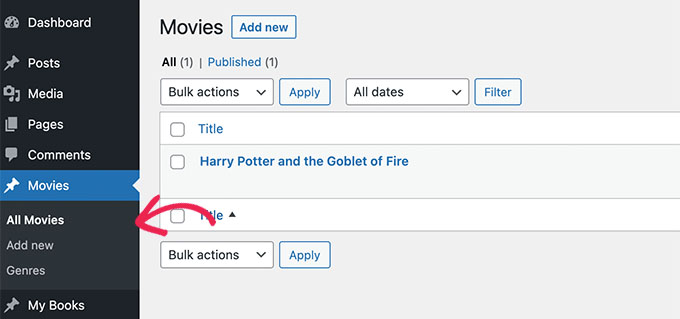
Now, your custom post types can have their own RSS feed, which users can access by adding /feed/ at the end of the custom post type archive URL.
https://example.com/custom-post-type/feed/
https://example.com/movies/feed/
However, these custom post-type feeds are not easily discoverable.
For example, when a user enters your website’s URL into their feed reader, they will only be shown the subscription option for your main WordPress RSS feed, and custom post types won’t be included.
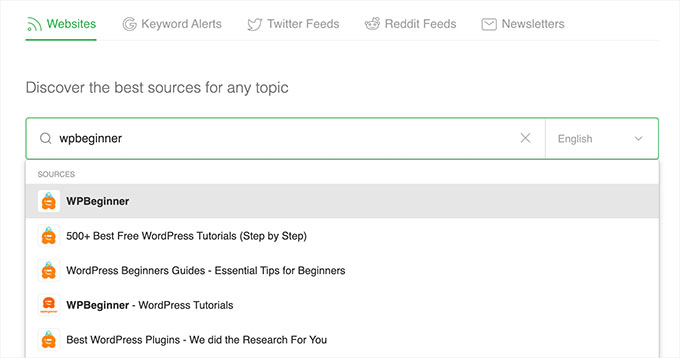
By adding these post types to your RSS feed, you make it easier for users to subscribe to all of your WordPress site content.
Plus, it can also help improve your website SEO by allowing custom post types in the main RSS feed to be indexed by the search engines.
That being said, let’s see how to easily add a custom post type to your main WordPress RSS feed. We will cover two methods, so you can use the links below to jump to the method you want to use:
Method 1: Add All Custom Post Types to Your WordPress RSS Feed
This method is for you if you want to add all the custom post types to your WordPress RSS feed.
If you are using an eCommerce plugin like WooCommerce, then using this method will also enable you to include the product’s custom post type in the main RSS feed.
You can easily do this by adding custom code to your theme’s functions.php file.
However, keep in mind that the smallest error when entering the code can make your website inaccessible.
That’s why we recommend using WPCode to add code to your website. It is the best custom code snippets plugin on the market and is the easiest way to add custom code without breaking your site.
First, you need to install and activate the free WPCode plugin. For more instructions, see our beginner’s guide on how to install a WordPress plugin.
Note: The free WPCode plugin is all you need for this tutorial. However, upgrading to the premium WPCode plugin will give you access to a cloud-based snippet library, smart conditional logic, code revisions, and more.
Upon activation, head to the Code Snippets » + Add Snippet page from the WordPress admin sidebar.
From here, click on the ‘Use Snippet’ button under the ‘Add Your Custom Code (New Snippet)’ option.
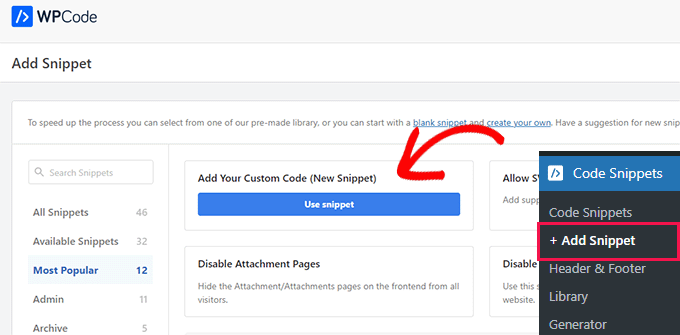
This will take you to the ‘Create Custom Snippet’ page, where you can start by typing a name for the code snippet.
After that, simply select ‘PHP Snippet’ as the ‘Code Type’ from the dropdown menu on the right.
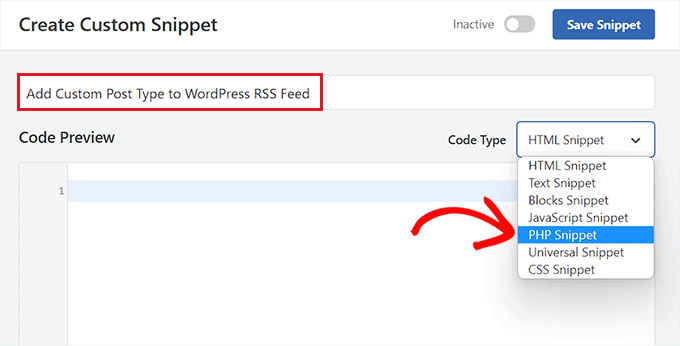
Next, you must copy and paste the following code into the ‘Code Preview’ box.
This code will allow you to add all publicly available post types to your main WordPress RSS feed.
function myfeed_request($qv) {
if (isset($qv['feed']))
$qv['post_type'] = get_post_types();
return $qv;
}
add_filter('request', 'myfeed_request');
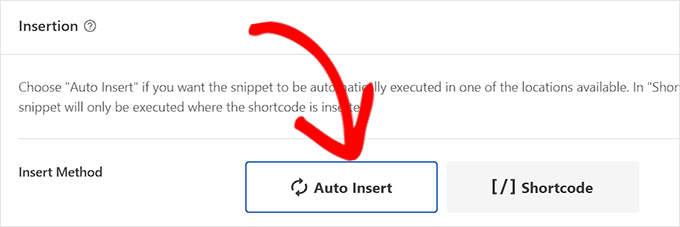
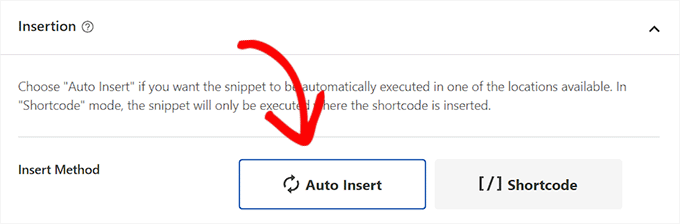
Once you have done that, just scroll down to the ‘Insertion’ section and choose ‘Auto Insert’ as the insert method.
Now, the code will automatically be executed on your website once you have activated and saved the snippet.
After that, scroll back to the top of the page and toggle the ‘Inactive’ switch to ‘Active’.
Finally, simply click the ‘Save Snippet’ button to save and execute the custom code on your website.
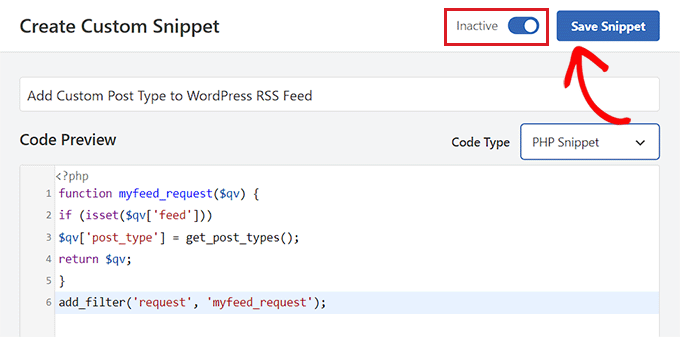
All the custom post types will now be added to your main WordPress RSS feed.
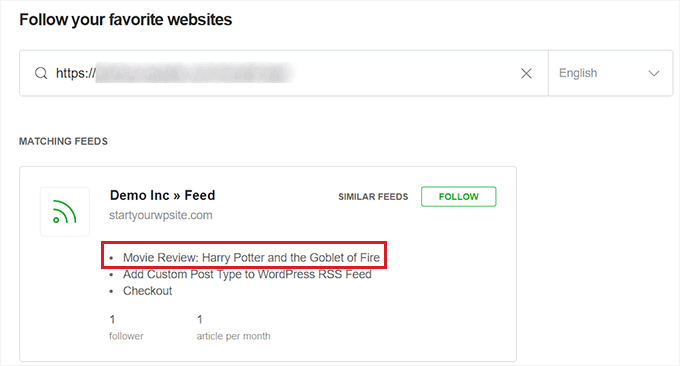
To make sure that your code is working, you can check your RSS feed by visiting a feed reader.
For this tutorial, we will be using Feedly, which is an online tool that allows users to add RSS feeds and websites to their Feedly account, easily organize their content, and receive updates in real time.
Once you are there, simply type your website URL under the ‘Follow your favorite websites’ option.
The custom post-type content will now be displayed in your WordPress RSS feed.
Method 2: Add a Specific Custom Post Type in the WordPress RSS Feed
If you want to add a specific custom post type to the main WordPress RSS feed, then this method is for you.
To do this, you will have to add custom code to your theme’s functions.php file. But keep in mind that the smallest error while entering the code can break your website.
That’s why we recommend using WPCode instead. It is the #1 WordPress code snippets plugin on the market. Using WPCode is the easiest and safest way to add custom code to your WordPress website.
First, you need to install and activate the free WPCode plugin. For more instructions, see our beginner’s guide on how to install a WordPress plugin.
Note: You can use the free WPCode plugin for this tutorial. However, upgrading to the premium WPCode plugin will give you access to a cloud-based snippet library, smart conditional logic, code revisions, and more.
Once the plugin is activated, visit the Code Snippets » + Add Snippet page from the WordPress admin sidebar.
From here, click the ‘Use Snippet’ button under the ‘Add Your Custom Code (New Snippet)’ option.
You will now be directed to the ‘Create Custom Snippet’ page, where you can start by typing a name for your code snippet.
This name won’t be displayed anywhere and is just used for identification purposes.
Next, choose the ‘PHP Snippet’ option from the ‘Code Type’ dropdown menu on the right.
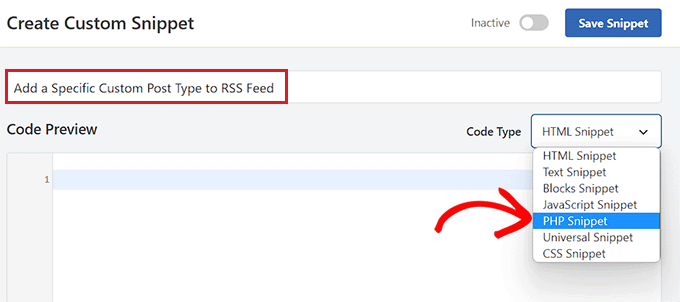
Once you have done that, copy and paste the following code into the ‘Code Preview’ box.
function myfeed_request($qv) {
    if (isset($qv['feed']) && !isset($qv['post_type']))
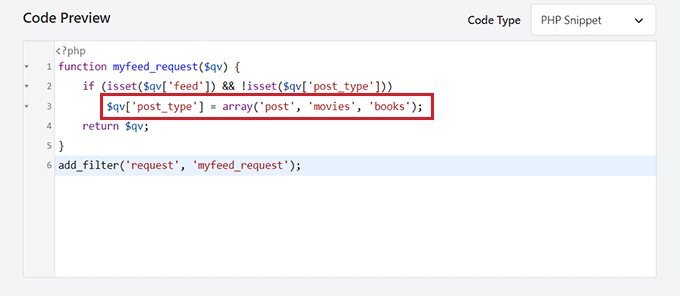
        $qv['post_type'] = array('post', 'movies', 'books');
    return $qv;
}
add_filter('request', 'myfeed_request');
After adding the code, type the name of the custom post type next to where '['post_type']' is written in the code. In our example, we have ‘post’, ‘movies’, and ‘books’.
This custom post type will be added to your main WordPress RSS feed.
Now, scroll down to the ‘Insertion’ section and select the ‘Auto Insert’ setting.
The custom code will now be automatically executed on your WordPress website upon activation.
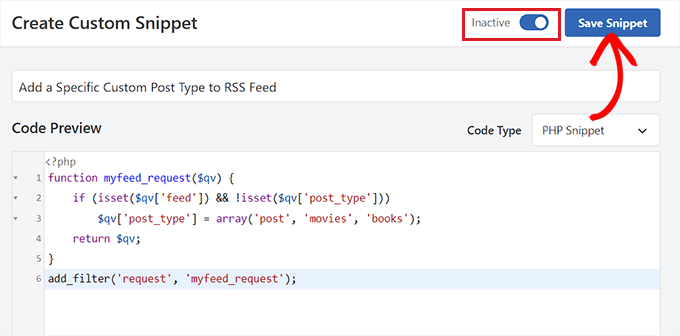
Next, you must scroll back to the top of the page and toggle the ‘Inactive’ switch to ‘Active’.
Finally, don’t forget to click the ‘Save Snippet’ button to save and execute the code on your WordPress website.
To make sure that the custom post type has been added, you will have to visit a feed reader like Feedly.
Once you are there, simply type in your website’s URL to search for its RSS feed.
The custom post-type content will now be displayed in your WordPress RSS feed.
Bonus: Create an RSS Sitemap for Better Search Engine Rankings
Once you have added custom post types to your main RSS Feed, you must create an RSS sitemap to attract more visitors and send traffic to your website.
This sitemap will contain your most recent content, helping Google to keep your content fresher in search results and boost your site traffic. To do this, you can use AIOSEO, which is the best WordPress SEO plugin on the market.
Upon activation, visit the All in One SEO » Sitemap page from the WordPress dashboard and switch to the ‘RSS Sitemap’ tab.
Here, you will see that the ‘Enable Sitemap’ toggle will already be activated.
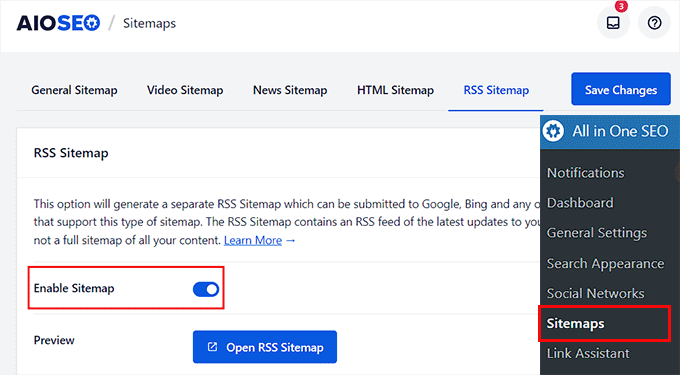
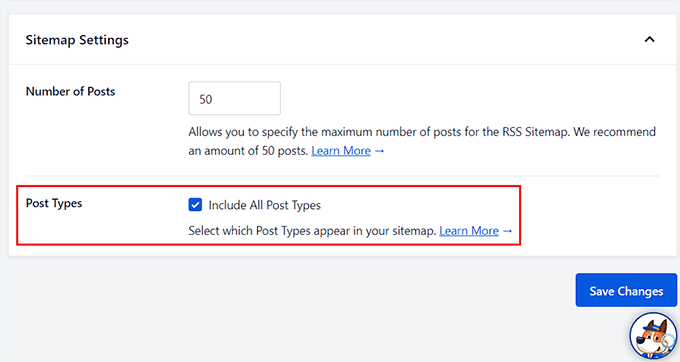
Now, scroll down to the ‘Sitemap Settings’ section, where you can add the number of posts and post types you want to include in the RSS Sitemap.
After that, just check the ‘Include All Post Types’ box to create a sitemap for all the post types on your site. Then, click the ‘Save Changes’ button to store your settings.
You have now successfully created an RSS sitemap for your WordPress blog. For more information, see our tutorial on how to add RSS sitemap in WordPress.
We hope this article helped you learn how to add custom post types to your main WordPress RSS feed. You may also want to see our tips to optimize WordPress RSS feeds and our top picks for the best WordPress RSS feed plugins to boost website traffic.
If you liked this article, then please subscribe to our YouTube Channel for WordPress video tutorials. You can also find us on Twitter and Facebook.




Syed Balkhi says
Hey WPBeginner readers,
Did you know you can win exciting prizes by commenting on WPBeginner?
Every month, our top blog commenters will win HUGE rewards, including premium WordPress plugin licenses and cash prizes.
You can get more details about the contest from here.
Start sharing your thoughts below to stand a chance to win!
Ralph says
Oh my! I didn’t even know custop posts don’t go into rss feed… Thank you for this guide. I will fix this immediately
WPBeginner Support says
Glad we could bring that to your attention
Admin
Aidan says
Hi,
This doesn’t appear to work with custom post types that are not using a custom taxonomy. We are using a CPT with the ‘category’ taxonomy. Is this why it isn’t working?
e.g. mysite.com/feed?post_type=news&category=economy
WPBeginner Support says
It should still work for those custom post types, you may want to ensure you’re adding the correct name for your custom post type
Admin
Amar says
It worked for me. Thanks!
WPBeginner Support says
Glad our article was helpful
Admin
Arijit Biswas says
Worked for me! Thank you.
Renier Delport says
Helpful as always!
ReZa says
Hi
thank you for your Teaching.
i use edd in my site, when i want to see edd feed, download category and download tag are not shown in a rss feed.
at all: in a custom post type, how can i add post type category , post type tag to a feed?
default WordPress feed for default post type, category and tag show nicely.
i’m waiting for your answare.
Samuel says
Feeds are automatically added in the section dedicated for the custom post type example.com/feed/?post_type=books . You can just add an RSS icon linking to the earlier link.
Gary says
The code wasn’t working for me until I created at least one ‘default post type’ post.
Trieu To says
I want to exclude post from post type in feed. How to?
Ruben says
I wanted to include ALL Custom Post Types so I used this first snippet.
This included submissions to my Jetpack contact form!
Unfortunately that took me a while to notice!
Using the 2nd snippet to define each post type in the array fixed the issue.
whoaloic says
Hello,
I meet an issue with a CPT.
I add a CPT ‘cpt1’ to my feed amont others CPT, but cpt1 does not show in the feed.
When I put cpt1 alone in the feed, it works.
any help would be greatly appreciated.
Regards.
whoaloic says
I desactivate then reactivate WPML and it works.
JMarqz says
I just want to ask you something, you could see your CPT in your-site.com/feed? I’m using CPT and WPML, but my CPT never shows in your-site.com/feed, just my normal posts.
I follow this comment:
And all the CPT I choose are showing in the Feed reader but never in your-site.com/feed. I desactivate and reactivate WPML still not showing in the URL. I appreciate a lot if you could tell me if your CPT are showing in the URL for the Feed (your-site.com/feed).
Chuck Whelon says
What if you don;t know the names of the custom post types you want to include in your feed (in example 2) – i.e. I have a webcomic,, & I know the custom post-type for that is “webcomic_post”, but I also want to include posts to my portfolio & woo commerce store products. When I use the first version of the code, these items all show up in the feed, pus some other stuff I want to exclude. The problem is that I don;t know the names of the custom post types being used, and I don’t know how to find them out? I did try ‘product’ and ‘portfolio’ but those didn’t work. I am a bit of a noob at WordPress, so apologies if this is a dumb question — Any help much appreciated!
Nathan says
When you’re in WordPress, hover over the “Portfolio” link, for example, in the left navigation. This should point you at a URL where you can see all of your Portfolio items. Go to that page and look in the address bar, you’ll see the name of the post type listed there.
Ziacinzia says
Hello, could you please advise where exactly should the code go? Thank you
Hasan Shahzad says
The code needs to be placed at the end of functions.php theme file.
Alex Leonard says
Thanks for this – set me in the right direction for a couple of things
Kasey says
Hi, thanks for this! where in the page does this code need to be added? At the top? Bottom? Thanks so much!
Moaz says
worked like a charm ! thnx
Neil Curtis says
Cheers, a quick and easy tip that worked straight away for me. I’ve basically got no ‘posts’ but two custom post types so I had nothing showing in my feed before I edited the functions.php.
cheers again, Neil
Mike says
THANK YOU!!!
Sussie T says
So nice! Thank you! That was just what I needed. And so simple.
Pranjal says
Excellent tip, works like charm!
Want to merge WooCommerce feed to main blog’s feed, thanks again!
Colin says
Boom. This just worked perfectly for me, thankyou thankyou thankyou
Juergen says
Thanks
just what I needed
Luke Rumley says
I realize this post is older, but it came in handy today, so thanks! One tip for those that use Jetpack and don’t want to embarrass their visitors, use the second method, not the first! The first method publishes the “feedbacks” CPT to the RSS feed, which are all of the contact form submissions from your site. Oops!
Ami says
+1 here, worked great, thank you!
MoiMM says
My last changes in my function.php file :
<code>
/*———————————————————————————–*//* Add Post format in RSS/*———————————————————————————–*/ function myfeed_request($qv) { if (isset($qv[‘feed’])) $qv[‘post_type’] = get_post_types(array( ‘public’ => true ) ); return $qv;}add_filter(‘request’, ‘myfeed_request’);
</code>
navjotjsingh says
You should use get_post_types( array( ‘public’ => true ) ) instead of get_post_types() because you may not want the post types which are set not to be a publicly querable to be included in the feed.
Luke Rumley says
Ah, that’s a great catch! See my mistake here: http://wordpress.org/support/topic/plugin-jetpack-by-wordpresscom-feedback-custom-post-type-is-created-after-activating-jetpack?replies=3#post-3799791
closemarketing says
Nice hack!
Zeeshan Hamid says
Thanks!
I’ve tried every permutation of this over last few weeks and nothing works. I use feedburner, could that be the problem?
Yotsugi says
Check this:
http://wordpress.org/support/topic/update-not-show-a-feed-after-publish-a-custom-post-type?replies=3
Anton says
this tutorial shows you a similar way to achieve this and where you dont have to specify each post type – http://www.ballyhooblog.com/add-custom-post-types-wordpress-main-feed/
m says
Could you add ‘page’ and so have pages in the feed as well?
Editorial Staff says
YES. Pages are it’s own custom post type – “page”. So add that along with your other custom post types.
Admin
Adam W. Warner says
I’ve just found this function and implemented this code (the first one for adding all custom post types) and it works great for adding my custom posts type to my main feed.
However, it has also added my pages to my feed. I thought this should only add posts, not pages?
How do I exclude pages?
ahmed sayed says
can you advice more or provided me code for pages
thank you
Chuck says
running that code in functions caused a white screen of death. Looking into why…