


Do you want to add a Facebook Like button in WordPress?
A Facebook Like button on your WordPress website can make it simple and easy for users to like and share your content. You can increase engagement and get more followers.
In this article, we will show you how to add the Facebook Like button in WordPress.

Why Add a Facebook Like Button in WordPress?
Facebook is one of the most popular social media platforms in the world. Many businesses use Facebook to connect with their customers and promote their products.
Adding a Facebook Like button to your WordPress website can help drive more engagement. It also encourages people to share your content on their Facebook profiles and attract new users to your site.
You can use the Facebook Like button to increase your social followers and build a community. It helps raise awareness about your products and services and boosts conversions.
That said, let’s see how you can add a Facebook Like button in WordPress using a plugin or adding custom code.
Method 1: Add Facebook Like Button in WordPress Using a Plugin
In this method, we will be using a WordPress plugin to add Facebook Like button. This method is very easy and recommended for beginners.
The first thing you need to do is install and activate the BestWebSoft’s Like & Share plugin. For more details, see our step-by-step guide on how to install a WordPress plugin.
Upon activation, you can go to Like & Share » Settings from your WordPress admin panel.
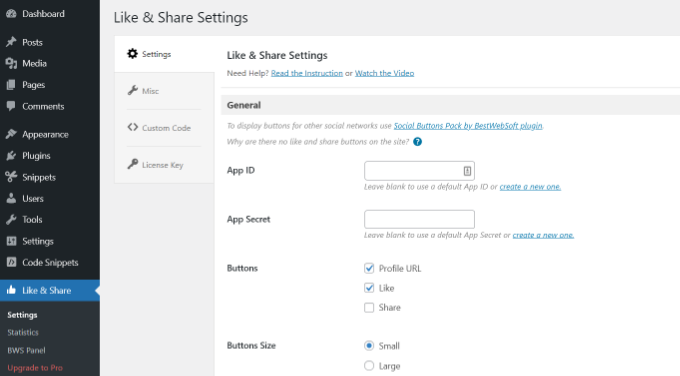
Next, you’ll need to add the Facebook App ID and App Secret. If you don’t have this information, then simply follow the steps below.
How to Create a Facebook App ID and App Secret
Go ahead and click the ‘create a new one’ link under App ID or App Secret field in the Like & Share plugin.
This will take you to the Meta for Developers website. We suggest opening the website in another tab or window because you’ll need to open the Like & Share settings page in your WordPress dashboard to enter the app ID and secret.
From here, you’ll need to select an app type. Go ahead and choose ‘Business’ as the app type and click the ‘Next’ button.
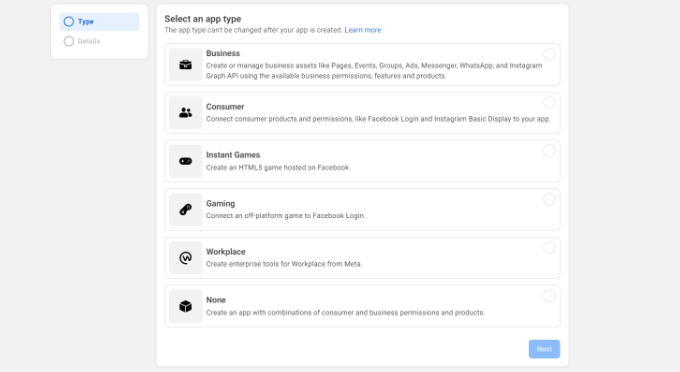
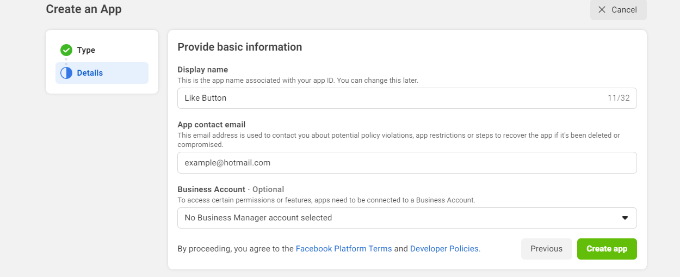
Next, you’ll need to provide basic information about your app.
You can enter a display name for your app, and be sure that the correct email address appears under the ‘App contact email’ field. Facebook will automatically pick the email address of the account you’re currently logged in as.
There’s also an option setting to choose a business account. You can leave this on ‘No Business Manager account selected’ and click the ‘Create app’ button.
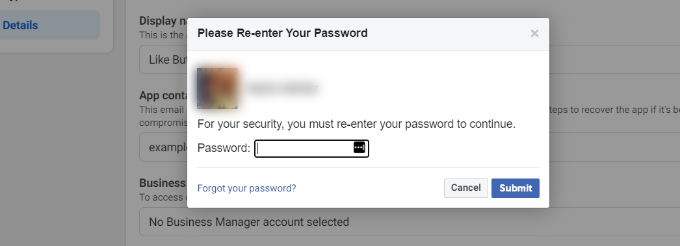
A popup window will now appear where Facebook will ask you to re-enter your password.
This is for security purposes to stop malicious activity on your account. Go ahead and enter your Facebook account password and click the ‘Submit’ button.
After that, you’ll see your app dashboard.
From here, you can head to Settings » Basic from the menu on your left.
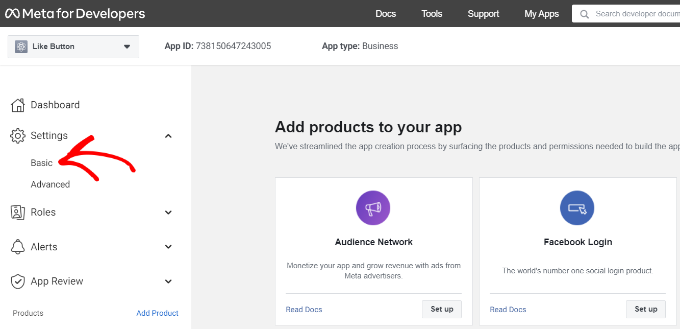
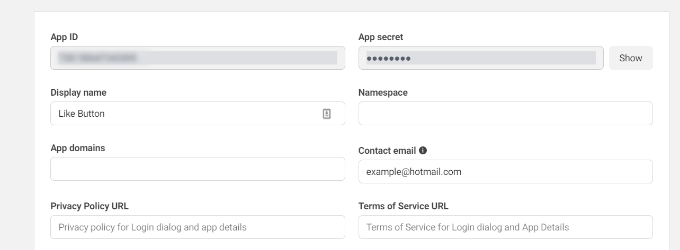
On the Basic settings page, you will see the ‘App ID’ and ‘App Secret.’
You can now enter this information in the Like & Share plugin settings in your WordPress dashboard.
Finish Up Customizing Your Facebook Like Button
First, copy the ‘App ID’ and head back to the tab or window where you have the Like & Share » Settings page opened. Simply enter the ‘App ID’ in the respective fields.
Now repeat the step by copying the ‘App Secret’ data from Meta for Developers page and pasting it into the Like & Share plugin settings.
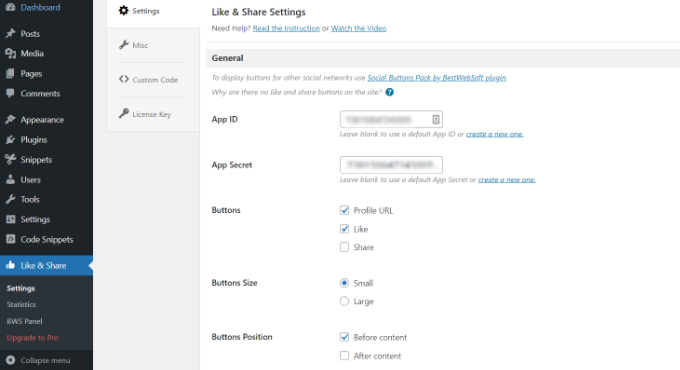
Once you’ve done that, you can choose whether to show the Facebook Like button along with the Profile URL and Share buttons.
There are also settings to edit the Facebook Like button’s size, its position before or after the content, and alignment.
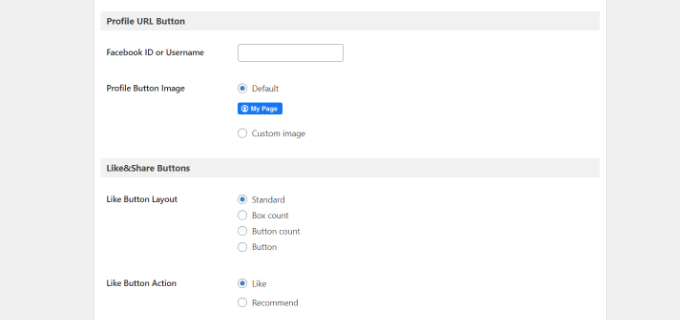
If you have enabled the Profile URL button, then you can scroll down to the ‘Profile URL Button’ section and enter your Facebook username or ID.
When you’re done, don’t forget to save your changes.
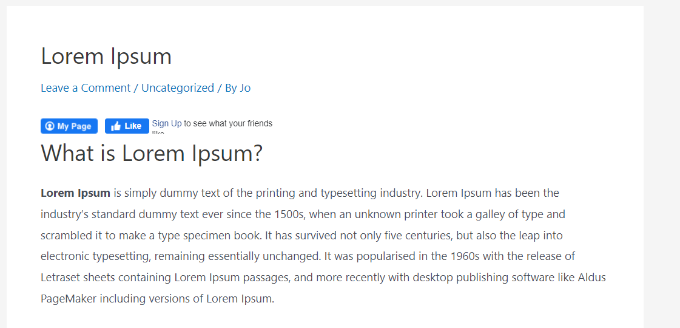
Now, the plugin will automatically add a Facebook Like button to your WordPress website and position it based on your settings.
You can also use the [fb_button] shortcode to add the Facebook Like button anywhere on your site.
That’s all! You can now visit your site and see the Like button on each post.
Method 2: Manually Add Facebook Like Button in WordPress
Another way to add a Facebook Like button is by using custom code. However, this method requires you to add the code directly in WordPress so we only recommend it for people who are comfortable editing code.
With that in mind, we are going to use the free WPCode plugin to do so, which makes it simple for anyone to add code to their WordPress blog.
First, you need to visit the ‘Like Button’ page on the Meta for Developers website and scroll down to the ‘Like Button Configurator’ section.
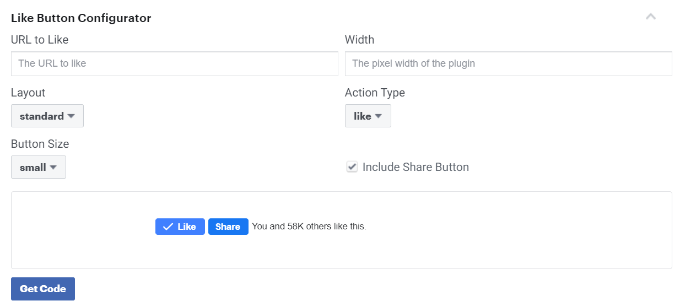
Next, you can enter the URL of your Facebook page in the ‘URL to Like’ field. This will be the page you’d like to connect with the Facebook Like button.
After that, simply use the configuration to choose the Like button layout and size. You will also see a preview of the Like button.
Once satisfied with the preview, click on the ‘Get Code’ button.
This will bring up a popup showing you two pieces of code snippets under the ‘JavaScript SDK’ tab.
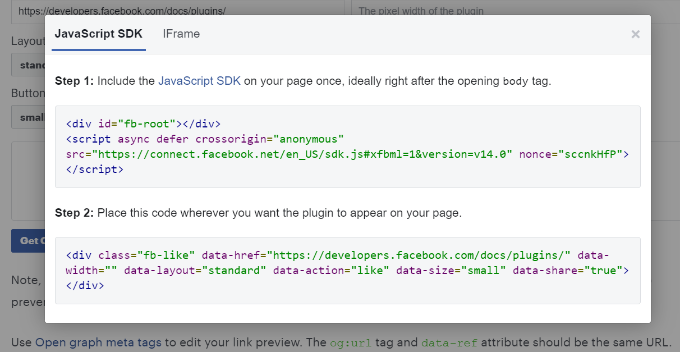
Please note that if you directly add these code snippets to your WordPress theme, it may break your website. Plus, the code snippets will be overwritten when you update the theme.
An easier way of adding code to your is by using the WPCode plugin. It lets you paste code snippets to your website and easily manage custom code without having to edit the theme files.
First, you’ll need to install and activate the WPCode free plugin. For more details, please see our guide on how to install a WordPress plugin.
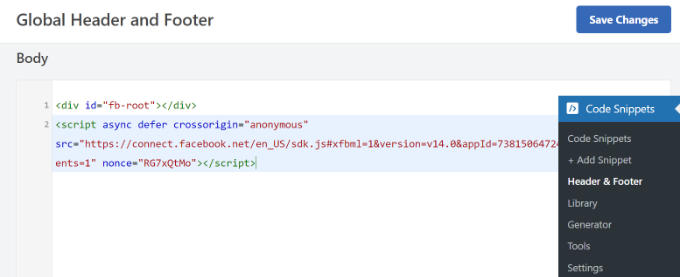
Upon activation, you can head to Code Snippets » Header and Footer from your WordPress dashboard. Now, you’ll need to copy the first code snippet and add it to your WordPress theme’s header.php file right after the <body> tag.
Simply copy the code and enter it in the ‘Body’ section. Don’t forget to click the ‘Save Changes’ button.
Next, you need to copy the second piece of code and paste it into your WordPress site to display the Like button.
To start, you can go to Code Snippets » + Add Snippet from your WordPress admin panel or click the ‘Add New’ button.
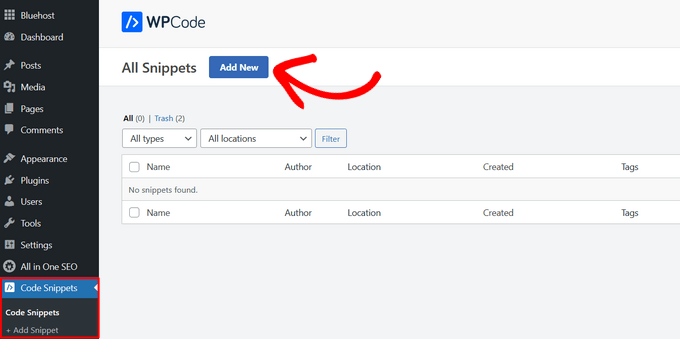
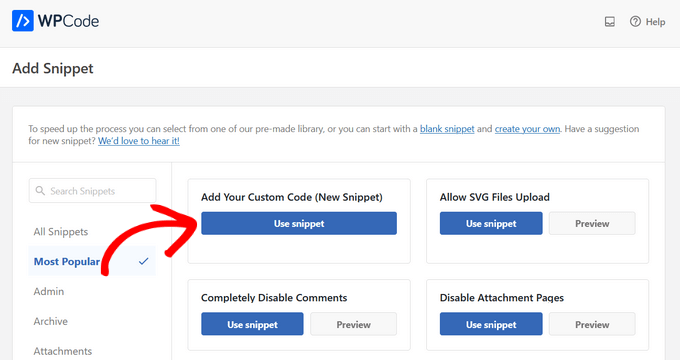
On the next screen, WPCode will allow you to select a snippet from the pre-built library or add a new custom code.
Go ahead and choose the ‘Add Your Custom Code (New Snippet)’ option and click the ‘Use snippet’ button.
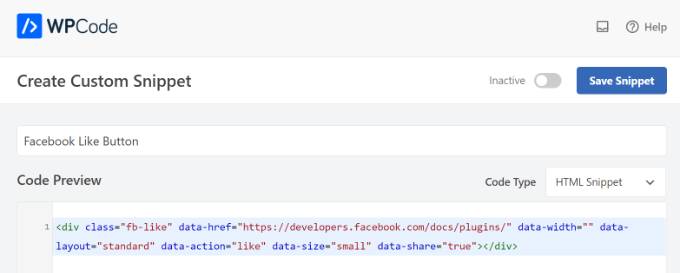
After that, you can give a name for your custom code and enter the second code snippet under the ‘Code Preview’ section.
Make sure to click the ‘Code Type’ dropdown menu and select ‘HTML Snippet’ as the code type.
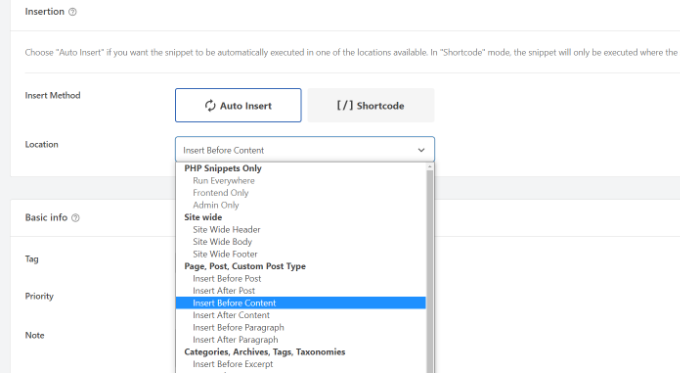
Next, you can scroll down to the ‘Insertion’ section and select where you’d like the Facebook Like button to appear. For example, let’s say you want it to appear before the content.
Simply click the ‘Location’ dropdown menu and choose the Insert Before Content option under Page, Post, Custom Post Types.
Once you’re done, you can click the ‘Save Snippet’ button.
You’ll also have to click the toggle and switch it from Inactive to Active.
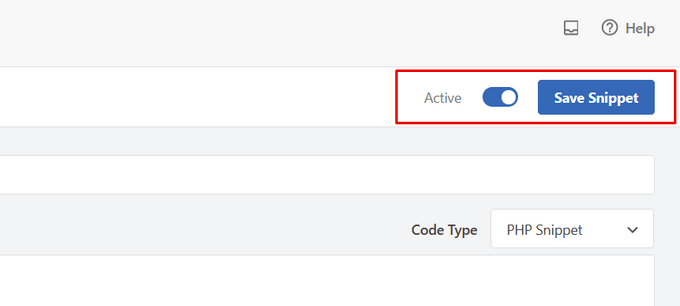
That’s it, a Facebook Like button will appear on your website after entering the code.
What is Open Graph Metadata & How to Add it to WordPress?
Open Graph is metadata that helps Facebook collect information about a page or post on your WordPress site. This data includes a thumbnail image, post/page title, description, and author.
Facebook is quite smart in pulling up the title and description fields. However, if your post has more than one image, then it may sometimes show an incorrect thumbnail when shared.
If you are already using the All in One SEO (AIOSEO) plugin, then this can be easily fixed by visiting All in One SEO » Social Networks and clicking on the Facebook tab.
Next, click the ‘Upload or Select Image’ button to set a default post Facebook image if your article doesn’t have an open graph image.
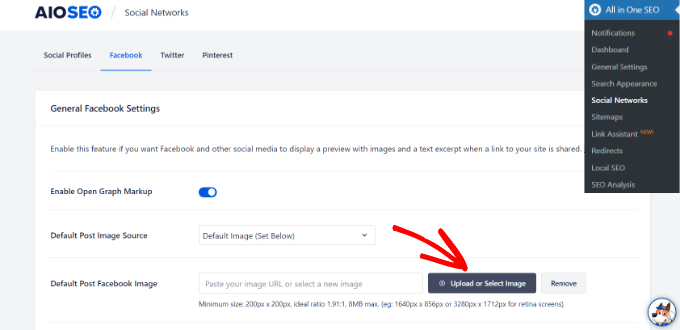
Besides that, you can also configure an open graph image for each individual post or page.
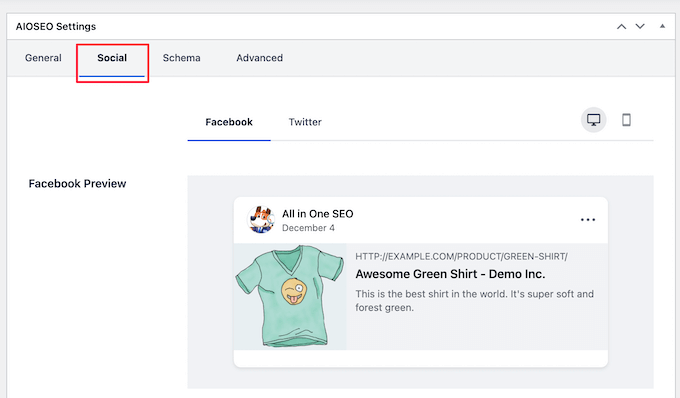
When you’re editing a post, just scroll down to the AIOSEO Settings section in the content editor. Next, switch to the ‘Social’ tab and see a preview of your thumbnail.
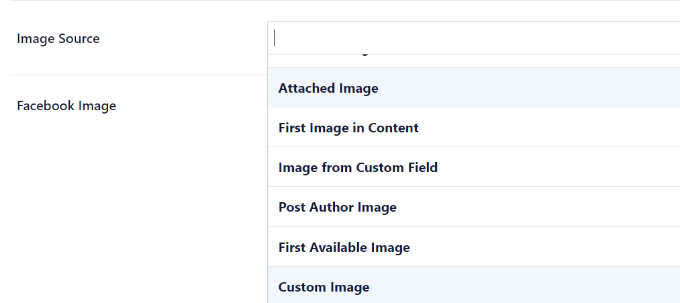
Now scroll down to the ‘Image Source’ option, and you can then choose an open graph image for your post.
For example, you can select the featured image, attached image, the first image in the content, or upload a custom image to be used as an open graph thumbnail.
For more details and alternate ways to add open graph metadata, see our guide on how to add Facebook Open Graph metadata in WordPress.
We hope this article helped you learn how to add Facebook Like button in WordPress. You may also want to see our list of how to register a domain name and the best social media plugins for WordPress.
If you liked this article, then please subscribe to our YouTube Channel for WordPress video tutorials. You can also find us on Twitter and Facebook.





Syed Balkhi says
Hey WPBeginner readers,
Did you know you can win exciting prizes by commenting on WPBeginner?
Every month, our top blog commenters will win HUGE rewards, including premium WordPress plugin licenses and cash prizes.
You can get more details about the contest from here.
Start sharing your thoughts below to stand a chance to win!
Earl Jones says
I’ve added the wp-like-button to my blog pages and configured it according to directions. The like counter goes up, so I know that readers are clicking the button, but where do I find the names of these readers so that I can follow-up with them?
WPBeginner Support says
At this time the plugin does not track that information.
Admin
Michel says
Hi Wp Beginner
Just wanna say thank you for all the great articles!
They allready have helped me a lot, easy to understand…..Love it!
Cheers guys, keep on doing like you do
WPBeginner Support says
You’re welcome, glad our articles have been helpful
Admin
Macdonald says
Hi, all.
I am using Blog Bank WordPress theme which has nicely built Facebook, Twitter, Google+ and LinkedIn buttons but I cannot seem to make them work as intended (refer to my respective social sites). I would like to know if there is a way to do it.
Thank you for the continual great work you are doing for us, beginners.
WPBeginner Support says
You would want to reach out to your theme’s support for this issue and they should be able to let you know if it is an error with the theme itself or a method to resolve the issue.
Admin
stephen Mgbemena says
Please admin, I’m using the header and footer plugin on my wordpress blog. I added the code on the footer and it’s showing the like button on the down end of my blog. Please how can I add it so it can show right after every single post. Thanks
Mary says
The WordPress plugin worked perfect. Thanks for tutorial.
soshail akash says
I am unable to make the plugin work on Archives It works perfectly fine on Single Posts.
Your help would mean a lot
Jonathan says
You said “You can leave the URL field empty, as we will dynamically fill in the URL in WordPress.”
I was expecting to article to then say what code to put in in order to dynamically fill the URL.
Does the URL fill dynamically if we leave the data-href blank, with no further action needed?
Vipin says
How do I show facebook like counts in the post meta.
Like this: Posted by Admin in Technology on Date | 2 comments | 5 Likes
Sandeep kumar says
Jetpack plugin also offers like button.
Ahmed says
i want change size of button to be more big
Toon says
So far so good, this works.
But how can I get rid of that popup window as soon as you hit the button.
Len Vanderlinde says
Have set up a personal web site (not for profit) rather then a blog using WordPress. Very impressed that I was able to do it with my very limited web knowledge. Would like to add a Facebook like button but your instructions do not work for my home page?
Thanks Len
suzannah says
THANK YOU. This worked like a charm. Any ideas how to do this on a page instead of just a post? Thanks!!! This is my new favorite site!
Patrick says
Hi,
This tutorial sounds like chinese to me. You use vocabulary which assumes certain knowledge that beginners do not have.
” First open your single.php file in your theme’s folder. Then paste the following code inside your post loop:”
What does that mean?
I understand that you keep your posts short, but very often they are really too short !
Thanks
mark says
Hi,
question, how do i inline FB like with Google +1 and other buttons, pretty much as you did here?
Thank you,
Mark
Vishwas anand says
This is my single.php file. Please tell me where to add the code.
” . __( ‘Next’, ‘twentyfifteen’ ) . ‘ ‘ .
” . __( ‘Next post:’, ‘twentyfifteen’ ) . ‘ ‘ .
‘%title’,
‘prev_text’ => ” . __( ‘Previous’, ‘twentyfifteen’ ) . ‘ ‘ .
” . __( ‘Previous post:’, ‘twentyfifteen’ ) . ‘ ‘ .
‘%title’,
) );
1
// End the loop.
endwhile;
?>
j.siurivera says
Thanks so much for the tutorial! However I couldn’t seem to get the Like button to show up on post.
I’ve been pasting the iframe code in between
and (iframe code paste here)
and some other locations before the end loop but still not coming out. Please help!
Here’s the single.php file for my theme (Eryn)
Thank you!!
j.siurivera says
Sorry just realized the php didn’t come out… here it is:
xuamox says
Works but it is not responsive. Are there any other options for a responsive design?
Manu Raj says
Thank you
Santiago says
I get an Error 404 page when i use the share button. Can you help me please?
Rebecca says
Thank you to the people who asked ‘the dumb questions.’ The answers helped me sooo much. Very happy! Thanks guys.
cathal butler says
Can’t get code to work…..below is copy of code from me single.php page. Where should the code be pasted
#content{margin-left:18px;}
<div class="post" id="post-“>
<?php the_content('Read the rest of this entry »’); ?>
‘Pages: ‘, ‘after’ => ”, ‘next_or_number’ => ‘number’)); ?>
<?php the_tags( 'Tags: ‘, ‘, ‘, ”); ?>
WPBeginner Support says
just above or below the_content() line.
Admin
Emmeline Jane says
Hi!
I’m currently tying to get the facebook insights to work through your code and plugin, however I can’t for the life of me figure out how to put this ‘proper’ facebook like code in…..!!
This is the code for my ‘singular.php’.. the theme I’m using is Hatch.
<div id="post-” class=””>
<?php echo apply_atomic_shortcode( 'byline', '’ . __( ‘By [entry-author] on [entry-published] [entry-edit-link before=” | “]’, ‘hatch’ ) . ” ); ?>
<?php the_content( __( 'Continue reading →’, ‘hatch’ ) ); ?>
” . __( ‘Pages:’, ‘hatch’ ), ‘after’ => ” ) ); ?>
Please let me know where to put the code! I’ve tried it every where, around the ( have_posts) etc…
WPBeginner Support says
Try putting the code between post title and the_content.
Admin
Amy says
How do I add a facebook “like my page” button on my posts? I saw the configuration and I have the two codes but I have no idea about Javascript, etc?? Thanks!!
Karen says
Hi thanks for the tutorial! I got it to work on my site but for some reason when I “like” a post it doesn’t show up in my FB feed. Any idea if I did something wrong?
Editorial Staff says
Sometimes if you excessively like posts from one site, then FB tends to temporarily block it. On the other hand, look in your activity feed to see if it is going there.
Admin
Juvy says
Hi, WPBeginner,
Can I ask your help. I am new of WordPress. I have a big problem on my website. Please help me how to resolve. I’m begging you. This is my website http://www.mymovietube.com and it was broken.
This is the error I received:
Parse error: syntax error, unexpected ‘<' in /home/mymovie/public_html/wp-content/plugins/facebook-social-plugins/widgets/like-button.php on line 2
Please let me know how to fix this.
Thank you.
Need Help,
Juvy
Editorial Staff says
You need to look at this article:
https://www.wpbeginner.com/beginners-guide/beginners-guide-to-pasting-snippets-from-the-web-into-wordpress/
Admin
Michael says
Is Facebook Insigts also working with the html5 version of the like button or just with the xfbml version? Both versions are working with the same javascript.
Great article by the way. I’m going to implement that into my website. Thanks.
Editorial Staff says
It should work with the HTML5 version as well.
Admin
Jake says
I was wondering if you could tell me how to customize the image and description that shows on Facebook when you like the site or possibly point me to a article that discusses this, I am having the hardest time trying to figure that part out. Thanks!
Editorial Staff says
Use the WordPress SEO by Yoast plugin. It adds og: (Open Graph) tags in your theme. The meta description you specify for your post will then end up being the description. The post thumbnail you attach will end up functioning as the thumbnail. Hope this helps.
Admin
Jake says
YES!!! This site rocks!!
garrick1234 says
Where does one find the single.php file? Sorry I know that sounds pretty dumb, but I am (sometimes)
wpbeginner says
@garrick1234 No such thing as a dumb question. You will find it in your FTP folder /wp-content/themes/yourthemename/Or in your WP-Admin go to Appearance > Editor and find it there.
Ginger says
How can you enable users to add their own comments to their recommendation at the time of posting?
wpbeginner says
When the user clicks, a comment box should just open. Specially if you are using the FBML version.
angie says
thank you for the layout=”button_count”!!! i’ve been looking for that everywhere!
Editorial Staff says
Hey,
Use WordPress SEO by Yoast and enable the social section. Or just install and activate Simple Facebook Connect… don’t have to do anything else, and it will work.
Admin
tingmike says
Thanks. One problem that I have is that the button doesn’t align with the Google+ and Pinterest buttons. It’s just two pixels too low compared to the other buttons. Any idea how to make them align to the same horizontal alignment?
wpbeginner says
@tingmike You can add CSS classes to make sure that it works.
Sophia says
Thanks this is brilliant!
Fran Dorf says
Where do I find the “post loop” in the single.php file? I’ve tried pasting your code in various places and nothing happens!!!
Editorial Staff says
Post loop is the code which says while have posts, the post etc. You want to post this code before the endwhile;
Admin
wpbeginner says
@Fran Dorf You have to look at while have_post, the_post
Kate says
While these instructions appear straightforward, they are of no use to someone who does not know how to “open your single.php file in your theme’s folder.” While I am on the internet all the time, I have next to zero knowledge of html. I have added code before, but I need instructions on how to get to the code in the first place. I cannot find anything anywhere on wordpress about a “single.php” file. Please help. I really want readers to be able to share my posts on Facebook, Twitter, and through e-mail.
wpbeginner says
If you are unaware of how to open your single.php file, then perhaps you should utilize one of the many free plugins that add a facebook like button to your site.
Tierney says
Hi, I posted the code on my site and it worked. However, the friend icon is not staying. When i refresh the page, the friend icon disappears. I want all of the friend that clicked the like button to remain so I would know who clicked the like button. I need their names for the prize drawing. Can you help? Here is my code:<iframe src="http://www.facebook.com/plugins/like.php?href=ID)); ?>&layout=standard&show_faces=true;width=450&action=like&colorscheme=light” scrolling=”no” frameborder=”20″ allowTransparency=”true” style=”border:none; overflow:hidden; width:450px; height:60px”>
Tierney says
sorry. I tried posting my code but showed up as that WP beginner. My apologies
wpbeginner says
your code is right… it seems like that its some sort of FB glitch that its not recording your likes.
Megan at Fiterature says
Hi – this is not working for me. I copy and pasted exactly what is above into my single.php section. I am using the Twenty Eleven theme. When I Update File and then check my website…no Like button. What am I missing?
papayacansada says
I’ve been having some headaches with this thing, all I want is a facebook like button on the homepage, I got that but the problem is that when the button is clicked it will like the most recent post and not the main page, after many attempts at the moment I have the code outside the loop, in the header so it displays pretty much everywhere, it seems that even this way when I’m on a single page the button work as supposed and likes go to the single post, my concern is the main page, I need it to like mydomain.com and not the latest post when I’m on the homepage.
wpbeginner says
@papayacansada where it says href in the code. Replace the php code with your site domain.
jenniferdoser says
This worked great – thanks! I’m just having 3 issues. (1) When I like a post, it shows the following text next to the thumbnail:You may use these HTML tags and attributes: (2) I would like to have the comment box drop down when someone clicks the like button, as it does on this site and I can’t seem to find any documentation on that.
(3) I tried to access insights after installing the Open Graph plugin, but I get this error message when I try to add insights for the blog:No admin data found at root webpage http://www.firelilyphotography.com/. Insights requires admin data at this root webpage for the specified URL http://www.firelilyphotography.com/blogWhat admin data do I have to add for insights to work?
Thank you!
wpbeginner says
@jenniferdoser Ok first, you need to follow the XFBML way if you want insights, and the dropdown message box on the like buttons.Then follow this tutorial:https://www.wpbeginner.com/wp-tutorials/how-to-get-facebook-insights-for-your-wordpress-site/
jenniferdoser says
I’m using the XFBML way and I’m still not quite there. I think the main issue is that when I first activated the plugin, I used my business page Facebook ID instead of my personal ID. I’ve since updated the ID, but I still get an error when I like a post:The app ID “73464248836” specified within the “fb:app_id” meta tag was invalid.This is my business page ID. I tried deleting the plugin and starting from scratch, but that’s not working. How can I get WP to recognize the new ID?
robolist says
@wpbeginner thanks for that For some reason i was thinking it wouldnt work. My college placed the codes for share buttons there before but when clicked they would ‘like’ all of the posts together. Maybe he didnt use the get_permalink function. Although i am sure i told him to use it. but it is working now so thank you so much…
kellydiek says
Are you aware of a plugin or even the possibility for this… you have a blog post with the like button on it. Currently has 15 ‘likes’. Let’s say you edit your blog post with updated information. Can you force facebook to repost the blog link to the wall of the users who already ‘liked’ the post previously? (So they know it’s been updated). Hope that makes sense. Requested by a client today and I’ve never heard of such a thing!
wpbeginner says
@robolist Are you using a theme framework?? If not then it shouldn’t be very hard. Place the code above inside your loop on the index.php or loop.php or your archive.php file…
robolist says
Fantastic tutorial guys… Just like all of your tutorials throughout this website, they are all very easy to follow. Great stuff
I have been developing a new blog for some time now and am working on a customised theme. We have placed several social share buttons on each post very similar to how you have suggested here. I chose to do it manually rather than using a plugin because i dont seem to be able to get exactly what i want from the plugins whether it be the correct share buttons i want or the lack of styling options with the plugin.
Placing the buttons manually allow me to use what i want and style them how i want. The only problem is, for the life of me i just cant figure out how to get the buttons to appear in the loop with the excerpt.
I would be extremely grateful if you could point me in the right direction.
Many thanks in advance.
filipstrbad says
when i add the code to single.php it only shows the like button on the new posts and not the old ones. can i add it to the old ones too?
wpbeginner says
@JustinElia This tutorial is for adding the like button for each WordPress post… if you want it to link to your facebook page, then simply change the href to facebook.com/yourfanpage
JustinElia says
This may be a very stupid question. I am using like buttons on my site and have tried various plugins and everything,however, how does one link the facebook like button with your page on your posts? Example : I go to like a certain post on facebook on my site and it says “So and So liked http://www.bigbackpacker.com post about blah blah blah” It doesn’t link to my facebook page for my blog. I hope this isn’t too confusing and any help would be appreciated, thank you.
ssfutrell says
I uploaded the facebook like button plugin. It is on the bottom of my posts. I want it at the top of all posts. How do I change it to be at the top of post. Can’t figure that out. I hope that you haven’t answered already. I need very plain instruction. Thanks.
wpbeginner says
@seocatalysts Use the facebook like box plugin…
seocatalysts says
Thanks for inform me about how to add like facebook button? and I did it but still My confusion is that how can i show that how many people like my blog? For this problem solve any script available….Any help would be appreciate…..