


Have you ever found yourself in a situation where you had to find a WordPress page ID, post ID, category ID, tag ID, comment ID, or user ID?
While working on WordPress, you may need these IDs to add certain features to your website. An ID is a unique number that identifies a particular item in your WordPress database. Each post, page, category, tag, comment, and user in WordPress has its unique ID.
In this article, we will show you how to easily find a post, category, tag, comment, or user ID in WordPress, step by step.
When Do You Need to Use Post ID and Page ID in WordPress?
WordPress uses a unique identification number for each blog post, landing page, comment, user, category, and tag on your website.
Finding this information is important if you are using a WordPress plugin that requires a specific ID for a page or post to add a feature or a visual effect.
For example, you can use a plugin to add subtitles for posts and pages using the respective post ID and page ID.
Similarly, let’s say you want to hide a specific WordPress post from your homepage. Then, you will need the exact page ID and post ID to remove it from your homepage.
That being said, let’s see how you can find the page, post, category, tag, comment, or user ID in WordPress.
To help you navigate our guide smoothly, you can click the links below to jump ahead to any section:
How to Find Post ID and Page ID in WordPress
In WordPress, posts and pages are two main ways to add content. The posts are mainly used for timely articles, whereas pages are used for static content.
Sometimes, you may want to filter your posts and pages or exclude them from certain features. In such a scenario, you may need your post and page IDs.
Let’s start with looking at how to find a post ID on your WordPress blog.
First, you must visit the Posts » All Posts page from the WordPress admin sidebar and find the post whose ID you need.
Next, hover your mouse over the post title to view your post ID.
When you do that, your post-edit URL will appear at the bottom left-hand corner of your screen. Now, take a look at the number that comes between ‘post=’ and ‘&action.’
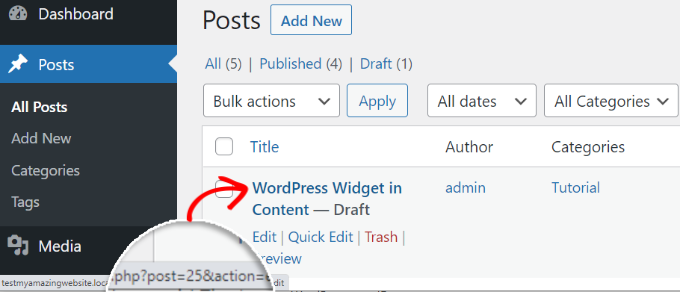
You got it! That’s your WordPress post ID number.
It is 25 in the example above.
You can also view your WordPress post ID on the block editor screen. When you open a post to edit, the post edit URL will appear in your browser’s address.
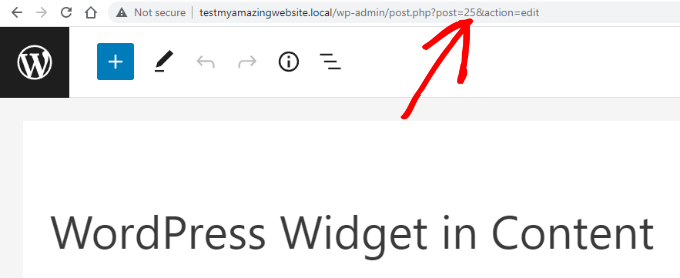
It is the same URL that had appeared at the bottom of the screen when you hovered your mouse over the post title.
The number that comes after ‘post=’ and before ‘&action’ is the post ID.
Now, you can use the same method to find your WordPress page ID as well. The only difference is that you must go to the Pages menu instead of Posts and open the specific page whose ID you want to find.
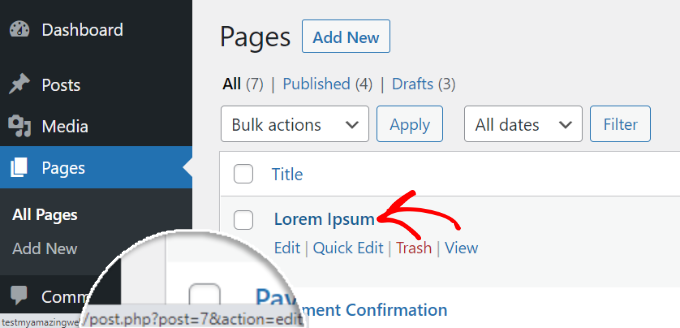
For example, the page ID in the screenshot above is 7.
How to Find Your WordPress Category ID and Tag ID
Categories and tags are used for sorting content on your WordPress website.
Sometimes, you may need to find a category or tag ID to add a plugin feature.
Finding a WordPress category ID, tag ID, or another custom taxonomy ID in WordPress is very similar to finding a post ID.
To do this, visit the Posts » Categories page from your WordPress admin panel. When you can see the list of your categories, hover your mouse over the specific category title whose ID you are looking for.
Now, you can see the category edit URL appear on a popup box in the bottom left corner of your screen.
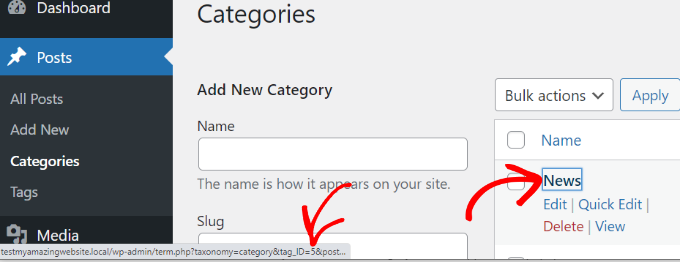
Your category ID is right there in the URL. It is the number that comes after ‘category&tag_ID=’ and before ‘&post_type’.
In the screenshot above, your WordPress category ID is 5.
You can also view your WordPress category ID by editing it. Simply open a category to edit, and you’ll see the category ID in the browser’s address bar.
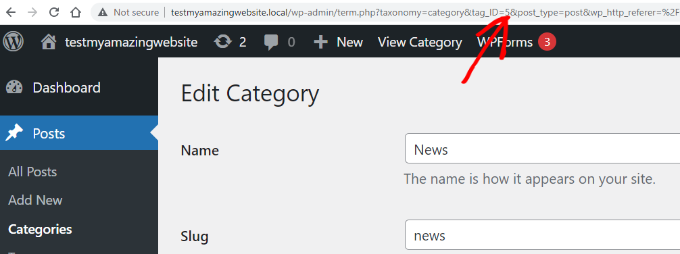
It is the same URL that appeared when you did a mouse hover over your category title.
The category ID is the number between ‘category&tag_ID=’ and ‘&post_type’, which is 2.
You may notice that even though we are editing a category, WordPress still displays the category ID as tag_ID. Don’t get confused by this.
All categories and tags are terms inside a WordPress taxonomy. The same editor handles them.
Now, you can similarly find your WordPress tag ID.
First, visit the Posts » Tags screen from the WordPress dashboard and then hover the mouse over the tag whose ID you want to view.
Once done, your tag edit URL will appear in the bottom left corner of the screen.
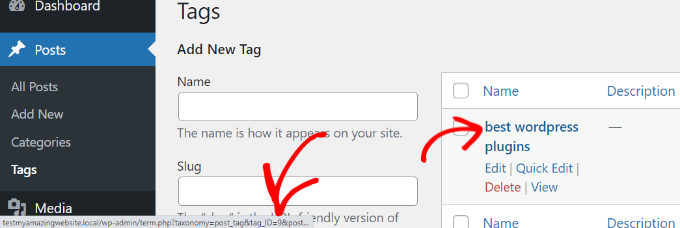
In the URL, the unique number between ‘tag&tag_ID=’ and ‘&post_type’ is your tag ID. In the screenshot above, 9 is your tag ID.
How to Find a Comment ID in WordPress
To find a comment’s ID, head over to the Comments page in your WordPress admin panel. Here, you will see a list of the comments on your WordPress site.
Simply hover your mouse over the ‘Edit’ link under the desired comment. Next, you will see the comment edit URL at the bottom left corner of your screen.
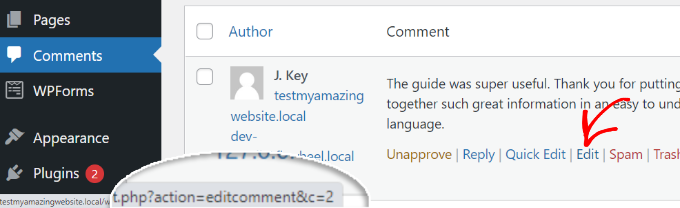
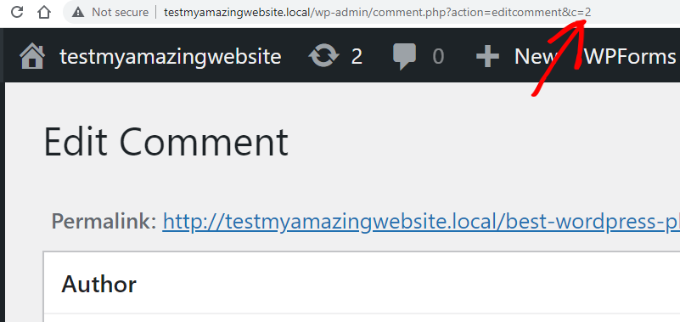
Your WordPress comment ID is right there at the end of the URL, after the ‘editcomment&c=.’ In the above screenshot, your comment ID is 2.
Similar to posts, pages, categories, and tags, you can also open the comment editor page to view your comment ID.
On the comment editor page, you can find your comment ID at the end of the comment edit URL.
How to Find a User ID in WordPress
Just like other items we discussed above, you can also find a user ID by looking at the user editing URL or by editing the user.
Go to the Users » All users page from the WordPress admin area and hover your mouse over the user name.
WordPress will now show the user edit URL in a small popup box in the bottom left corner of your screen.
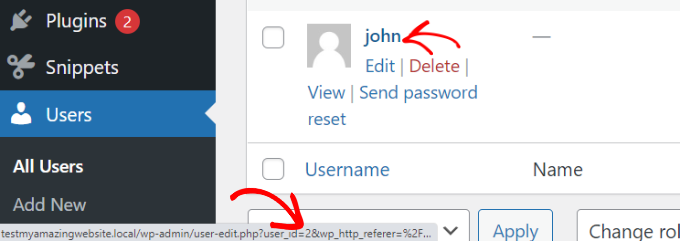
The number that comes after ‘user_id=’ and before ‘&wp’ is your WordPress user ID. In the screenshot above, the user ID is 2.
You can also find a user ID also in the user editor page. Simply click on the ‘Edit’ link under a user name.
Next, WordPress will open the user’s profile, and you can get the user ID from the browser’s address bar.
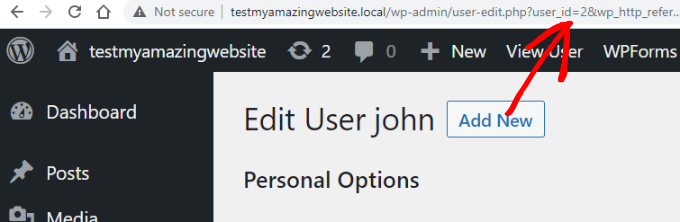
If you are trying to find your own user ID, then WordPress will open the profile editor without a user ID in the URL.
To find your user ID, visit the Users » All Users page from the admin area. WordPress will display a list of authors with the number of posts they have written next to it.
Hover the mouse over the number of posts you have written, and you will be able to see your author edit URL at the bottom left corner of the screen. This URL includes your author ID.
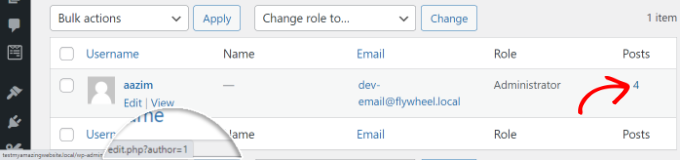
Alternatively, you can click on the number of posts you have written, and then WordPress will redirect you to a page that lists all posts written by you.
Here, you can get the user ID from the browser’s address bar because it will be displayed as an author, like this:
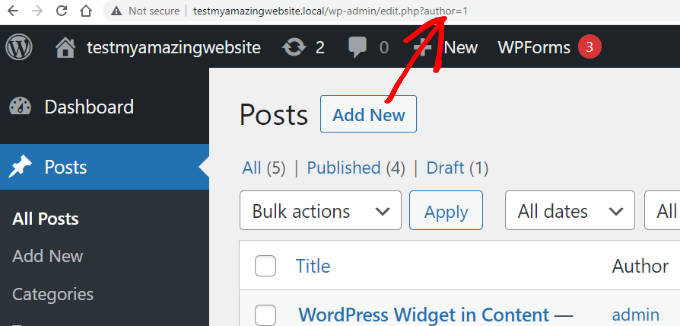
In this example, the user (author) ID is 1.
Bonus: Find Your Product ID in WordPress
If you have a WooCommerce store, then you may need to find your product ID sometimes to display it on a page, show related products, or offer upsells.
You can easily do this by visiting the Products » All Products page from the WordPress dashboard.
Once you are there, simply hover your mouse over a product title of your choice. A line of command will now be shown under the title, along with the product ID number.
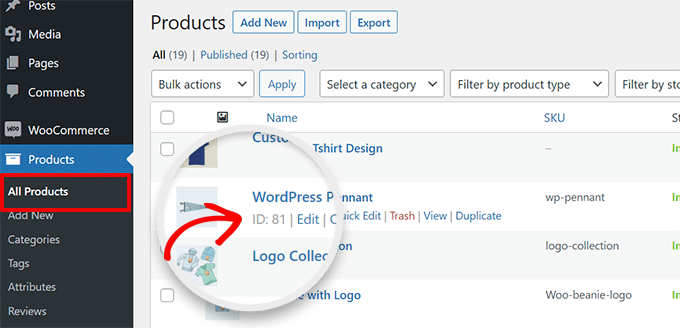
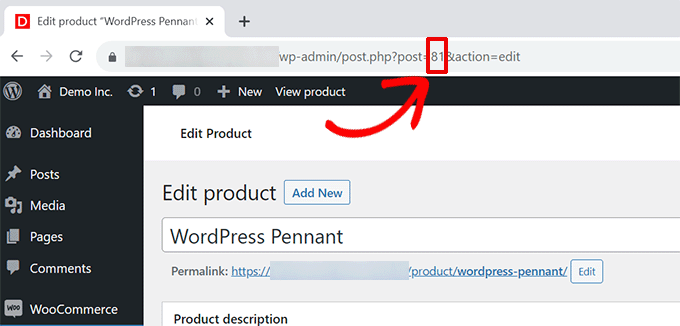
If you want, then you can also click the ‘Edit’ link to open the product page.
You will then be able to see the product ID in the URL on your browser’s address bar.
For more detailed instructions, see our tutorial on how to find product IDs in WooCommerce.
We hope this article helped you find the post, category, tag, comments, and user ID in WordPress. You may also want to see our beginner’s guide on how to do basic image editing in WordPress and our expert picks for the best WordPress themes for SEO experts.
If you liked this article, then please subscribe to our YouTube Channel for WordPress video tutorials. You can also find us on Twitter and Facebook.




Syed Balkhi says
Hey WPBeginner readers,
Did you know you can win exciting prizes by commenting on WPBeginner?
Every month, our top blog commenters will win HUGE rewards, including premium WordPress plugin licenses and cash prizes.
You can get more details about the contest from here.
Start sharing your thoughts below to stand a chance to win!
Mrteesurez says
Finding comments ID ??
This is strange to me, I love WordPress more for this.
I know of post and page, ID helps to style a particular page or give it a custom template.
Thanks for this insightful post.
Diego Weissel says
I wish they add a feature of getting ID just like name in many places on dashboard, heavy to load then? too may calls?
Erez says
How did I forget about GET url that displays the IDs?
thank you!
Edward says
You didn’t show how to find the tag’s id. Is anyone know how to find the tag id?
WPBeginner Support says
Please see our guide on How to find post, category, tag, comments, or user ID in WordPress.
Admin
AnnieR says
I’m trying to find a user id, this is what my url looks like when I’m editing the user.
wp-admin/profile.php?wp_http_referer=%2Fwp-admin%2Fusers.php
Can’t see anything in there that might be a user id!
Salvatore lobello says
I found the video very helpfut.
Vinay says
Hey guys,
How to find the siteID of a wordpress site?
Thanks in advance.
Erez says
just in case you still need it:
look at this plugin: Wp Show Site ID
Ejaz Khan says
Thanks so much,
Bikramjit Singh says
Hi,,How can i find a particular post in the post list if i have the post ID number?
O G says
Hi. It seems that you can’t find your own user ID because what shows up in the address bar is this: “…/wp-admin/profile.php?wp_http_referer=%2Fdemo%2Fdynamik%2Fwp-admin%2Fusers.php
Looks like you have to login with another username to check your own user id.
Arup Ghosh says
Great Post, I was wondering to check the IDs of categories.
Jean says
Note that finding the user id via ‘Edit User’ won’t work unless he has written at least one post.
Abdul Rahim says
Very nice post, If i want to change any post or page id, then what I need do?
Robert Neu says
Nice post. You can also install this plugin to highlight the IDs more clearly:
http://wordpress.org/plugins/reveal-ids-for-wp-admin-25/
Oliver Schlöbe says
Thanks for suggesting my plugin.
Srihari Thalla says
Thanks for the Plugin.